
Spherum 3D
Updated
Current Version
5.3
Offered By

Stop worrying about high battery drain when using Spherum 3D on your phone. Free yourself from the tiny screen and enjoy the app on a much larger display. From now on, get a full-screen experience of your app with the convenience of a keyboard and mouse. MEmu offers you all the surprising features you’d expect: quick installation and easy setup, intuitive controls, and no more worries about battery life, mobile data, or unexpected calls. The all-new MEmu 9 is the choice for using Spherum 3D on your computer. With the MEmu multi-instance manager, you can run two or more accounts at the same time. Most importantly, our exclusive emulation engine unlocks your PC’s full potential, delivering smooth and enjoyable performance.
Show more
Enjoy superb experience of using Spherum 3D on PC with MEMU App Player. It's a powerful free Android emulator which provides you with thousands of android apps for their desktop version. Enjoy connecting with friends and polishing your work with higher efficiency! Spherum: Create, Connect & Revolutionize Your RealityStep into a world where imagination knows no bounds.
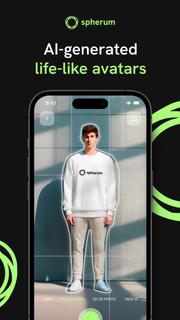


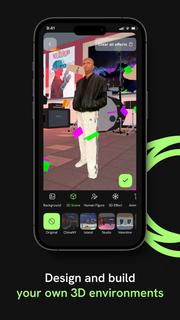
Spherum: Create, Connect & Revolutionize Your RealityStep into a world where imagination knows no bounds. Spherum, a state-of-the-art volumetric mobile app, allows you to create a 3D avatar of yourself for virtual world. Release yourself, free up new perspectives, and connect in new ways. Welcome to the future of digital interaction.The Power of Volumetric AvatarsPowered by proprietary AI technology, Spherum transforms your 2D self into immersive, lifelike avatars. Our groundbreaking animation technology allows you to animate your avatar and experience it across a myriad of platforms, from smartphones to VR, AR, and the Web. Thanks to our compatibility with Quest 2, HTC Vive, and Pico, you can immerse yourself in the volumetric metaverse like never before!Creating Extraordinary ExperiencesDesign and build your own 3D environments, capturing and reliving unforgettable memories along the way. Adjust your avatar's size, add your choice of background, and bring your avatar to life with a range of visual effects. Complete your creation with a soundtrack from our library and get inspired by videos in the Spherum app.Features:Create and animate a 3D avatar of yourself.Use your avatar in augmented reality.Adjust your avatar's size to your liking.Personalize your 3D environments with custom backgrounds.Add visual effects to your avatar for a unique touch.Use preset camera movements to experience the full volumetric dimension of your avatar.Complete your creation with a soundtrack from our curated library.Share your unique content on social media using the hashtag #Spherum.Are You Ready to Revolutionize Your World?As an innovative company driving the development of volumetric video technology, our mission is to turn the concept of holograms from fantasy to reality. Our vision is to blur the lines between the virtual and the real, creating extraordinary experiences within everyone's reach. We aim to make the technology of shooting and broadcasting volumetric 3D video accessible to everyone.Experience the future with Spherum. Release yourself, free up new perspectives, and immerse yourself in boundless dimensions.
Show more

1. Download MEmu installer and finish the setup

2. Start MEmu then open Google Play on the desktop

3. Search Spherum 3D in Google Play
Install
4. Download and Install Spherum 3D
5. On install completion click the icon to start

6. Enjoy using Spherum 3D on PC with MEmu
MEmu Play is the best Android emulator, and 100 million users already enjoy its superb Android app experience. Powered by advanced virtualization technology, it lets you enjoy thousands of Android apps smoothly on your PC—including the most graphics-intensive ones.
Bigger screen with better graphics; Long duration, without limitation of battery or mobile data.
Full Keymapping support for precise control of keyboard and mouse or gamepad.
Multiple game accounts or tasks on single PC at one time with Multi-Instance manager.
Use Spherum 3D on PC by following steps: