Video Editor All in one PC

Download Video Editor All in one on PC

Video Editor All in one PC

Video Editor All in one

  • Updated

  • Current Version

    1.0.5

  • Offered By

    Video Editor All in one PC

Features of Video Editor All in one on PC

Stop worrying about high battery drain when using Video Editor All in one on your phone. Free yourself from the tiny screen and enjoy the app on a much larger display. From now on, get a full-screen experience of your app with the convenience of a keyboard and mouse. MEmu offers you all the surprising features you’d expect: quick installation and easy setup, intuitive controls, and no more worries about battery life, mobile data, or unexpected calls. The all-new MEmu 9 is the choice for using Video Editor All in one on your computer. With the MEmu multi-instance manager, you can run two or more accounts at the same time. Most importantly, our exclusive emulation engine unlocks your PC’s full potential, delivering smooth and enjoyable performance.

Show more

Screenshots & Video of Video Editor All in one PC

Enjoy superb experience of using Video Editor All in one on PC with MEMU App Player. It's a powerful free Android emulator which provides you with thousands of android apps for their desktop version. Enjoy connecting with friends and polishing your work with higher efficiency! Video Editor Provide you to complete package of editor tool for our user.
APP Info

Video Editor Provide you to complete package of editor tool for our user. Video Editor or video maker is very good essential tool provide range of the editor features which enable a content maker to make their own video content for youtube, facebook, vidmate and other social media and video steaming content without any watermark and copyright.
Features contain of Application


Video Joiner
Video joiner function provide consistently join number of video files together in JUST ONE CLICK.

Video Cutter
Video Cutter is a startling function of Video All in one editor. With the help of Video cutter, the user can cut or trim the stablest part from a video file without losing original quality.in addition that it support many different file formats like .mp4, .mkv, .mov and many other.

Video Converter
Would you like to convert Video files configuration to another formation? Convert Video Function has brazenly transform your Video file to a various format like as .mp4, .mkv, .mov etc. Just explore it.

Reverse Movie
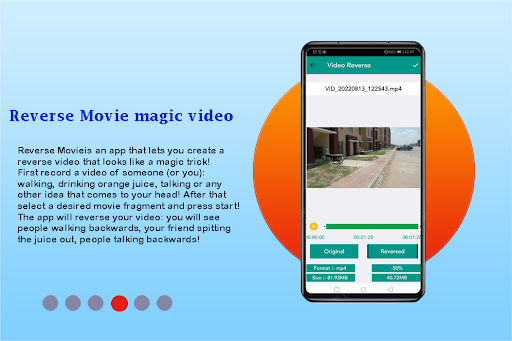
Reverse Movie FX is an app that lets you create a reverse video that looks like a magic trick! First record a video of someone (or you): walking, drinking orange juice, talking or any other idea that comes to your head! After that select a desired movie fragment and press start! The app will reverse your video: you will see people walking backwards, your friend spitting the juice out, people talking backwards!

Video To Audio
Video to Audio has to be a function of Video all in one where
The user can extract from Video file to Audio file and save an audio file to many supportive formats.

Mute Video
Sometimes we come to a situation where we have to show the only visualization not audio here you can remove audio with the help of mute function.

Extract Frame
With the help of this function, you can make an album of the image from video file at every second.

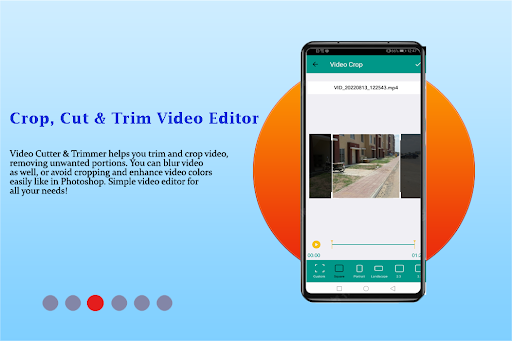
Resize Video- Crop Video
With the help of this function, you can use Resize Features of New Video all in one Editor and customize the video files size per your needs.

Create GIF
Here, the user can create GIF from video files and it’s easy to use, and simple step to create but still provides powerful/a ton features: video to GIF.

Video Boomerang
Boomerang Video function helps to create boomerang videos that loop back and run continuously.

Video Thumbnails
With the help of this function, a user can create thumbnails of the full video in a single image, which gives a complete idea of your video in a single image.

Video Watermark
With the help of this function, Users can make your private video with your branding.

Combine Video
Here, User can play a similar video on the unit screen with a separate frame of visualization.

Rotate Video
Sometimes we need to rotate video default ordination with the help of this function user can not only rotate video but also flip if the user wants to do it and its conversion is lossless.

Mirror Effect
This effect gives a fun user can apply a mirror effect for make mirror video, converted video has both the part real view and a mirror view of the original video.

Volume
With the help, this function user can increase video volume up 2 times, volume down to 0.5 times louder.

Video Effect (more than 40 filters)
Using this amazing feature user can easily add many video effects (Like- Sepia, Vignette, Gray, Rose, Red, Blue Vintage etc) to your videos.

Video Splitter
Split and Post your complete stories by splitting long videos into parts of 30 second videos or custom duration videos.

Format Supported
Video All In One Editor application support many video file formats such as .mp4, .mkv, .mov, .3gp and many more.


Key Features
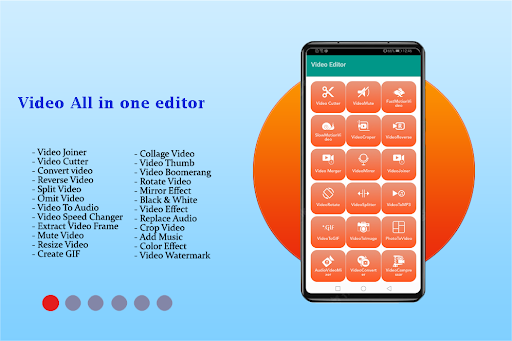
Video Joiner
Video Cutter
Convert video
Reverse Video
Split Video
Omit Video
Video To Audio
Video Speed Changer
Extract Video Frame
Mute Video

Show more

How to Download Video Editor All in one on PC

  • Video Editor All in one PC

    1. Download MEmu installer and finish the setup

  • Video Editor All in one PC

    2. Start MEmu then open Google Play on the desktop

  • Video Editor All in one PC

    3. Search Video Editor All in one in Google Play

  • Video Editor All in one PC Install

    4. Download and Install Video Editor All in one

  • Video Editor All in one PC

    5. On install completion click the icon to start

  • Video Editor All in one PC
    Video Editor All in one PC Video Editor All in one PC

    6. Enjoy using Video Editor All in one on PC with MEmu

Why Use MEmu for Video Editor All in one

MEmu Play is the best Android emulator, and 100 million users already enjoy its superb Android app experience. Powered by advanced virtualization technology, it lets you enjoy thousands of Android apps smoothly on your PC—including the most graphics-intensive ones.

  • Bigger screen with better graphics; Long duration, without limitation of battery or mobile data.

  • Full Keymapping support for precise control of keyboard and mouse or gamepad.

  • Multiple game accounts or tasks on single PC at one time with Multi-Instance manager.

Ready to Use?

Video Editor All in one - FAQs

  • How to use Video Editor All in one on PC?

    Use Video Editor All in one on PC by following steps:

    • Download MEmu, then install and launch it
    • Login to Google Play Store, install the app
    • Enjoy using the app on PC with MEmu
  • What are the minimum system requirements to run Video Editor All in one on PC?
    • Intel or AMD Processor
    • Microsoft Windows 7 and above
    • 2GB of memory
    • 5GB of free disk space
    • Hardware Virtualization Technology