Video Editor and Maker
Updated
Current Version
1.1.0
Offered By

Stop worrying about high battery drain when using Video Editor and Maker on your phone. Free yourself from the tiny screen and enjoy the app on a much larger display. From now on, get a full-screen experience of your app with the convenience of a keyboard and mouse. MEmu offers you all the surprising features you’d expect: quick installation and easy setup, intuitive controls, and no more worries about battery life, mobile data, or unexpected calls. The all-new MEmu 9 is the choice for using Video Editor and Maker on your computer. With the MEmu multi-instance manager, you can run two or more accounts at the same time. Most importantly, our exclusive emulation engine unlocks your PC’s full potential, delivering smooth and enjoyable performance.
Show more
Enjoy superb experience of using Video Editor and Maker on PC with MEMU App Player. It's a powerful free Android emulator which provides you with thousands of android apps for their desktop version. Enjoy connecting with friends and polishing your work with higher efficiency! Get flawless video editing with MJ video editor for android!
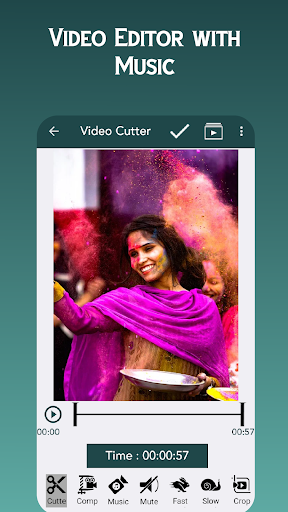
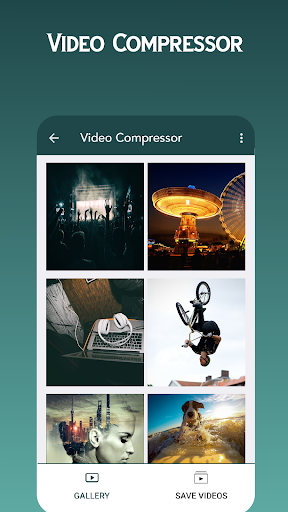
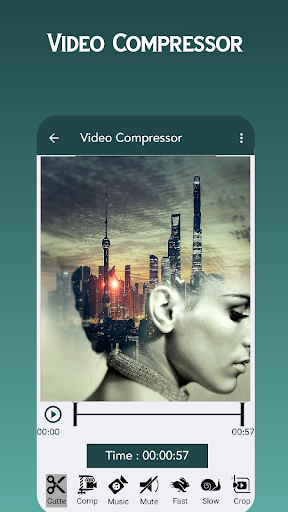
Get flawless video editing with MJ video editor for android!
MJ video editor is your ultimate destination to provide you with exceptional video results. You will get smart features of video cropper from video editor to upload in YouTube. You can install video editor - video converter, video converter of cost. Video editor app is unique and amazing app. It also work like video splitter app. It is a high-definition video editor for Facebook or Instagram and easy video cutter app with exceptionally smart and attractive themes. Video splitter app all in one video editor because of the smart features it possesses. MJ video editor download is known for its seamless video editing.
Split videos from video splitter app
Compress video without losing quality.
Crop video and export it in HD quality.
Fit your video in any aspect ratio.
Easily reverse and rewind your video with one click.
You can rotate or flip the video.
Merge videos from video merger app.
Compress video
Create a music video or place music on your video, or vlog in a flash from compressed video editor app. Make your video stand out from the crowd by using creative filters of the video splitter app. Voice augmentation and speed modification are also included in the blurred backdrop.
* Changing the rate of video playback
* You can alter the pace of the video with slow motion.
* Full-screen movie creator with fast/slow-motion effect.
* Increase the speed of movies or use slow motion to enhance them. We're
talking about a huge range here!
* Aspect ratio for cropping the video.
* Convert video files to MP4, FLV, 3gp in a jiffy by HD video converter and
compressor.
* Create a musical collection of videos of high quality.
* An all-in-one video editor app
* Trim and edit videos. Professional video trimming and cropping app.
* Merging two or more videos. Make a single video from many clips.
* Video can be compressed and convert MBs to Kbs with ease by video
compressor.
* You can reverse video by video reverser.
* Video join feature is also introduced in it.
* Make a cut in the video and save it as an HD file by using the video cutter
app.
* Easy-to-use movie creator and vertical pro vlogger for the video-sharing
website YouTube.
* Video creator and video editor allow you to use any aspect ratio for your movie and images to make videos Seamlessly
* Video compressor tool for creating and editing movie, film.
* Using the MJ video editor download, you can put up a professional-
looking video.
* Get your mobile videos shown in the gallery.
MJ video editor app has the greatest video editing application capabilities to make your posts stand out. Discover new video-making concepts by following us. In addition to cutting and merging videos, the MJ video editor download can also edit films with music and remove its actual sound. Video editor & maker video show has a beautiful interfaces and graphics.
It is our pleasure to answer any questions you may have regarding our MJ video editor app at Mjtechnologies555@gmail.com.
Show more

1. Download MEmu installer and finish the setup

2. Start MEmu then open Google Play on the desktop

3. Search Video Editor and Maker in Google Play
Install
4. Download and Install Video Editor and Maker
5. On install completion click the icon to start

6. Enjoy using Video Editor and Maker on PC with MEmu
MEmu Play is the best Android emulator, and 100 million users already enjoy its superb Android app experience. Powered by advanced virtualization technology, it lets you enjoy thousands of Android apps smoothly on your PC—including the most graphics-intensive ones.
Bigger screen with better graphics; Long duration, without limitation of battery or mobile data.
Full Keymapping support for precise control of keyboard and mouse or gamepad.
Multiple game accounts or tasks on single PC at one time with Multi-Instance manager.
Use Video Editor and Maker on PC by following steps: