Video editor - VidMix
Updated
Current Version
1.0
Offered By

Stop worrying about high battery drain when using Video editor - VidMix on your phone. Free yourself from the tiny screen and enjoy the app on a much larger display. From now on, get a full-screen experience of your app with the convenience of a keyboard and mouse. MEmu offers you all the surprising features you’d expect: quick installation and easy setup, intuitive controls, and no more worries about battery life, mobile data, or unexpected calls. The all-new MEmu 9 is the choice for using Video editor - VidMix on your computer. With the MEmu multi-instance manager, you can run two or more accounts at the same time. Most importantly, our exclusive emulation engine unlocks your PC’s full potential, delivering smooth and enjoyable performance.
Show more
Enjoy superb experience of using Video editor - VidMix on PC with MEMU App Player. It's a powerful free Android emulator which provides you with thousands of android apps for their desktop version. Enjoy connecting with friends and polishing your work with higher efficiency! Video Editor is a video maker and free video editor app with music.
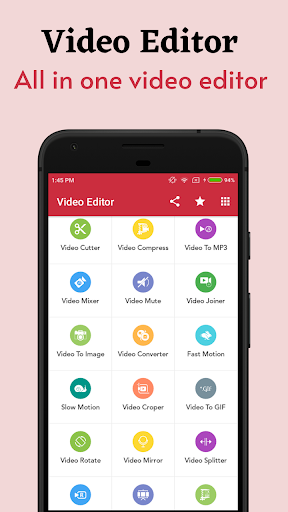
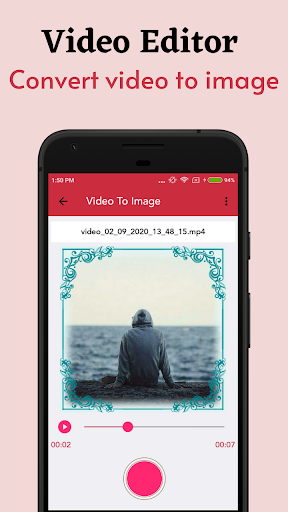
Video Editor is a video maker and free video editor app with music. It is an all-in-one video editor with powerful video editing features: video trim, cut, merge, fast & slow motion, edit video and photos with music, edit video with transition effects, add filters to video, crop video without losing quality etc.
All in one video editor app you have many videos and you want to edit it with smart phone,video joiner will help you do that thing. video editor bring excellent video editing experience to you on smart phone.
Video maker with music is the easiest way to create, edit and share great music videos with your friends and family, turn everyday moments into works of art.
Feature of video editor with music app:
Photo video maker with music
photo video maker is one of the best and most powerful applications for creating videos, creating movies, creating slide show movies on your device with video editor app.
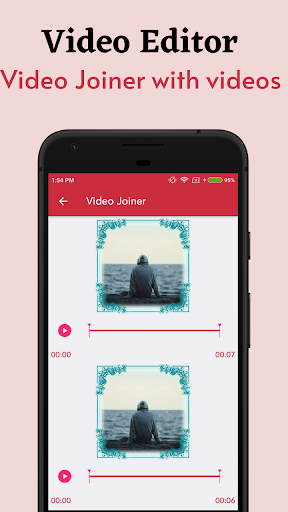
Video Joiner
video joiner function provide consistently join n-number of video files together in just one click in all in video editor app.
Video Cutter
video cutter is a startling function of video all in one editor in addition that it support many different file formats like .mp4, .mkv, .mov and many other in video editor app.
Video Converter
convert video function has brazenly transform your video file to a various format like as .mp4, .mkv, .mov etc.
Video To Audio
video to audio has to be a function of video all in one where the user can extract from video file to audio file and save an audio file to many supportive formats.
Mute Video
sometimes we come to a situation where we have to show the only visualization not audio here you can remove audio with the help of mute function in all in one video editor.
Resize Video
with the help of this function, you can use resize features of new video all in one editor and customize the video files size per your needs in video editor app.
Create GIF
here, the user can create gif from video files and it's easy to use, and simple step to create but still provides powerful/a ton features: video to gif make in video editor app.
Combine Video
here, user can play a similar video on the unit screen with a separate frame of visualization.
Video Merger
video joiner tools helps you to create single video file from multiple small video files make in video editor app.
Video Player
Hd video player tools playback any editing video in video editor app.
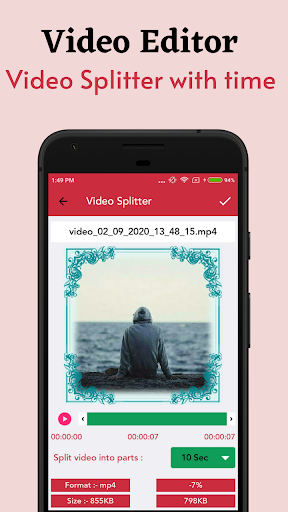
Video Splitter
video splitter tools splitting video with selected time intervals as you like with same video and audio quality.
Audio Merger
video editor : audio merger tools merging multiple audio file or cutting audio file to create ringtone/alarm/music easily.
music meter makes utilization of the well-known ffmpeg library, which is the standard library of sound and video file modification.
Key Fetures
• It's Completely Free.
• The app works offline.
• Simple UI.
• Small size app.
• Share and copy video with friends
• Edit video with amazing features, like adding text into video, picture in picture, trim video, crop video
• Add music, and you can also trim the music.
• Customize duration of the video accurately
• Zoom in and out. Let your audience focus on the region you want!
• Fast motion/slow motion to adjust and control the speed of every video clip.
• Video dubbing. Add your own voice or sound effects we provide to make the video even cooler.
• Video reverse, video playback to make a funny and creative original video.
• Add 20+ awesome filters , make your video fantastic.
• Add 10+ classic transitions to video, make your video high quality
• Add text with various fonts, and different animations
• Fast trim: You can trim video quickly, without video quality lose
• Merge multiple video into one file, and you can add music
• Share your video to social networks
If You Really Like This App, Please Rate and Share.
Show more

1. Download MEmu installer and finish the setup

2. Start MEmu then open Google Play on the desktop

3. Search Video editor - VidMix in Google Play
Install
4. Download and Install Video editor - VidMix
5. On install completion click the icon to start

6. Enjoy using Video editor - VidMix on PC with MEmu
MEmu Play is the best Android emulator, and 100 million users already enjoy its superb Android app experience. Powered by advanced virtualization technology, it lets you enjoy thousands of Android apps smoothly on your PC—including the most graphics-intensive ones.
Bigger screen with better graphics; Long duration, without limitation of battery or mobile data.
Full Keymapping support for precise control of keyboard and mouse or gamepad.
Multiple game accounts or tasks on single PC at one time with Multi-Instance manager.
Use Video editor - VidMix on PC by following steps: