
Video Maker From Photo & Music
Updated
Current Version
1.3.0
Offered By

Stop worrying about high battery drain when using Video Maker From Photo & Music on your phone. Free yourself from the tiny screen and enjoy the app on a much larger display. From now on, get a full-screen experience of your app with the convenience of a keyboard and mouse. MEmu offers you all the surprising features you’d expect: quick installation and easy setup, intuitive controls, and no more worries about battery life, mobile data, or unexpected calls. The all-new MEmu 9 is the choice for using Video Maker From Photo & Music on your computer. With the MEmu multi-instance manager, you can run two or more accounts at the same time. Most importantly, our exclusive emulation engine unlocks your PC’s full potential, delivering smooth and enjoyable performance.
Show more
Enjoy superb experience of using Video Maker From Photo & Music on PC with MEMU App Player. It's a powerful free Android emulator which provides you with thousands of android apps for their desktop version. Enjoy connecting with friends and polishing your work with higher efficiency! Photo and music video maker app is a great tool that helps you create beautiful and unique videos from your favorite photos and songs.
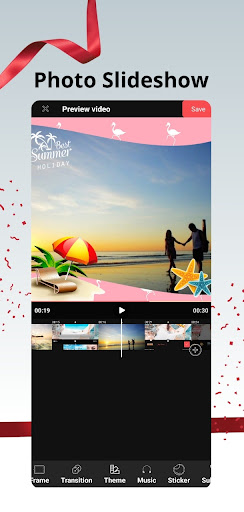
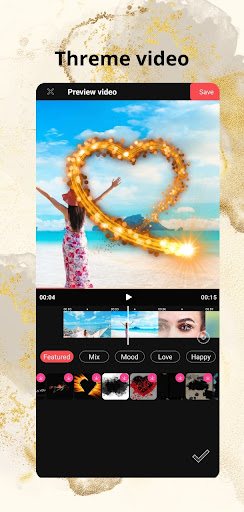
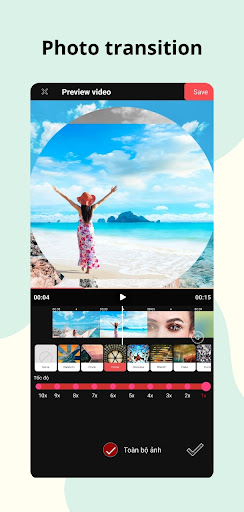
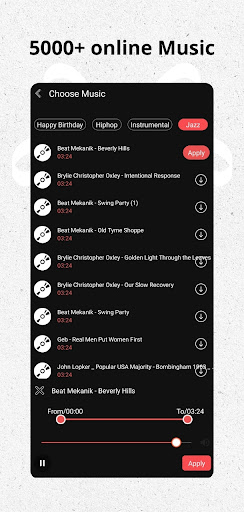
Photo and music video maker app is a great tool that helps you create beautiful and unique videos from your favorite photos and songs. With an intuitive and easy-to-use interface, the Video Maker From Photo & Music application allows creative users to easily create stylish, natural videos. You can add motion of stickers, text along with editing features, with many transition effects from basic to 3D to create smooth and attractive to create unique and impressive videos. statue. You can even customize the video duration, speed, and ratio to suit your content and preferences.
Main Functions :
- Edit images to create videos
From happy family photos to fun moments with friends in everyday life or important events: Halloween, Christmas, Happy New Year, birthdays, Valentine's Day, happiness,..., You can edit, cut, and beautify to start creating unique and personalized videos for your own videos.
- Add music to video
Not only can you add music from your personal device, but you can also explore a rich online music store. Whether you're a fan of upbeat pop music or gentle classical music, you can find the right music to make your videos come alive like never before.
- Add stickers with many styles
Easily add stickers: cartoon, personality, lovely, holidays... continuously updated with effects, adjust the desired time.
- Add text to video
Customize fonts, effects, colors, and time when text appears on video
- Unique Transitions and Effects
This application offers a diverse tool palette with dozens of effects and transition speeds for you to freely create, making your video a truly lively and attractive work.
- Create videos by topic
Meet countless attractive video topics such as: Love, friendship, Christmas, mood...
- Flexible Video Frame, Duration and Ratio
The ability to customize video frame, duration and aspect ratio allows users to express unlimited creativity. You can create vertical videos for social media stories, horizontal videos for sharing on different platforms, and even square videos for cross-platform compatibility.
- Friendly interface and easy to use
Not everyone is an expert in using complex tools, and that's completely understood. Therefore, the application's interface is designed to be extremely simple and friendly. Even if you have no design experience, you can create impressive videos in just a few minutes.
- Export high quality videos
Professional video creator supports 1080, 2k resolution (support depends on phone device type).
With this editor, creating videos with photos, music and other elements becomes easy and fun. You can beautify your videos with subtitles, themes, transitions, stickers, text and almost anything you desire in a creative and personalized way for your videos.
If you have any suggestions and requests for technical support, please contact us at: hpsky.studio@gmail.com.
Show more

1. Download MEmu installer and finish the setup

2. Start MEmu then open Google Play on the desktop

3. Search Video Maker From Photo & Music in Google Play
Install
4. Download and Install Video Maker From Photo & Music
5. On install completion click the icon to start

6. Enjoy using Video Maker From Photo & Music on PC with MEmu
MEmu Play is the best Android emulator, and 100 million users already enjoy its superb Android app experience. Powered by advanced virtualization technology, it lets you enjoy thousands of Android apps smoothly on your PC—including the most graphics-intensive ones.
Bigger screen with better graphics; Long duration, without limitation of battery or mobile data.
Full Keymapping support for precise control of keyboard and mouse or gamepad.
Multiple game accounts or tasks on single PC at one time with Multi-Instance manager.
Use Video Maker From Photo & Music on PC by following steps:































