
Video Playmaker Pro
Updated
Current Version
2.0.3
Offered By

Stop worrying about high battery drain when using Video Playmaker Pro on your phone. Free yourself from the tiny screen and enjoy the app on a much larger display. From now on, get a full-screen experience of your app with the convenience of a keyboard and mouse. MEmu offers you all the surprising features you’d expect: quick installation and easy setup, intuitive controls, and no more worries about battery life, mobile data, or unexpected calls. The all-new MEmu 9 is the choice for using Video Playmaker Pro on your computer. With the MEmu multi-instance manager, you can run two or more accounts at the same time. Most importantly, our exclusive emulation engine unlocks your PC’s full potential, delivering smooth and enjoyable performance.
Show more
Enjoy superb experience of using Video Playmaker Pro on PC with MEMU App Player. It's a powerful free Android emulator which provides you with thousands of android apps for their desktop version. Enjoy connecting with friends and polishing your work with higher efficiency! In the ever-evolving realm of video creation and editing, the cutting-edge Video PlayMaker Pro, developed by the innovative Syntholight, takes center stage as a sophisticated and versatile application.
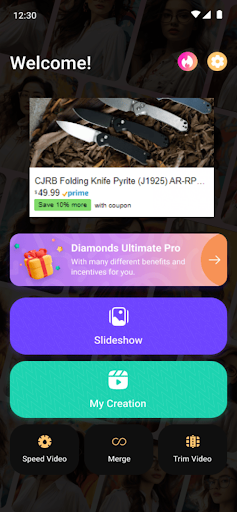
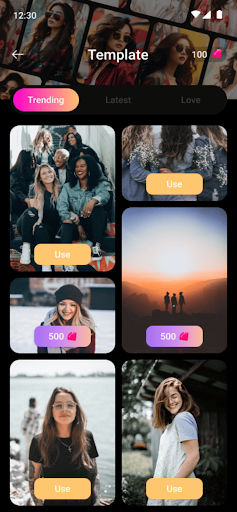
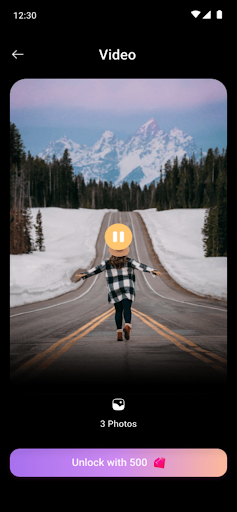
In the ever-evolving realm of video creation and editing, the cutting-edge Video PlayMaker Pro, developed by the innovative Syntholight, takes center stage as a sophisticated and versatile application. Offering a comprehensive suite of functionalities, including image-to-video conversion, video playlist management, playback acceleration, cutting, and merging, this app caters to the diverse and dynamic needs of content creators across various domains.
At its core, Video PlayMaker Pro excels in the seamless transformation of static images into dynamic and captivating video narratives. The image-to-video conversion feature, marked by its simplicity and adaptability, accommodates a spectrum of requirements—from personal memory compilation to the development of engaging promotional content. Syntholight's unwavering commitment to user-friendly interactions is evident in the seamless integration of this foundational feature, ensuring accessibility and expressive freedom for users of all levels.
A defining feature of Video PlayMaker Pro is its robust video playlist management system. This functionality provides users with a structured and organized creative space, empowering them to curate and arrange their video content efficiently. Whether managing content streams for social media or creating a cohesive brand presence for businesses, the playlist management ensures versatility and ease of use.
Recognizing the accelerated pace of modern communication, Video PlayMaker Pro introduces an innovative playback acceleration feature. Users can dynamically adjust the speed of their videos, unlocking creative possibilities. Whether crafting captivating time-lapse sequences or delivering information with a heightened tempo, this feature adds a layer of creativity and practicality to the video creation process.
Precision in video editing is a cornerstone of Video PlayMaker Pro, evident in its cutting and merging capabilities. Users can seamlessly trim unwanted segments, maintaining a polished and streamlined quality in their videos. The merging feature enhances creative possibilities, allowing the combination of multiple clips to craft cohesive and impactful visual narratives.
Beyond its feature-rich offerings, Video PlayMaker Pro distinguishes itself with an intuitive and user-friendly interface. Designed to cater to both novice and seasoned content creators, the application ensures a smooth and intuitive navigation experience. Clear menus and concise instructions guide users through the video creation journey, fostering an inclusive platform for individuals with varying levels of technical proficiency.
In conclusion, Video PlayMaker Pro by Syntholight transcends the boundaries of a mere application; it is a dynamic canvas for unparalleled creativity and storytelling. With its seamless image-to-video conversion, playlist management, acceleration, cutting, and merging features, Video PlayMaker Pro caters to a diverse audience of content creators. Whether one is a social media influencer, a business professional, or an aspiring artist, Video PlayMaker Pro empowers users to bring their visual stories to life while adhering to policies and guidelines.
Show more

1. Download MEmu installer and finish the setup

2. Start MEmu then open Google Play on the desktop

3. Search Video Playmaker Pro in Google Play
Install
4. Download and Install Video Playmaker Pro
5. On install completion click the icon to start

6. Enjoy using Video Playmaker Pro on PC with MEmu
MEmu Play is the best Android emulator, and 100 million users already enjoy its superb Android app experience. Powered by advanced virtualization technology, it lets you enjoy thousands of Android apps smoothly on your PC—including the most graphics-intensive ones.
Bigger screen with better graphics; Long duration, without limitation of battery or mobile data.
Full Keymapping support for precise control of keyboard and mouse or gamepad.
Multiple game accounts or tasks on single PC at one time with Multi-Instance manager.
Use Video Playmaker Pro on PC by following steps:































