
Video Repair, MP4 Fix -iRepair
Updated
Current Version
1.1.7.0
Offered By

Stop worrying about high battery drain when using Video Repair, MP4 Fix -iRepair on your phone. Free yourself from the tiny screen and enjoy the app on a much larger display. From now on, get a full-screen experience of your app with the convenience of a keyboard and mouse. MEmu offers you all the surprising features you’d expect: quick installation and easy setup, intuitive controls, and no more worries about battery life, mobile data, or unexpected calls. The all-new MEmu 9 is the choice for using Video Repair, MP4 Fix -iRepair on your computer. With the MEmu multi-instance manager, you can run two or more accounts at the same time. Most importantly, our exclusive emulation engine unlocks your PC’s full potential, delivering smooth and enjoyable performance.
Show more
Enjoy superb experience of using Video Repair, MP4 Fix -iRepair on PC with MEMU App Player. It's a powerful free Android emulator which provides you with thousands of android apps for their desktop version. Enjoy connecting with friends and polishing your work with higher efficiency! iRepair App: A Comprehensive Android Video Repair ToolIn the digital age, videos have become an integral part of our lives.
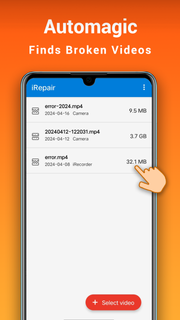
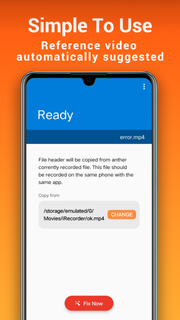
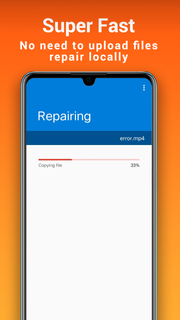
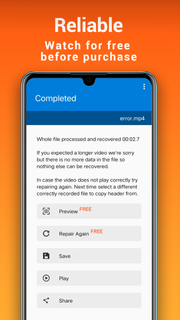
iRepair App: A Comprehensive Android Video Repair ToolIn the digital age, videos have become an integral part of our lives. Whether it's recording life's precious moments, tracking driving patterns with a dashcam, or capturing screen recordings for work, video files play a significant role. However, the issue of video file corruption has increased alongside it, causing inconvenience to users. To address this problem, iRepair App was developed as a video repair application specifically designed for Android devices. It can tackle a variety of video issues and help users recover valuable video materials.iRepair App supports multiple video formats, including but not limited to mp4, m4v, mov, 3gp, which cover almost all mainstream video types available on the market. Whether it's due to power outages, blue screens, water damage to devices, software crashes, system freezes, network anomalies, or physical device damage, iRepair App offers effective solutions for video file corruption.The application works by encoding and decoding the video file's codecs, a process that fixes errors within the video and restores its normal playback. Users don't have to worry about complicated operations; iRepair App provides a simple and intuitive user interface, allowing users to complete video repairs in just three easy steps:1. Launch the application and click the "Select" button to choose the damaged video file from your Android device.2. Click the "Repair" button to start the repair process. During this process, the application automatically analyzes the issues with the video file and performs the necessary repairs.3. After the repair is complete, the application will notify the user. At this point, the video will be fixed and ready to play with any video player.iRepair App not only repairs corrupted video files but also addresses common issues that arise during video playback, such as audio-video desynchronization, audio playing without video, format incompatibilities, and video lagging. These issues are often caused by video file encoding problems or device compatibility issues. iRepair App effectively resolves these problems through its transcoding technology.Furthermore, the output video quality maintained by iRepair App is consistently high. Users do not need to worry about any loss in video quality during the repair process. The application ensures that the clarity and smoothness of the video are preserved, making the repaired video indistinguishable in quality from the original.The use cases for iRepair App are vast, benefiting both individual users and professionals. For personal users, it can repair accidentally corrupted video files from everyday life, such as family videos or travel recordings. For professionals, it can help restore work-related video files that have been compromised due to equipment malfunctions or other reasons, such as dashcam footage or surveillance videos.In summary, iRepair App is a powerful, easy-to-use, and highly compatible video repair tool. It helps users solve a variety of video issues and recover corrupted video files, ensuring that precious memories are preserved. For Android users who frequently deal with video files, iRepair App is an essential application to have.
Show more

1. Download MEmu installer and finish the setup

2. Start MEmu then open Google Play on the desktop

3. Search Video Repair, MP4 Fix -iRepair in Google Play
Install
4. Download and Install Video Repair, MP4 Fix -iRepair
5. On install completion click the icon to start

6. Enjoy using Video Repair, MP4 Fix -iRepair on PC with MEmu
MEmu Play is the best Android emulator, and 100 million users already enjoy its superb Android app experience. Powered by advanced virtualization technology, it lets you enjoy thousands of Android apps smoothly on your PC—including the most graphics-intensive ones.
Bigger screen with better graphics; Long duration, without limitation of battery or mobile data.
Full Keymapping support for precise control of keyboard and mouse or gamepad.
Multiple game accounts or tasks on single PC at one time with Multi-Instance manager.
Use Video Repair, MP4 Fix -iRepair on PC by following steps: