
Vidovi
Updated
Current Version
1.0.9
Offered By

Stop worrying about high battery drain when using Vidovi on your phone. Free yourself from the tiny screen and enjoy the app on a much larger display. From now on, get a full-screen experience of your app with the convenience of a keyboard and mouse. MEmu offers you all the surprising features you’d expect: quick installation and easy setup, intuitive controls, and no more worries about battery life, mobile data, or unexpected calls. The all-new MEmu 9 is the choice for using Vidovi on your computer. With the MEmu multi-instance manager, you can run two or more accounts at the same time. Most importantly, our exclusive emulation engine unlocks your PC’s full potential, delivering smooth and enjoyable performance.
Show more
Enjoy superb experience of using Vidovi on PC with MEMU App Player. It's a powerful free Android emulator which provides you with thousands of android apps for their desktop version. Enjoy connecting with friends and polishing your work with higher efficiency! How can Vidovi enhance your video recordings for a more professional and natural look?

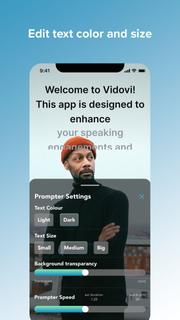
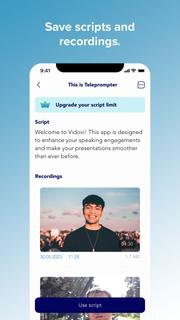
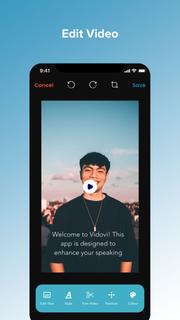
How can Vidovi enhance your video recordings for a more professional and natural look?• Maintain direct eye contact with the camera while reading your script.• Eliminate the hassle of using paper scripts or notes.• No need to memorize your lines; read them effortlessly from the teleprompter.• Stay focused on-camera without glancing away at notes or prompts.• Reduce mistakes and reshoots, ensuring smoother video production.Here's a summary of all the wonderful features:- Record Pro Videos without expensive equipment.- Vidovi's teleprompter keeps your script in view, allowing confident delivery and maintaining eye contact with your viewers.- Adjust your teleprompter with customizable settings and monitor your recording in real-time to ensure perfect lighting and audio quality.- Capture multiple takes of your video and choose the best one for a polished and professional result.- The Teleprompter App works seamlessly offline, allowing you to create and record content wherever inspiration strikes.- Tailor the teleprompter to suit your unique needs. Adjust the scrolling speed, font size, to ensure optimal readability and comfort during recording.- Post in one click to Facebook, Instagram, and Twitter and make your content go viral in no time.- Store your videos and scripts in local storage, giving you easy access whenever you need them.- Be the first to share breaking news or updates on social media, engaging your viewers instantly. It's a simple way to make a major impact: get more views, increase engagement, and build your audience.So save your time and let Vidovi show you some magic!Wanna try?Unlock your potential as a video creator and immerse your audience in compelling stories with the Teleprompter App. Download now and take the first step towards creating authentic, captivating videos that leave a lasting impression.PRO PURCHASE AVAILABLE:* Vidovi is free for scripts of up to 500 characters. There's no limit to the video's length! You can record videos as long as you need, without any watermarks, giving you the freedom to create without restrictions.
Show more

1. Download MEmu installer and finish the setup

2. Start MEmu then open Google Play on the desktop

3. Search Vidovi in Google Play
Install
4. Download and Install Vidovi
5. On install completion click the icon to start

6. Enjoy using Vidovi on PC with MEmu
MEmu Play is the best Android emulator, and 100 million users already enjoy its superb Android app experience. Powered by advanced virtualization technology, it lets you enjoy thousands of Android apps smoothly on your PC—including the most graphics-intensive ones.
Bigger screen with better graphics; Long duration, without limitation of battery or mobile data.
Full Keymapping support for precise control of keyboard and mouse or gamepad.
Multiple game accounts or tasks on single PC at one time with Multi-Instance manager.
Use Vidovi on PC by following steps:































