
VidVault : Video Downloader
Updated
Current Version
3.6
Offered By

Stop worrying about high battery drain when using VidVault : Video Downloader on your phone. Free yourself from the tiny screen and enjoy the app on a much larger display. From now on, get a full-screen experience of your app with the convenience of a keyboard and mouse. MEmu offers you all the surprising features you’d expect: quick installation and easy setup, intuitive controls, and no more worries about battery life, mobile data, or unexpected calls. The all-new MEmu 9 is the choice for using VidVault : Video Downloader on your computer. With the MEmu multi-instance manager, you can run two or more accounts at the same time. Most importantly, our exclusive emulation engine unlocks your PC’s full potential, delivering smooth and enjoyable performance.
Show more
Enjoy superb experience of using VidVault : Video Downloader on PC with MEMU App Player. It's a powerful free Android emulator which provides you with thousands of android apps for their desktop version. Enjoy connecting with friends and polishing your work with higher efficiency! Super Fast VidVault : Video Downloader app is your ultimate video-saving companion.
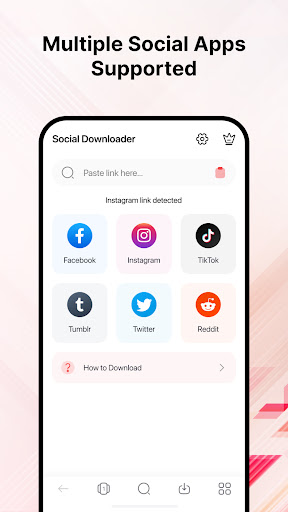
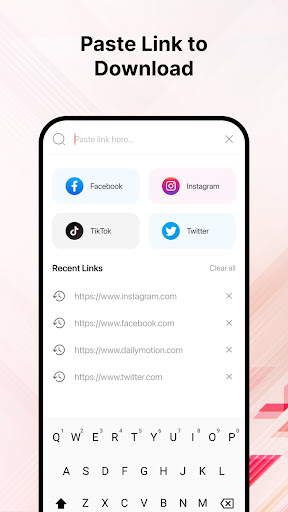
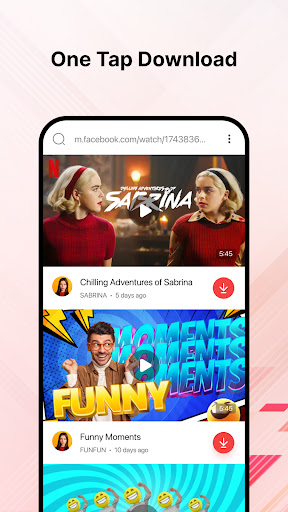
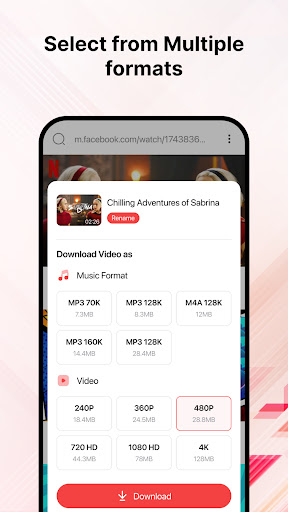
Super Fast VidVault : Video Downloader app is your ultimate video-saving companion. When surfing social media, if you like a reel, it can be your instant Instagram video downloader. There is no need to struggle with multiple apps or vague platforms when you have a one-click video saver app.
With this user-friendly download manager app, you can grab your favorite videos from all social media platforms. The social video downloader is compatible with Facebook, Instagram, Twitter, TikTok, Reddit, Tumbler, and other platforms. The All video downloader app supports widely-used mp4 format, making sure you can enjoy your saved videos on any device hassle-free. It offers you high-quality, full-length downloads in the minimum possible time.
Key Features :
⦁ Super fast Downloads – Fast video downloaders fetch your content swiftly.
⦁ Supports All Social Media – Cover all social media platforms, including TikTok, Facebook, Instagram, Twitter, Tumbler, and more.
⦁ Resume Downloads – Efficient Facebook video downloader resume downloads automatically to save time and effort.
⦁ Safe and Secure – Keep your data private and secure.
⦁ Organize Your Library – Manage your downloaded videos in one place.
⦁ Video Format Supported – Download videos in mp4 Format with high-quality visuals.
⦁ Universal Compatibility – Enjoy your saved videos on any device or media player without compatibility issues.
Superfast Downloads :
With all video downloader apps, you can download videos at lightning speed. Whether you're grabbing a quick clip or a longer video, you won't be left waiting. Super fast VidVault : Video Downloader app makes the download process incredibly swift, saving you time and frustration.
Supports All Social Media :
The app is not limited to just one platform. It's a versatile social video downloader that works seamlessly with various social media sites. You can easily download videos from platforms like TikTok, Facebook, Instagram, Twitter, and more. There's no need to switch between different apps for each platform; we've got them all covered.
Resume Downloads :
Interruptions can happen during downloads due to internet connection disruption or server issues. The resume download feature is a lifesaver in such situations. If your download gets interrupted, you can pick up where you left off, saving you the hassle of starting the download from scratch.
Safe and Secure :
Your privacy and security is our top priority. Super fast VidVault : Video Downloader app ensures that your data remains private and secure. You can use the all video downloader app with confidence, knowing that your information is protected.
Organize Your Library :
Managing your downloaded videos is made easy with this feature. The video manager app provides a library to organize and categorize your saved videos. Organizing makes it convenient to find and enjoy the videos later.
Universal Format Support :
The video saver app supports the widely-used mp4 format, which is compatible with virtually all devices and media players. You won't have to worry about format compatibility issues when playing your downloaded videos.
Universal Compatibility :
The videos you download can be enjoyed on any device or media player without compatibility hiccups. This universal compatibility ensures a seamless viewing experience, no matter where or how you watch your videos.
How to use Super fast VidVault : Video Downloader?
Copy the video link from your favorite social media platform.
⦁ Open the Super fast VidVault : Video Downloader app.
⦁ Paste the link in the provided space.
⦁ Hit the download button.
⦁ Wait for the magic to happen.
⦁ Once the download is complete, find your video in the app's library.
⦁ Enjoy your saved videos anytime, anywhere.
Super fast VidVault : Video Downloader app is an all-in-one solution for your video-saving needs. Download, watch, and share with ease!
Show more

1. Download MEmu installer and finish the setup

2. Start MEmu then open Google Play on the desktop

3. Search VidVault : Video Downloader in Google Play
Install
4. Download and Install VidVault : Video Downloader
5. On install completion click the icon to start

6. Enjoy using VidVault : Video Downloader on PC with MEmu
MEmu Play is the best Android emulator, and 100 million users already enjoy its superb Android app experience. Powered by advanced virtualization technology, it lets you enjoy thousands of Android apps smoothly on your PC—including the most graphics-intensive ones.
Bigger screen with better graphics; Long duration, without limitation of battery or mobile data.
Full Keymapping support for precise control of keyboard and mouse or gamepad.
Multiple game accounts or tasks on single PC at one time with Multi-Instance manager.
Use VidVault : Video Downloader on PC by following steps:































