
Wing Bank
Updated
Current Version
4.32.3
Offered By

Stop worrying about high battery drain when using Wing Bank on your phone. Free yourself from the tiny screen and enjoy the app on a much larger display. From now on, get a full-screen experience of your app with the convenience of a keyboard and mouse. MEmu offers you all the surprising features you’d expect: quick installation and easy setup, intuitive controls, and no more worries about battery life, mobile data, or unexpected calls. The all-new MEmu 9 is the choice for using Wing Bank on your computer. With the MEmu multi-instance manager, you can run two or more accounts at the same time. Most importantly, our exclusive emulation engine unlocks your PC’s full potential, delivering smooth and enjoyable performance.
Show more
Enjoy superb experience of using Wing Bank on PC with MEMU App Player. It's a powerful free Android emulator which provides you with thousands of android apps for their desktop version. Enjoy connecting with friends and polishing your work with higher efficiency! Ever wonder how other people maximize their time?
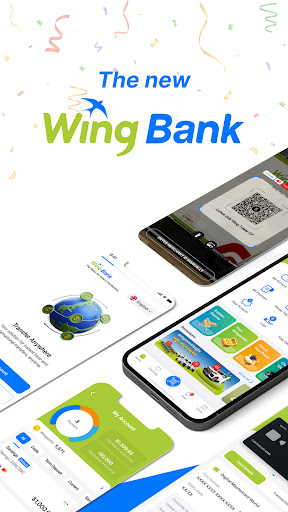
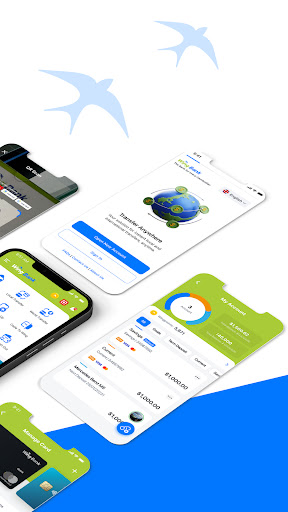
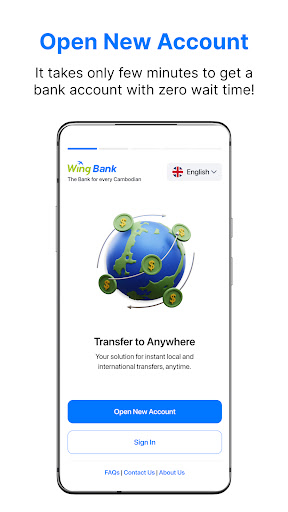
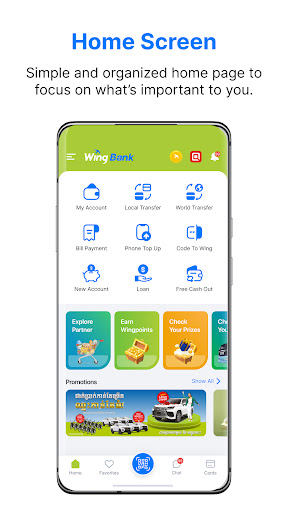
Ever wonder how other people maximize their time? They do not visit physical banks, wait for their change every purchase, or line up in long queues to pay bills. Instead, they do all of these things in one platform. A platform that caters to all Cambodians.
The Wing Bank App is your ever-reliable mobile banking companion. Send money to anyone in Cambodia and other parts of the globe, pay your bills on-time, top up your phone, and shop online in just a few clicks. It’s safe, convenient, easy-to-use, and fast so you can do it anywhere, anytime. Get the Wing Bank App today!
Here’s how you can maximize your Wing Bank App:
•Opt for cashless transactions to ensure the safety of your money.
•Consistently check your account activity.
•Use for convenient day-to-day payments.
SEND MONEY
•Send and receive money anywhere in Cambodia.
•Send money from one Wing account to another via Wing-2-Wing.
•Send money from one Wing account to a non-Wing user via Wing WeiLuy.
•Send and receive money to or from international remittance partners globally. International partners are located from different parts of the globe!
•Transfer money from Wing to a bank account and vices versa.
PHONE TOP-UP
•Top-up your phone easily with any amount via Wing.
•Top-up your family members or your friend’s phone or buy them phone credits via Wing.
•List of available mobile providers: Cellcard, Metaphone, Smart, QB, CooTel, and Yes Seatel.
BILL PAYMENT
•Make online bill payment directly from the Wing Bank app.
•Electricity, water, insurance, internet cable? Wing has got you covered! Enjoy hassle-free payment at the comfort of your own home! Do all of these in a click of a button and pay all of your utilities on time.
WINGPAY
•Scan the QR Code and easily pay Wing’s partner merchants using the app. No need to bring actual cash or physical card! Amazing, right?
•No cash, no risk. Enjoy the cashless way of spending your money.
WING ONLINE MASTERCARD
•Have total control of your money! Use your Wing Online Mastercard and enjoy cashless transactions from different local and international brands.
•It’s a Mastercard, which means it’s accepted worldwide! Shop at different merchants at the convenience of your home.
•No need to wait long queues. Just one click, your purchase is fast and secure.
•Completely virtual. No actual cash needed.
WING2WORLD
Enjoy international money transfers using the Wing Bank App. It's as simple as pressing a few buttons!
In-bound service: Migrant workers can easily send their money to any of Wing Partner's in more than 200 countries and receiving is easy.
Outbound service: Cambodians or expats can send their hard-earned money to anyone in real-time using the Wing Bank App.
We now partner with Western Union and MoneyGram for more coverages
WING ANG PAO
Save papers and don’t use actual red packets! Gift your friends any amount with the Wing Ang Pao. All it takes is a few simple steps! Select "Individual" or "Group" and enter the recipient's Wing account or phone number.
Business with Wing? Talk to us and we'll help you.
WINGSME
Affordable business settlement and disbursement? Manage your business transactions with WingSME. Grow your business with Wing, maximize all opportunities, offer more services to clients, and enjoy all benefits.
WINGBIZ+
Payroll system is all over the place? Secure the disbursements of your funds and make sure payroll is on time through Wing!
Effectiveness:
1. It cuts off the unnecessary backend headcounts
2. Employees can withdraw anytime!
3. No maintenance fee.
Productivity:
1. One-click solution to disburse funds.
2. Save time for approval of processes.
3. Avail all the features on the Wing Bank App.
Hassle-free:
1. Get your salary on time!
2. Risk-free of handling cash.
Wing is with you wherever, whenever. Bring your everyday wallet and start a cashless society! Invite your friends to download the app today and register their Wing accounts!
Show more

1. Download MEmu installer and finish the setup

2. Start MEmu then open Google Play on the desktop

3. Search Wing Bank in Google Play
Install
4. Download and Install Wing Bank
5. On install completion click the icon to start

6. Enjoy using Wing Bank on PC with MEmu
MEmu Play is the best Android emulator, and 100 million users already enjoy its superb Android app experience. Powered by advanced virtualization technology, it lets you enjoy thousands of Android apps smoothly on your PC—including the most graphics-intensive ones.
Bigger screen with better graphics; Long duration, without limitation of battery or mobile data.
Full Keymapping support for precise control of keyboard and mouse or gamepad.
Multiple game accounts or tasks on single PC at one time with Multi-Instance manager.
Use Wing Bank on PC by following steps: