
XFollow - Get followers, likes
Updated
Current Version
8.0
Offered By

Stop worrying about high battery drain when using XFollow - Get followers, likes on your phone. Free yourself from the tiny screen and enjoy the app on a much larger display. From now on, get a full-screen experience of your app with the convenience of a keyboard and mouse. MEmu offers you all the surprising features you’d expect: quick installation and easy setup, intuitive controls, and no more worries about battery life, mobile data, or unexpected calls. The all-new MEmu 9 is the choice for using XFollow - Get followers, likes on your computer. With the MEmu multi-instance manager, you can run two or more accounts at the same time. Most importantly, our exclusive emulation engine unlocks your PC’s full potential, delivering smooth and enjoyable performance.
Show more
Download XFollow - Get followers, likes on PC with MEmu Android Emulator. Enjoy playing on big screen. XFollow - Get followers, likes supports users who want steady, authentic engagement on social posts.
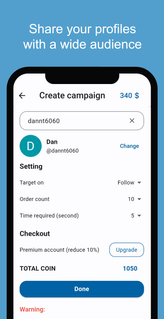

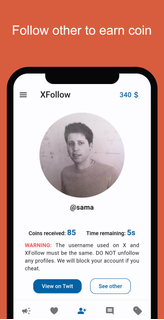

XFollow - Get followers, likes supports users who want steady, authentic engagement on social posts. It centers on showcasing your own content inside a community so real people can find it, and it helps you notice what resonates. You can observe diverse posts for ideas, then refine your style at your own pace. As participation grows, visibility can improve through consistent interaction. To get started quickly, download XFollow - Get followers, likes and follow the in app guidance.XFollow - Get followers, likes FeaturesShare videos for organic reachXFollow - Get followers, likes lets you post your social videos within the app so other users can discover them. Your clips appear to a broader audience over time, which can lead to real views and reactions. The focus stays on consistent activity and natural visibility rather than artificial boosts.Explore community contentYou can browse a wide range of creator videos and accounts to see different styles and trends. This helps you understand what audiences engage with before shaping your next post. The exploration flow keeps you in touch with fresh ideas while you decide what fits your voice.Message and connect with creatorsYou can start conversations with other users to exchange feedback and ideas. Direct messages make it easier to discuss content approaches and form working relationships. This interaction supports collaboration that can improve your planning and publishing routine.Prioritize genuine interactionsXFollow - Get followers, likes does not support buying, selling, or exchanging followers or likes. It is an independent third party focused on authentic engagement. Users should follow the terms and guidelines of any platform they use while interacting through the app.Start using XFollow todayXFollow - Get followers, likes focuses on real engagement through community sharing, discovery, and messaging. It suits users who want to grow by participating and learning from others. Install the XFollow - Get followers, likes latest version to use the current tools and follow the latest policies.
Show more

1. Download MEmu installer and finish the setup

2. Start MEmu then open Google Play on the desktop

3. Search XFollow - Get followers, likes in Google Play
Install
4. Download and Install XFollow - Get followers, likes
5. On install completion click the icon to start

6. Enjoy using XFollow - Get followers, likes on PC with MEmu
MEmu Play is the best Android emulator, and 100 million users already enjoy its superb Android app experience. Powered by advanced virtualization technology, it lets you enjoy thousands of Android apps smoothly on your PC—including the most graphics-intensive ones.
Bigger screen with better graphics; Long duration, without limitation of battery or mobile data.
Full Keymapping support for precise control of keyboard and mouse or gamepad.
Multiple game accounts or tasks on single PC at one time with Multi-Instance manager.
Use XFollow - Get followers, likes on PC by following steps: