Aniimo
Aggiornata
Versione corrente
1.0.1
Offerta da

Vista tutta la passione dimostrata nel giocare a Aniimo, le tue mani non dovrebbero essere limitate al minuscolo schermo di un telefono. Gioca come un professionista e ottieni il pieno controllo del gioco con tastiera e mouse. MEmu ti offre tutto ciò che ti aspetti. Scarica e gioca a Aniimo su PC. Gioca quanto vuoi, niente più limitazioni di batteria, dati mobili e chiamate inquietanti. Il nuovissimo MEmu 9 è la scelta migliore per giocare a Aniimo su PC. Realizzato sulla base della nostra esperienza, lo squisito sistema di mappatura dei tasti preimpostati rende Aniimo un vero e proprio gioco per PC. MEmu è un gestore multi-instanza che permette di giocare con 2 o più account sullo stesso dispositivo. E la cosa più importante, il nostro esclusivo motore di emulazione può liberare tutto il potenziale del tuo PC, rendendo tutto fluido.
Mostra altro
Scarica Aniimo su PC con MEmu Android Emulator. Divertiti giocando sul grande schermo. Aniimo è un RPG open world gratuito di nuova generazione, incentrato sulla cattura di creature.

Aniimo è un RPG open world gratuito di nuova generazione, incentrato sulla cattura di creature. Nel vasto continente di Idyll, incontrerai innumerevoli creature uniche conosciute come Aniimo. Stringi un legame con loro e scopri la bellezza di questo mondo da una prospettiva completamente nuova e con nuove abilità.
Potrai anche viaggiare verso una metropoli fluttuante nel cielo, dove incontrerai altri Esploratori, condividerai storie e parteciperai a emozionanti battaglie competitive. Scegli il tuo Aniimo e intraprendi un viaggio epico, ricco di esplorazione, scoperte e avventura!
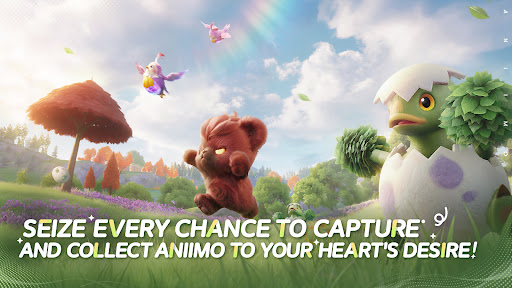
Cogli ogni occasione per catturare e collezionare Aniimo a volontà!
Quando ti avventuri su Idyll, chiunque incontri può diventare un compagno! Cattura gli Aniimo usando gli Aniipod, piazza trappole e calcola alla perfezione il momento della cattura: goditi l'emozione e l'imprevedibilità di ogni istante! Gli Aniimo unici appariranno in base all'ambiente, alle condizioni meteorologiche, ai fenomeni e all'ora del giorno. La maggior parte degli Aniimo può evolversi, rendendo la loro collezione e scoperta ancora più entusiasmanti.
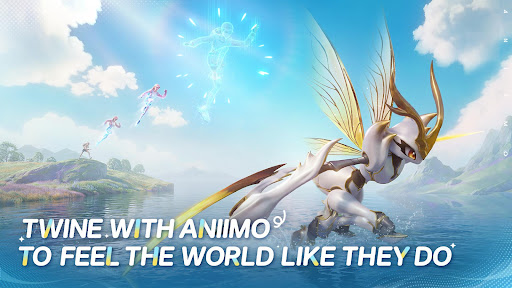
Unisciti ad Aniimo e vivi il mondo come lo vivono loro!
Nel tuo viaggio avventuroso, unisciti ad Aniimo e diventa praticamente uno qualsiasi degli Aniimo che collezioni. Usa le abilità degli Aniimo per risolvere enigmi, vincere battaglie e superare sfide! Unisciti ad Aniimo e scopri il mondo da una prospettiva completamente nuova.
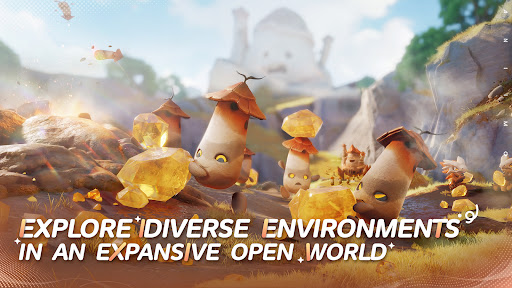
Tuffati nell'avventura e divertiti a esplorare un vasto mondo aperto.
Il continente di Idyll è immenso e ricco di bellezza, lo scenario perfetto per catturare, unire, trovare risposte e permettere agli Aniimo di esprimere tutto il loro potenziale. Sfida, gareggia, scopri... l'esplorazione immersiva rende ogni passo del viaggio avvincente. Che tu stia planando, tuffandoti, scavando... puoi mettere piede ovunque.
Partecipa a emozionanti sfide in tempo reale con Aniimo.
Nel vasto mondo di Aniimo, ogni sfida in tempo reale è piena di incognite e sorprese. La modalità PvE "Egg Heist" ti permette di unirti a una squadra di 3 giocatori in qualsiasi momento per partecipare a ricerche e battaglie in tempo reale nelle Isole Perdute.
Che tu giochi da solo, in multiplayer, in cerca di avventura, di battaglie o semplicemente desideri diventare più forte, qui ogni sfida è reale e immediata!
Divertiti con campeggio e viaggi on the road con i tuoi amici
Ogni Esploratore ora possiede un camper personale nel vasto continente di Idyll, parcheggiato in un campeggio in questo mondo aperto, dove può incontrare e interagire con altri giocatori. Al ritorno in Patria con il tuo camper, puoi piantare colture, costruire decorazioni e organizzare liberamente il tuo spazio con Aniimo per trasformare l'intera Patria in un paradiso immersivo, accogliente e divertente.
Mostra altro

1. Scarica il programma di installazione di MEmu e completa l'installazione

2. Avvia il Memu e apri il Google Play sulla homepage

3. Cerca Aniimo in Google Play
Install
4. Scarica e installa Aniimo
5. Al termine dell'installazione, fai clic sull'icona per avviar

6. Divertiti giocando a Aniimo su PC con MEmu
MEmu App Player è il miglior emulatore Android gratuito, utilizzato da 50 milioni di persone per ottenere un'esperienza di gioco Android superba. La tecnilogia di virtualizzazione MEmu ti permette di giocare a migliaia di giochi Android con semplicità sul tuo computer, anche i giochi con la grafica più esigente.
Schermo più grande con una grafica migliore; Lunga durata, senza limitazione di batteria o dati mobili.
Supporto completo per mappa di tastiera per un controllo preciso di tastiera e mouse o gamepad.
Multipli account di gioco o attività su un singolo PC contemporaneamente con il gestore di multi istanza.
Play Aniimo on PC by following steps: