Aniimo
Zaktualizowano
Aktualna wersja
Sprzedawca

Przy całej swojej pasji do grania w Aniimo, twoje ręce nie powinny być ograniczone na małym ekranie telefonu. Graj jak zawodowiec i uzyskaj pełną kontrolę nad grą za pomocą klawiatury i myszy. MEmu oferuje ci wszystko, czego oczekujesz. Pobierz i graj Aniimo na PC. Graj tak długo, jak chcesz, bez ograniczeń baterii, danych komórkowych i niepokojących połączeń. Zupełnie nowy MEmu 9 to najlepszy wybór do grania w Aniimo na PC. Przygotowany dzięki naszej wiedzy, znakomity, wstępnie ustawiony system mapowania klawiszy sprawia, że Aniimo jest prawdziwą grą na PC. Zakodowany naszą absorpcją, menedżer wielu instancji umożliwia granie na 2 lub więcej kontach na tym samym urządzeniu. A co najważniejsze, nasz emulator może uwolnić pełny potencjał twojego komputera, sprawić, że wszystko będzie płynne. Dbamy nie tylko o to, jak grasz, ale także o cały proces czerpania radości z grania.
Pokaż więcej
Ciesz się wspaniałym doświadczeniem podczas grania w Aniimo na komputerze z aplikacją MEMU App Player. Jest to potężny darmowy emulator Androida pozwalający grać w tysiące gier na Androida. Aniimo is a free-to-play, next-gen creature-catching open-world RPG.
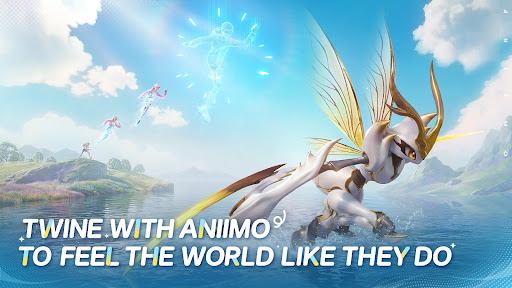

Aniimo is a free-to-play, next-gen creature-catching open-world RPG. On the vast continent of Idyll, you'll encounter countless unique creatures known as Aniimo. Twine with them and experience the beauty of this world from a completely new perspective and with new abilities.
You can also travel to a metropolis floating in the sky, where you'll meet other Pathfinders, share stories, and engage in thrilling competitive battles. Choose your Aniimo and embark on an epic journey - one full of exploration, discovery, and adventure!
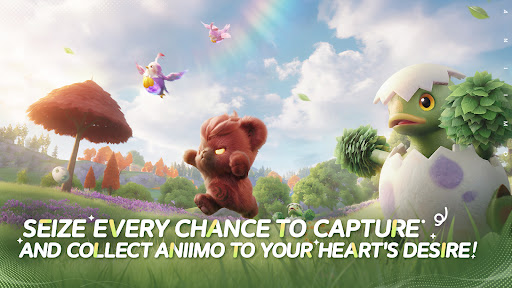
Seize every chance to capture and collect Aniimo to your heart's desire!
When embarking on an adventure on Idyll, anyone you meet can become a companion! Catch Aniimo using Aniipods, set traps and time your catch perfectly - enjoy the thrill and uncertainty of every moment! Unique Aniimo will appear according to the environment, weather, phenomena and time of day. Most Aniimo can evolve, making collecting and discovering Aniimo even more exciting.
Twine with Aniimo to feel the world like they do
On your journey of adventure you can Twine with Aniimo and essentially become any Aniimo that you collect. Use the Aniimo’s skills to solve puzzles, win battles and overcome challenges! Twine with Aniimo, to see the world from a brand new perspective.
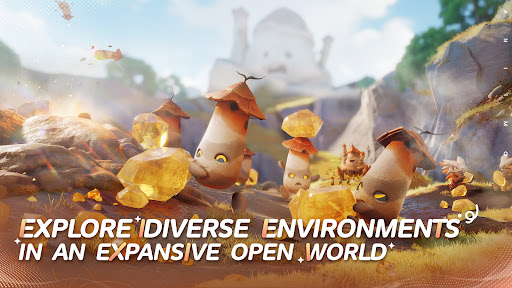
Jump into the adventure and enjoy exploring an expansive open world
The continent of Idyll is expansive and alive with beauty and the perfect setting to capture, to Twine, to find answers and for the Aniimo to reach their full potential. Challenge, race, discover... immersive exploration ensures every step of the journey is engaging. Whether you're gliding, diving, burrowing... you can step foot anywhere.
Join exciting real-time challenges with Aniimo
In the vast world of Aniimo, every real-time challenge is full of unknowns and surprises. The PVEVP mode "Egg Heist" allows you to join a 3-player team anytime to engage in real-time searches and battles in the Lost Isles.
Whether you're solo, multiplayer, adventuring, battling, or simply looking to quickly become stronger, here, every challenge is real and instantaneous!
Enjoying camping and roadtrips with your friends
Each Pathfinder now owns a personal RV on the vast continent of Idyll, parked at a campsite in this open world, where they can meet and interact with other players. When you return to Homeland with your RV, you can plant crops, build decorations, and freely arrange your space with Aniimo to transform the entire Homeland into a warm, fun, and interactive immersive paradise.
Pokaż więcej

1. Pobierz instalator MEmu i zakończ instalację

2. Uruchom MEmu, a następnie otwórz Google Play na pulpicie

3. Wyszukaj Aniimo w Google Play
Install
4. Pobierz i zainstaluj Aniimo
5. Po zakończeniu instalacji kliknij ikonę, aby rozpocząć

6. Ciesz się grą Aniimo na PC z MEmu
MEmu Play to najlepszy emulator Androida, a 100 milionów ludzi już korzysta z jego i dosta doskonałe wrażenia z gier na Androida. Technologia wirtualizacji MEmu umożliwia płynne granie w tysiące gier Androida na komputerze, nawet tych najbardziej wymagających grafiki.
Większy ekran z lepszą grafiką; Długi czas, bez ograniczeń baterii lub danych mobilnych.
Pełna obsługa mapowania klawiszy dla precyzyjnego sterowania klawiaturą i myszą lub gamepadem.
Wiele kont gier lub zadań na jednym komputerze jednocześnie z menedżerem wielu instancji.
Play Aniimo on PC by following steps: