
Aniimo
อัปเดตเมื่อ
เวอร์ชันปัจจุบัน
1.0.1
ให้บริการโดย

เวลาคุณเล่น Aniimo, คุณอาจรู้สึกว่ามือคุณอาจบังจอแล้วทำให้ไม่ได้เล่นแบบเต็มที่. เล่นแบบไร้ขีดจำกัดด้วยเม้าส์และคีย์บอร์ด. MEmu มีตัวเลือกหลายอย่างให้คุณใช้งานเกมที่คุณเล่นแบบที่คุณต้องการ. ดาวน์โหลดและเล่น Aniimo บน PC. เล่นนานแค่ไหนก็ได้, ไม่ต้องชาร์จแบตเตอรี่, หรือเจอคนโทรเข้ามาระหว่างเล่น. MEmu 9 เป็นตัวเลือกสำหรับการเล่น Aniimo บน PC. ทางทีมงานเราได้ปรับแต่งเกม, ปรับให้เล่นเกมบางเกมได้เหมือนเล่น Aniimo เป็นเกม PC เช่นเล็งด้วยเม้าส์หรือใช้คีย์บอร์ด. ระบบของเรายังทำให้คุณสามารถเปิดเล่นได้มากกว่า 2 เกมพร้อมๆกันในคอมของคุณ. และที่สำคัญที่สุด, ระบบโปรแกรมของเราสามารถทำให้คุณใช้ระบบของ PC ทำให้เกมลื่นเหมือนกับใช้โทรศัพท์รุ่นล่าสุด. เราไม่ได้ดูแลเรื่องการเล่นเกม, แต่เราดูแลถึงความสนุกสนานที่คุณได้จากการเล่นด้วย.
แสดงเพิ่มเติม
ดาวน์โหลด Aniimo บน PC ด้วย MEmu Android Emulator สนุกกับการเล่นบนหน้าจอขนาดใหญ่ แอนีโมคือเกม RPG โลกเปิดแนวจับสัตว์เลี้ยงเจนใหม่ ณ ทวีปอิดิลล์อันกว้างใหญ่ คุณจะได้พบกับสิ่งมีชีวิตแปลกใหม่มากมายที่เรียกว่าแอนีโม ผูกจิตกับพวกมัน สัมผัสความงดงามของโลกใบนี้ผ่านมุมมองและความสามารถใหม่.

แอนีโมคือเกม RPG โลกเปิดแนวจับสัตว์เลี้ยงเจนใหม่ ณ ทวีปอิดิลล์อันกว้างใหญ่ คุณจะได้พบกับสิ่งมีชีวิตแปลกใหม่มากมายที่เรียกว่าแอนีโม ผูกจิตกับพวกมัน สัมผัสความงดงามของโลกใบนี้ผ่านมุมมองและความสามารถใหม่
นอกจากนี้คุณยังสามารถเดินทางไปยังมหานครลอยฟ้า ซึ่งคุณจะได้พบกับเหล่าผู้เบิกทาง ร่วมแบ่งปันเรื่องราว และร่วมแข่งขันสุดมันส์อีกด้วย เลือกแอนีโมของคุณและออกผจญภัยครั้งยิ่งใหญ่สู่โลกแห่งการสำรวจและการค้นพบกันเลย!
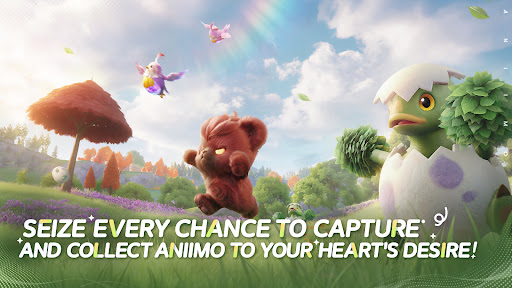
คว้าทุกโอกาสในการจับและสะสมแอนีโมตามที่ใจคุณปรารถนา!
เมื่อออกผจญภัยในอิดิลล์ ทุกคนที่คุณพบสามารถกลายมาเป็นเพื่อนร่วมทางได้! จับแอนีโมด้วยแอนีพ็อด วางกับดัก และกะจังหวะจับให้แม่น ทั้งตื่นเต้นและลุ้นระทึกในทุกช่วงเวลา! แอนีโมพิเศษจะปรากฏตัวตามสภาพแวดล้อม สภาพอากาศ เหตุการณ์พิเศษและช่วงเวลาต่างๆ ของวัน แอนีโมส่วนใหญ่วิวัฒนาการได้ ทำให้การสะสมและการค้นพบน่าตื่นเต้นยิ่งขึ้น
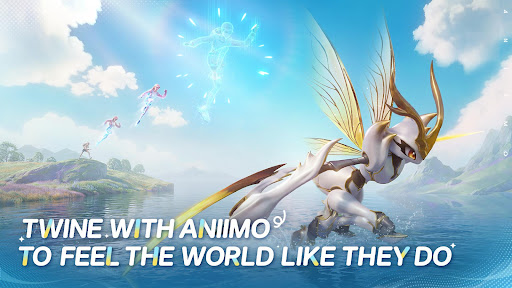
ผูกจิตกับแอนีโมเพื่อสัมผัสกับโลกในแบบเดียวกับแอนีโม
ระหว่างการผจญภัย คุณจะสามารถผูกจิตกับแอนีโมเพื่อกลายเป็นแอนีโมที่คุณจับมาได้ ใช้ทักษะของแอนีโมเพื่อไขปริศนา ต่อสู้ และฝ่าฟันอุปสรรค! ผูกจิตกับแอนีโม และมองโลกในมุมใหม่
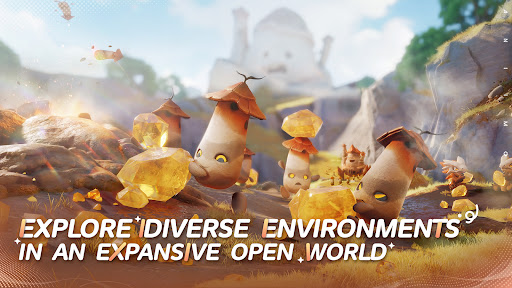
กระโจนสู่การผจญภัย ออกสำรวจโลกเปิดอันกว้างใหญ่
ทวีปอิดิลล์ทั้งกว้างใหญ่และงดงามและเป็นที่ที่เหมาะกับการจับ ผูกจิต ค้นหาคำตอบ และพัฒนาศักยภาพของแอนีโมให้เต็มที่ ท้าทาย แข่งขัน ออกค้นพบ... สำรวจให้เต็มอิ่ม ทุกก้าวเต็มไปด้วยความสนุก ไม่ว่าจะร่อน ดำน้ำ หรือมุดดิน... คุณก็ไปได้ทุกที่
ร่วมมือกับแอนีโม ฝ่าความท้าทายเรียลไทม์สุดมันส์
ในโลกอันกว้างใหญ่ของแอนีโม ทุกความท้าทายแบบเรียลไทม์เต็มไปด้วยสิ่งไม่คาดฝัน โหมด PvEvP "ขโมยไข่" ให้คุณรวมทีม 3 คนได้ทุกเมื่อเพื่อออกสำรวจและต่อสู้แบบเรียลไทม์ในเกาะสาบสูญ
ไม่ว่าจะเล่นคนเดียวหรือหลายคน ออกผจญภัย ต่อสู้ หรืออยากแข็งแกร่งขึ้นอย่างรวดเร็ว ทุกความท้าทายจะเกิดขึ้นจริงแบบเรียลไทม์ที่นี่!
สนุกไปกับการตั้งแคมป์และท่องเที่ยวกับเพื่อน
เหล่าผู้เบิกทางจะมีรถ RV ส่วนตัวสำหรับบนทวีปอิดิลล์อันกว้างใหญ่ จอดพักที่แคมป์ในโลกเปิดกว้าง พบปะและโต้ตอบกับผู้เล่นอื่น เมื่อกลับสู่ดินแดนบ้านเกิดพร้อม RV คุณจะสามารถปลูกพืช สร้างของตกแต่ง และจัดพื้นที่ได้อย่างอิสระ ร่วมมือกับแอนีโม เปลี่ยนดินแดนบ้านเกิดให้กลายเป็นสวรรค์แสนอบอุ่น สนุกสนาน และเต็มไปด้วยชีวิตชีวา
แสดงเพิ่มเติม

1. ดาวน์โหลดตัวติดตั้ง MEmu และสิ้นสุดการติดตั้ง

2. เริ่ม MEmu จากนั้นเปิด Google Play บนหน้าแรก

3. ค้นหา Aniimo ใน Google Play
Install
4. ดาวน์โหลดและติดตั้ง Aniimo
5. เมื่อติดตั้งเสร็จให้คลิกที่ไอคอนเพื่อเริ่มใช้งาน

6. สนุกกับการเล่น Aniimo บนพีซีด้วย MEmu
MEmu App Player เป็นอีมูเลเตอร์ Android ที่ดีที่สุดและผู้คนกว่า 50 ล้านคนเพลิดเพลินไปกับประสบการณ์การเล่นเกม Android ที่ยอดเยี่ยม เทคโนโลยีการจำลองเสมือนของ MEmu ช่วยให้คุณเล่นเกม Android หลายพันเกมได้อย่างราบรื่นบนพีซีของคุณแม้แต่เกมที่ต้องใช้กราฟิกมากที่สุด
จอใหญ่และกราฟฟิกสวยกว่า; เล่นได้นาน, ไม่ต้องใช้แบตเตอรี่โทรศัพท์หรือเน็ตโทรศัพท์.
ระบบปรับแต่งปุ่มคีย์บอร์ดและเม้าส์ตามที่คุณเลือก
เล่นมากกว่าหนึ่งเกมบน PC ในเวลาเดียวกันด้วยระบบหลายจอหรือ Multi-Instance manager.
Play Aniimo on PC by following steps: