Aniimo
Dikemas kini
Versi Semasa
Ditawarkan Oleh

Dengan semangat anda untuk bermain Aniimo, tangan anda tidak seharusnya terhad pada skrin kecil telefon anda. Main seperti profesional dan kendalikan sepenuhnya permainan anda dengan papan kekunci dan tetikus. MEmu menawarkan semua perkara yang anda harapkan. Muat turun dan mainkan Aniimo di PC. Main selagi anda mahu, tidak ada batasan bateri, data mudah alih dan panggilan yang mengganggu. MEmu 9 yang baru adalah pilihan terbaik untuk bermain Aniimo di PC. Disiapkan dengan kepakaran kami, sistem pemetaan kunci pratetap yang indah menjadikan Aniimo permainan PC sebenar. Dikodkan dengan penyerapan kami, pengurus multi-instance menjadikan bermain 2 atau lebih akaun pada peranti yang sama mungkin. Dan yang paling penting, enjin emulasi eksklusif kami dapat melepaskan potensi penuh PC anda, menjadikan semuanya lancar.Kami tidak hanya peduli bagaimana anda bermain, tetapi juga keseluruhan proses menikmati kebahagiaan permainan.
Tunjukkan Lagi
Muat turun Aniimo pada PC dengan MEmu Android Emulator. Nikmati bermain di skrin besar Aniimo is a free-to-play, next-gen creature-catching open-world RPG.
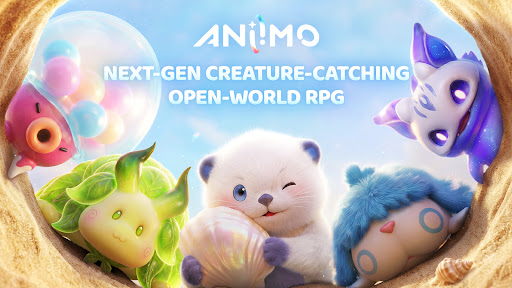
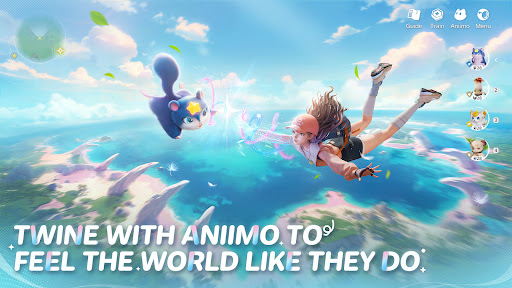
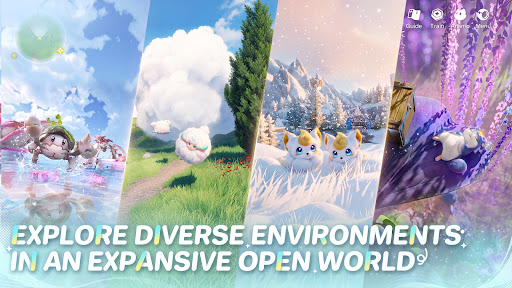
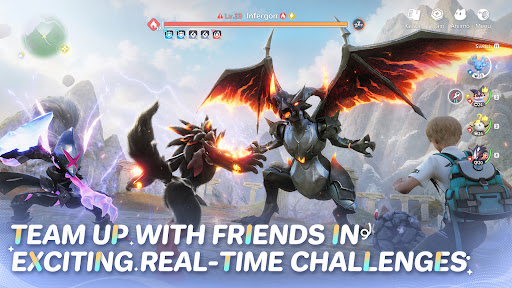
Aniimo is a free-to-play, next-gen creature-catching open-world RPG. On the vast continent of Idyll, you'll encounter countless unique creatures known as Aniimo. Twine with them and experience the beauty of this world from a completely new perspective and with new abilities.
You can also travel to a metropolis floating in the sky, where you'll meet other Pathfinders, share stories, and engage in thrilling competitive battles. Choose your Aniimo and embark on an epic journey - one full of exploration, discovery, and adventure!
Seize every chance to capture and collect Aniimo to your heart's desire!
When embarking on an adventure on Idyll, anyone you meet can become a companion! Catch Aniimo using Aniipods, set traps and time your catch perfectly - enjoy the thrill and uncertainty of every moment! Unique Aniimo will appear according to the environment, weather, phenomena and time of day. Most Aniimo can evolve, making collecting and discovering Aniimo even more exciting.
Twine with Aniimo to feel the world like they do
On your journey of adventure you can Twine with Aniimo and essentially become any Aniimo that you collect. Use the Aniimo’s skills to solve puzzles, win battles and overcome challenges! Twine with Aniimo, to see the world from a brand new perspective.
Jump into the adventure and enjoy exploring an expansive open world
The continent of Idyll is expansive and alive with beauty and the perfect setting to capture, to Twine, to find answers and for the Aniimo to reach their full potential. Challenge, race, discover... immersive exploration ensures every step of the journey is engaging. Whether you're gliding, diving, burrowing... you can step foot anywhere.
Join exciting real-time challenges with Aniimo
In the vast world of Aniimo, every real-time challenge is full of unknowns and surprises. The PVEVP mode "Egg Heist" allows you to join a 3-player team anytime to engage in real-time searches and battles in the Lost Isles.
Whether you're solo, multiplayer, adventuring, battling, or simply looking to quickly become stronger, here, every challenge is real and instantaneous!
Enjoying camping and roadtrips with your friends
Each Pathfinder now owns a personal RV on the vast continent of Idyll, parked at a campsite in this open world, where they can meet and interact with other players. When you return to Homeland with your RV, you can plant crops, build decorations, and freely arrange your space with Aniimo to transform the entire Homeland into a warm, fun, and interactive immersive paradise.
Tunjukkan Lagi

1. Muat turun pemasang MEmu dan selesaikan persediaan

2. Mulakan MEnu kemudian buka Google Play di desktop

3. Cari Aniimo di Google Play
Install
4. Muat turun dan Pasang Aniimo
5. Apabila selesai pemasangan, menekan ikon itu untuk memulakan

6. Nikmati bermain Aniimo di komputer dengan MEmu
MEmu Play adalah emulator Android terbaik dan 100 juta orang sudah menikmati pengalaman permainan Androidnya yang luar biasa. Teknologi virtualisasi MEmu memberi kuasa kepada anda untuk bermain beribu-ribu permainan Android dengan lancar di komputar anda, malah yang paling intensif grafik.
Skrin lebih besar dengan grafik yang lebih baik; Tempoh yang panjang, tanpa had bateri atau data mudah alih.
Sokongan Keymapping penuh untuk kawalan tepat papan kekunci dan tetikus atau gamepad.
Pelbagai akaun permainan atau tugas pada satu PC sekaligus dengan pengurus pelbagai contoh.
Play Aniimo on PC by following steps: