Don't Starve Together
Aggiornata
Versione corrente
2.3.1
Offerta da

Vista tutta la passione dimostrata nel giocare a Don't Starve Together, le tue mani non dovrebbero essere limitate al minuscolo schermo di un telefono. Gioca come un professionista e ottieni il pieno controllo del gioco con tastiera e mouse. MEmu ti offre tutto ciò che ti aspetti. Scarica e gioca a Don't Starve Together su PC. Gioca quanto vuoi, niente più limitazioni di batteria, dati mobili e chiamate inquietanti. Il nuovissimo MEmu 9 è la scelta migliore per giocare a Don't Starve Together su PC. Realizzato sulla base della nostra esperienza, lo squisito sistema di mappatura dei tasti preimpostati rende Don't Starve Together un vero e proprio gioco per PC. MEmu è un gestore multi-instanza che permette di giocare con 2 o più account sullo stesso dispositivo. E la cosa più importante, il nostro esclusivo motore di emulazione può liberare tutto il potenziale del tuo PC, rendendo tutto fluido.
Mostra altro
Scarica Don't Starve Together su PC con MEmu Android Emulator. Divertiti giocando sul grande schermo. Combatti, coltiva, costruisci ed esplora in compagnia nell'espansione multigiocatore autonoma di Don't Starve, il gioco di sopravvivenza estrema.
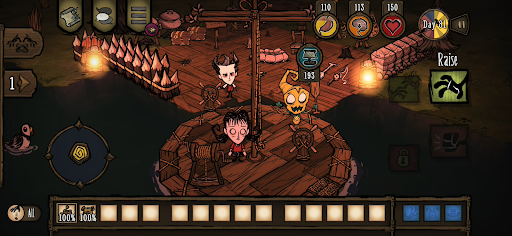
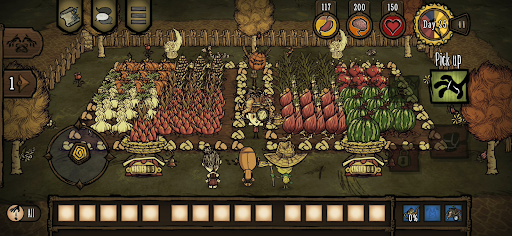
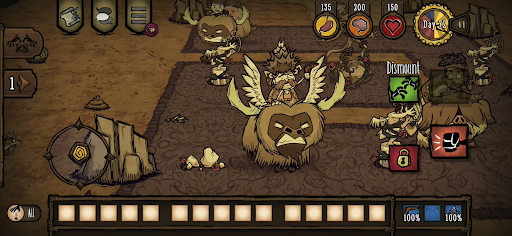
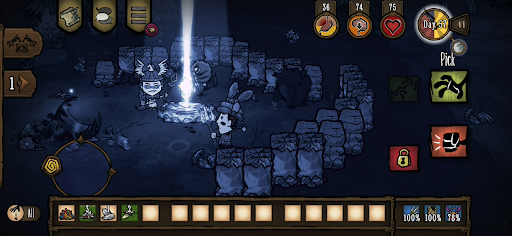
Combatti, coltiva, costruisci ed esplora in compagnia nell'espansione multigiocatore autonoma di Don't Starve, il gioco di sopravvivenza estrema.
Entra in un mondo bizzarro e inesplorato pieno di creature stravaganti, pericoli nascosti e antichi segreti. Procurati le risorse per fabbricare oggetti e strutture che si abbinano al tuo stile di sopravvivenza. Gioca a modo tuo mentre scopri i misteri de "La Costante". Gioca in cooperazione con i tuoi amici in una partita privata, o trova degli sconosciuti online. Unisciti ad altri giocatori per sopravvivere al difficile ambiente circostante, oppure prova a farcela da solo.
Sopravvivi in compagnia, sperduto in un tetro mondo pieno di sorprese e misteri, e fatti strada fuori dall'oscurità.
CARATTERISTICHE
– Fai quello che puoi per sopravvivere in questo mondo tetro e fumettoso, e scegli tra un vasto catalogo di personaggi con il proprio trascorso e stile di gioco.
– L'unione fa la forza: queste terre sono piene di mostri e pericoli, quindi le tue speranze aumentano se sei in compagnia di amici in cooperativa locale o di partner che incontri online.
– Pensa ai tuoi bisogni: costruisci un insediamento, coltiva e caccia per il cibo, crea dell'equipaggiamento migliore per difenderti e avventurati; non dimenticare di prenderti una pausa tra i fiori di tanto in tanto, o comincerai a impazzire!
– Chi ti ha messo in questa condizione di pericolo, e perché? Dovrai esplorare "La Costante" e svelare i suoi fitti misteri per scoprirlo e scappare da questo tetro luogo.
– Gioca a modo tuo: scegli la modalità che preferisci e regola il livello di difficoltà modificando una vasta quantità di parametri.
– Scegli tra una grande varietà di oggetti estetici per il tuo personaggio preferito: sopravvivi, ma con stile! (disponibile tramite acquisti in-app)
Riprogettato appositamente per dispositivi portatili
– Interfaccia rinnovata: interfaccia utente esclusiva per dispositivi portatili con controllo touch completo
– Obiettivi di Google Play Games
– Sblocchi condivisi con PC e console - Collega i tuoi account e condividi le skin e i personaggi sbloccati con PC e console
– Salvataggio nel cloud: condividi i tuoi progressi tra dispositivi Android
– Compatibile con i controller MFi
Mostra altro

1. Scarica il programma di installazione di MEmu e completa l'installazione

2. Avvia il Memu e apri il Google Play sulla homepage

3. Cerca Don't Starve Together in Google Play
Install
4. Scarica e installa Don't Starve Together
5. Al termine dell'installazione, fai clic sull'icona per avviar

6. Divertiti giocando a Don't Starve Together su PC con MEmu
MEmu App Player è il miglior emulatore Android gratuito, utilizzato da 50 milioni di persone per ottenere un'esperienza di gioco Android superba. La tecnilogia di virtualizzazione MEmu ti permette di giocare a migliaia di giochi Android con semplicità sul tuo computer, anche i giochi con la grafica più esigente.
Schermo più grande con una grafica migliore; Lunga durata, senza limitazione di batteria o dati mobili.
Supporto completo per mappa di tastiera per un controllo preciso di tastiera e mouse o gamepad.
Multipli account di gioco o attività su un singolo PC contemporaneamente con il gestore di multi istanza.
Play Don't Starve Together on PC by following steps: