Don't Starve Together
Aktualisiert
Aktuelle Version
2.3.1
Angeboten von

Bei all Ihrer Leidenschaft für das Spielen von Don't Starve Together sollten Ihre Hände nicht auf einen winzigen Bildschirm Ihres Telefons beschränkt sein. Spielen Sie wie ein Profi und übernehmen Sie die volle Kontrolle über Ihr Spiel mit Tastatur und Maus. MEmu bietet Ihnen all die Dinge, die Sie erwarten. Laden Sie Don't Starve Together herunter und spielen Sie es auf dem PC. Spielen Sie so lange, wie Sie wollen, ohne Grenzwerte für Akku, mobile Daten und störende Anrufe. Das brandneue MEmu 9 ist die beste Wahl, um Don't Starve Together auf dem PC zu spielen. Das exquisite voreingestellte Tastaturbelegungssystem, das mit unserem Fachwissen vorbereitet wurde, macht Don't Starve Together zu einem echten PC-Spiel. Der MEmu Multi-Instanz-Manager ermöglicht das Spielen von 2 oder mehr Konten auf demselben Gerät. Und das Wichtigste: Unsere exklusive Emulations-Engine kann das volle Potenzial Ihres PCs freisetzen und für reibungslose Abläufe sorgen.
Mehr anzeigen
Laden Sie Play Don't Starve Together auf dem PC mit MEmu Android Emulator. Viel Spaß beim Spielen auf großmundieren. Gemeinsam kämpfen, farmen, bauen und erkunden – in der Wildnis der eigenständigen Mehrspieler-Erweiterung des kompromisslosen Überlebensspiels "Don't Starve".
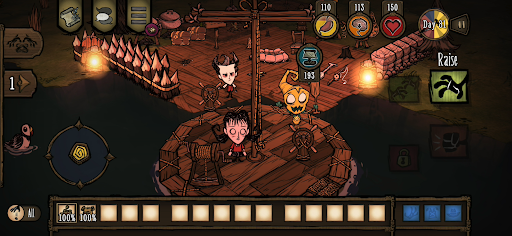
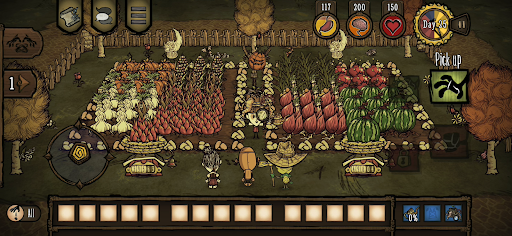
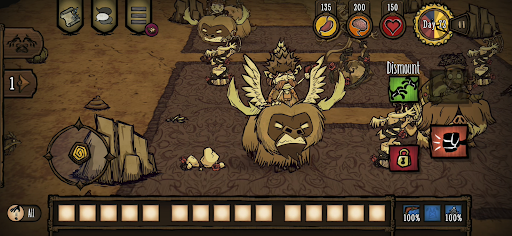
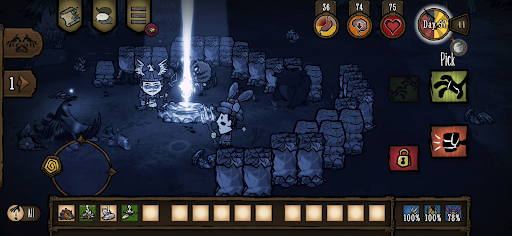
Gemeinsam kämpfen, farmen, bauen und erkunden – in der Wildnis der eigenständigen Mehrspieler-Erweiterung des kompromisslosen Überlebensspiels "Don't Starve".
Begib dich in eine seltsame und unbekannte Welt voller fremdartiger Kreaturen, versteckter Gefahren und uralter Geheimnisse. Sammle Ressourcen, um Gegenstände herzustellen und Strukturen zu bauen, die zu deinem Überlebensstil passen. Spiel auf deine Art und lüfte die Geheimnisse der "Konstanten". Spiele mit deinen Freunden ein privates Spiel oder finde neue Freunde online. Arbeite mit anderen Spielern zusammen, um in der harschen Welt zu überleben, oder versuch es ganz alleine.
Überlebt gemeinsam in einer düsteren Welt voller Überraschungen und Geheimnisse und erarbeitet euch einen Weg aus der Finsternis heraus.
SPIELINHALTE
– Tu was du kannst, um in dieser gruseligen Cartoon-Welt zu überleben und wähle aus einer langen Liste von Charakteren, allesamt mit einer einzigartigen Hintergrundgeschichte und Spielweise.
– Gemeinsam seid ihr stark: Hier wimmelt es nur so vor Gefahren und Monstern, also steigen deine Chancen, wenn du Freunde im lokalen Koop dabei hast oder dir beim Spielen online Partner an die Seite holst.
– Kümmere dich um dein Wohl: Baue eine Siedlung, baue Nahrung an oder geh auf die Jagd, stelle bessere Ausrüstung zu deiner Verteidigung her und geh auf Erkundungstour. Aber vergiss nicht, auch mal an den Blumen zu riechen, sonst verlierst du den Verstand!
– Wie bist du überhaupt in dieser gefährlichen Umgebung gelandet, und warum? Dazu musst du die "Konstante" erkunden und ihre Rätsel lösen, so gelingt dir die Flucht aus diesem finsteren Ort.
– Spiel auf deine Art: Wähle den Modus, der dir gefällt, und passe die Schwierigkeit über eine große Auswahl an Parametern an.
– Statte deine Lieblingscharaktere mit einer Vielzahl verschiedener kosmetischer Gegenstände aus. Stilsicher überleben! (als In-App-Käufe erhältlich)
Neugestaltet für Mobilgeräte
– Überarbeitete Benutzeroberfläche – exklusive mobile Benutzeroberfläche mit vollständiger Touch-Steuerung
– Erfolge für Google Play Games
– Gemeinsame Freischaltungen für PC und Konsole – Verknüpfe deine Konten und teile deine freigeschalteten Skins und Charaktere mit dem PC und der Konsole
– Cloud-Speicherung – Teile deinen Fortschritt zwischen Android-Geräten
– Kompatibel mit MFi-Controllern
Mehr anzeigen

1. Laden das MEmu-Installationsprogramm herunter und beenden die Installation

2. MEmu starten und Google Play auf der Homepage öffnen

3. Suchen Don't Starve Together in Google Play
Install
4. Herunterladen und Installieren Don't Starve Together
5. Klicken nach Abschluss der Installation auf das Symbol, um es zu starten

6. Viel Spaß beim Spielen von Don't Starve Together auf dem PC mit MEmu
MEmu App Player ist der beste kostenlose Android-Emulator und 50 Millionen Menschen genießen bereits seine hervorragende Android-Gaming-Erfahrung. Mit der MEmu-Virtualisierungstechnologie können Sie Tausende von Android-Spielen problemlos auf Ihrem PC spielen, selbst bei grafikintensiven Spielen.
BGrößeres Bild mit besserer Grafik; Keine unterbrechungen, keine sorgen um Akku
Komplette Tastenbelegung unterstützt mit Maus und Tastatur oder Controller
Mit dem „Multi-Instance-Manager“ können Sie mehrere Spielkonten oder Spiele gleichzeitig auf einem PC ausführen.
Play Don't Starve Together on PC by following steps: