Don't Starve Together
Actualizada
Versión actual
2.3.1
Ofrecida por

Con toda tu pasión para jugar Don't Starve Together, no se supone que tus manos estén limitadas en una pequeña pantalla de tu teléfono. Juega como un profesional y obtén el control total de tu juego con el teclado y el mouse. MEmu le ofrece todas las cosas que espera. Descargar y jugar Don't Starve Together en PC. Juega todo el tiempo que quieras, sin más limitaciones de batería, datos móviles y llamadas molestas. El nuevo MEmu 9 es la mejor opción para jugar Don't Starve Together en PC. Preparado con nuestra experiencia, el exquisito sistema de keymapping preestablecido convierte a Don't Starve Together en un verdadero juego de PC. Codificado con nuestra absorción, el administrador de instancias múltiples hace posible jugar 2 o más cuentas en el mismo dispositivo. Y lo más importante, nuestro exclusivo motor de emulación puede liberar todo el potencial de su PC, hacer que todo sea más fluido. Nos importa no solo cómo juegas, sino también todo el proceso de disfrutar de la felicidad de los juegos.
Más detalles
Descargar Don't Starve Together en PC con MEmu Android Emulador. Disfruta jugando en la pentalla grande. Lucha, cultiva, construye y explora en compañía en la expansión multijugador independiente del juego de supervivencia en la naturaleza Don't Starve.
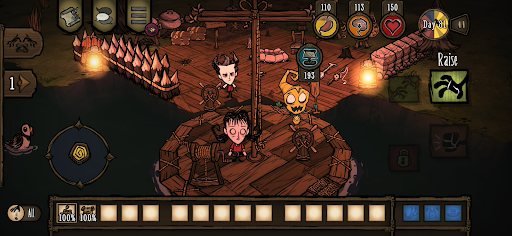
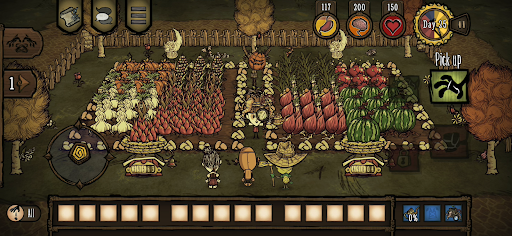
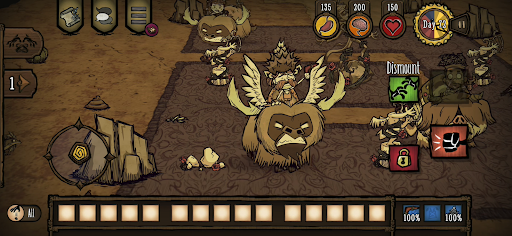
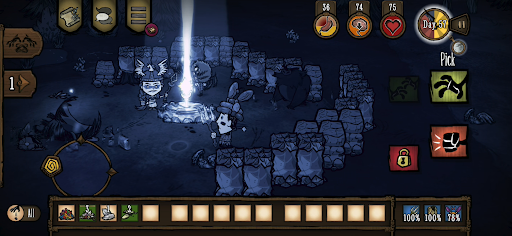
Lucha, cultiva, construye y explora en compañía en la expansión multijugador independiente del juego de supervivencia en la naturaleza Don't Starve.
Adéntrate en un mundo extraño e inexplorado, repleto de criaturas insólitas, peligros ocultos y antiguos secretos. Reúne recursos para fabricar objetos y construir estructuras adaptadas a tu propio estilo de supervivencia. Juega a tu manera mientras descubres los misterios de La Constante. Disfruta de partidas privadas con tus amigos o conoce a nuevos compañeros en línea. Une fuerzas con otros jugadores para sobrevivir en este entorno hostil o enfréntate al desafío en solitario.
Sobrevive junto a otros en un mundo sombrío, repleto de sorpresas y misterios, y ábrete camino a través de la oscuridad.
CARACTERÍSTICAS
– Haz lo que sea necesario para sobrevivir en este inquietante mundo de estilo caricaturesco. Elige entre una amplia variedad de personajes, cada uno con su propia historia y un estilo de juego único.
– La unión hace la fuerza: estas tierras están repletas de peligros y monstruos. Tendrás más posibilidades de sobrevivir si juegas con tus amigos en cooperativo local o haces equipo con otros jugadores en línea.
– Céntrate en sobrevivir: construye un asentamiento, cultiva, caza para alimentarte, fabrica mejor equipo para defenderte y explora el mundo. Pero no olvides detenerte de vez en cuando para disfrutar de la naturaleza... o acabarás perdiendo la cordura.
– ¿Quién te ha traído a este peligroso lugar y por qué? Explora La Constante, desvela sus secretos y descubre cómo escapar de este oscuro mundo.
– Juega a tu manera: elige el modo de juego que prefieras y ajusta la dificultad gracias a una amplia variedad de opciones de personalización.
– Desbloquea un sinfín de aspectos para tus personajes favoritos y sobrevive con estilo. (Disponibles mediante compras dentro del juego).
REDISEÑADO CUIDADOSAMENTE PARA DISPOSITIVOS MÓVILES
– Interfaz renovada: interfaz exclusiva para dispositivos móviles con controles táctiles totalmente optimizados.
– Logros de Google Play Games.
– Desbloqueos compartidos con PC y consola: vincula tus cuentas y comparte tus skins y personajes desbloqueados con PC y consola.
– Guardado en la nube: comparte tu progreso entre dispositivos Android.
– Compatible con mandos MFi.
Más detalles

1. Descargar el instalador de MEmu y finalice la instalación

2. Iniciar MEmu y abrir Google Play en la página de inicio

3. Buscar Don't Starve Together en Google Play
Install
4. Descargar y instalar Don't Starve Together
5. Hacer click al icono para iniciar

6. Disfruta jugando Don't Starve Together en PC con MEmu
MEmu App Player es el mejor emulador de Android gratuito y 50 millones de personas ya están disfrutando su magnífica experiencia jugando en Android. La tecnología de virtualización de MEmu te permite jugar a miles de juegos Android suavemente en tu PC, incluso los más intensivos gráficamente.
Pantalla más grande con mejores gráficos; Larga duración, sin limitación de batería o datos móviles.
Soporte completo de keymapping para un control preciso del teclado y el mouse o gamepad.
Múltiples cuentas de juegos o tareas en una sola PC a la vez con el administrador de instancias múltiples.
Play Don't Starve Together on PC by following steps: