Don't Starve Together
Atualizada
Versão atual
2.3.1
Oferecido por

Com toda a sua paixão por jogar Don't Starve Together, não deixe os polegares te atrapalharem em uma pequena tela do seu celular. Jogue como um profissional e tenha controle total do seu jogo com teclado e mouse. O MEmu oferece todas as coisas que você está esperando. Baixe e jogue Don't Starve Together no PC. Jogue o tempo que quiser, sem mais limitações de bateria, dados móveis e aquelas ligações enquanto estiver jogando. O novíssimo MEmu 9 é a melhor escolha de jogar Don't Starve Together no PC. Com grandes novidades no sistema de mapeamento que faz Don't Starve Together um jogo de PC real. Nossa equipe melhorou o gerenciamento de várias instâncias do Android, reduzindo tempo de reprodução de 2 ou mais contas no mesmo dispositivo. O mais importante, nosso mecanimos de emulação exclusivo pode liberar todo o potencial do seu PC sem travamentos, rodando tudo liso. Nós nos preocupamos não apenas com você joga, mas com todo o processo de desfrutar de 100% do seu jogo favorito.
Mostre mais
Download do Don't Starve Together no PC com MEmu Android Emulador: Divirta-se jogando na tela grande. Lute, cultive, construa e explore com seus amigos nesta expansão multijogador independente de Don't Starve, o aclamado e implacável jogo de sobrevivência na natureza selvagem.
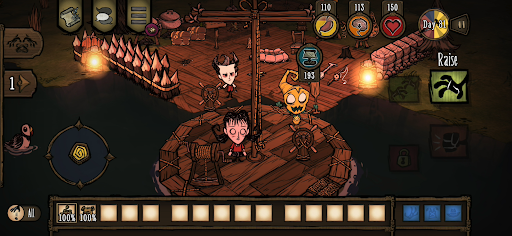
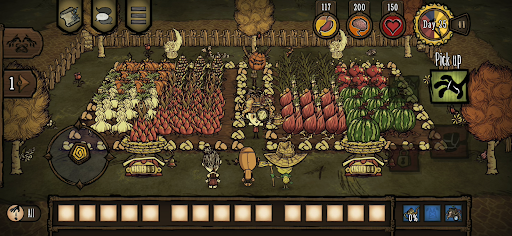
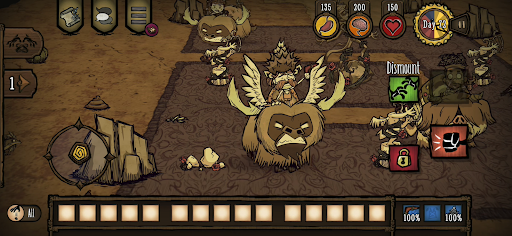
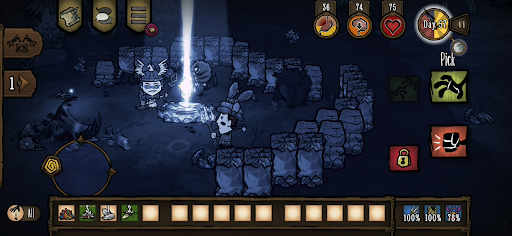
Lute, cultive, construa e explore com seus amigos nesta expansão multijogador independente de Don't Starve, o aclamado e implacável jogo de sobrevivência na natureza selvagem.
Entre em um mundo estranho e inexplorado, repleto de criaturas peculiares, perigos ocultos e segredos ancestrais. Reúna recursos para fabricar itens e construir estruturas que combinem com seu estilo de sobrevivência. Jogue do seu jeito enquanto desvenda os mistérios de "A Constante". Coopere com seus amigos em uma partida privada ou faça novos amigos on-line. Trabalhe em equipe para sobreviver aos desafios desse mundo hostil ou aventure-se por conta própria.
Sobrevivam juntos em um mundo sombrio, repleto de surpresas e mistérios, e usem a criatividade para abrir caminho pela escuridão.
CARACTERÍSTICAS
– Faça o que puder para sobreviver neste mundo sombrio e cartunesco, e escolha entre um vasto elenco de personagens, cada um com a própria história e estilo de jogo.
– A união faz a força: estas terras estão repletas de perigos e monstros, e suas chances de sobrevivência aumentam quando você está cercado de amigos no cooperativo local ou de companheiros que encontrar on-line pelo caminho.
– Cuide de suas necessidades: construa um assentamento, plante e cace para obter alimento, crie equipamentos melhores para se defender e parta em expedições. Mas não se esqueça de descansar entre as flores de vez em quando — ou começará a perder a sanidade!
– Quem o trouxe para este lugar perigoso, e por quê? Explore "A Constante" e desvende seus mistérios enigmáticos para descobrir a verdade e encontrar uma forma de escapar deste mundo sombrio.
– Jogue do seu jeito: escolha o modo que preferir e ajuste a dificuldade por meio de uma ampla variedade de configurações.
– Escolha entre uma variedade enorme de itens cosméticos para seus personagens preferidos: sobreviva, mas com muito estilo! (disponível por meio de compras no aplicativo)
Redesenhado para dispositivos móveis
– Interface reformulada para dispositivos móveis com controlo tátil completo.
– Conquistas do Google Play Games
– Desbloqueios partilhados com o PC e a consola - Associe as suas contas e partilhe as suas skins e personagens desbloqueadas com o PC e a consola
– Dados na nuvem: partilha o teu progresso entre dispositivos Android
– Compatível com comandos MFi
Mostre mais

1. Faça o download do instalador do MEmu e conclua a instalação

2. Inicie o MEmu e depois abra o Google Play na página inicial

3. Pesquise Don't Starve Together no Google Play
Install
4. Baixe e Instale Don't Starve Together
5. Na conclusão da instalação, clique no ícone para iniciar

6. Divirta-se jogando Don't Starve Together no PC com MEmu
O MEmu App Player é o melhor emulador de Android grátis e 50 milhões de pessoas já desfrutam de sua excelente experiência de jogos no Android. A tecnologia de virtualização do MEmu permite que você jogue milhares de jogos do Android sem problemas no seu PC, mesmo os com gráficos mais intensivos.
Tela maior com gráficos melhores; Longa duração e sem limitação de bateria ou dados móveis.
Suporte completo ao Mapaeamento de Teclas para controle preciso do teclado e mouse ou gamepad.
Várias contas de jogos ou tarefas em um único PC de uma só vez com o Gerenciador de várias instâncias.
Play Don't Starve Together on PC by following steps: