Don't Starve Together
अपडेट किया गया
वर्तमान वर्शन
2.3.1
संसाधन

अपने सेलफोन पर Don't Starve Together का उपयोग करते समय ओवरचार्ज के बारे में चिंता करना बंद करें, अपने आप को छोटी स्क्रीन से मुक्त करें और बहुत बड़े डिस्प्ले पर ऐप का उपयोग करने का आनंद लें। अब से, कीबोर्ड और माउस के साथ अपने ऐप का पूर्ण-स्क्रीन अनुभव प्राप्त करें। एमईएमयू आपको उन सभी आश्चर्यजनक सुविधाओं की पेशकश करता है जिनकी आपको उम्मीद थी: त्वरित इंस्टॉल और आसान सेटअप, सहज नियंत्रण, बैटरी की कोई सीमा नहीं, मोबाइल डेटा और परेशान कॉल। आपके कंप्यूटर पर Don't Starve Together का उपयोग करने का सबसे अच्छा विकल्प नया MEmu 9 है। हमारे अवशोषण के साथ कोडित, बहु-उदाहरण प्रबंधक एक ही समय में 2 या अधिक खाते खोलना संभव बनाता है। और सबसे महत्वपूर्ण, हमारा अनन्य उत्सर्जन इंजन आपके पीसी की पूरी क्षमता को जारी कर सकता है, सब कुछ सुचारू और सुखद बना सकता है।
और दिखाएं
डाउनलोड करें Don't Starve Together पीसी पर MEmu एंड्रॉयड एमुलेटर के साथ बड़े पर्दे पर खेलने का आनंद लें। बेहद चुनौतीपूर्ण जंगल में जीवित रहने के खेल, डोंट स्टार्व के इस स्टैंडअलोन मल्टीप्लेयर विस्तार में एक साथ लड़ें, खेती करें, निर्माण करें और अन्वेषण करें.
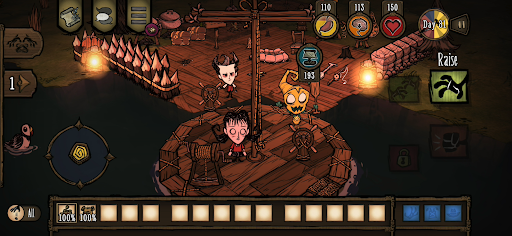
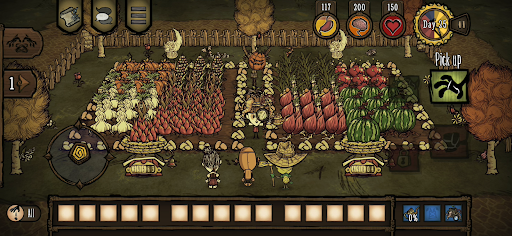
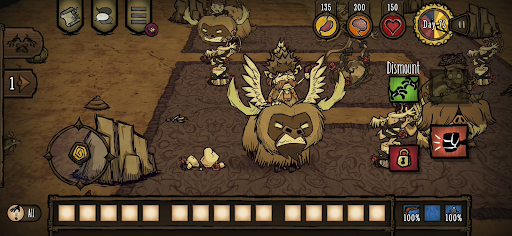
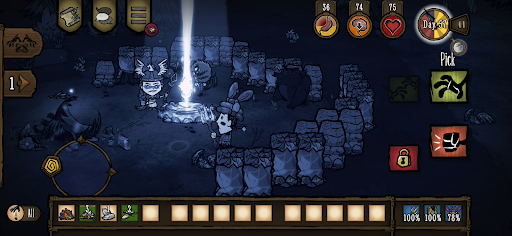
बेहद चुनौतीपूर्ण जंगल में जीवित रहने के खेल, डोंट स्टार्व के इस स्टैंडअलोन मल्टीप्लेयर विस्तार में एक साथ लड़ें, खेती करें, निर्माण करें और अन्वेषण करें.
अजीबोगरीब जीवों, छिपे हुए खतरों और प्राचीन रहस्यों से भरी एक विचित्र और अनजानी दुनिया में प्रवेश करें. अपनी जीवन शैली के अनुरूप वस्तुएं बनाने और संरचनाएं बनाने के लिए संसाधन इकट्ठा करें. "द कॉन्स्टेंट" के रहस्यों को सुलझाते हुए अपने तरीके से खेलें. निजी खेल में अपने दोस्तों के साथ सहयोग करें, या ऑनलाइन नए दोस्त बनाएं. कठोर वातावरण में जीवित रहने के लिए अन्य खिलाड़ियों के साथ मिलकर काम करें, या अकेले ही आगे बढ़ें.
आश्चर्यों और रहस्यों से भरी एक अंधकारमय दुनिया में फंसे हुए एक साथ जीवित रहें, और अंधेरे से बाहर निकलने का रास्ता बनाएं. चाहे कुछ भी करना पड़े, लेकिन सबसे महत्वपूर्ण बात, भूखे न रहें.
विशेषताएं
– इस डरावनी और कार्टून जैसी दुनिया में जीवित रहने के लिए जो कुछ भी कर सकते हैं, करें और अपने-अपने बैकस्टोरी और प्लेस्टाइल वाले पात्रों की एक विस्तृत सूची में से चुनें.
– साथ रहने में ही सुरक्षा है: ये इलाके खतरों और राक्षसों से भरे हैं, इसलिए स्थानीय को-ऑप में दोस्तों या रास्ते में मिलने वाले ऑनलाइन साथियों के साथ रहने से आपके बचने की संभावना बढ़ जाती है.
– अपनी ज़रूरतों का ध्यान रखें: बस्ती बसाएँ, खेती करें और भोजन के लिए शिकार करें, अपनी रक्षा के लिए बेहतर उपकरण बनाएँ और अभियानों पर जाएँ, लेकिन बीच-बीच में फूलों के बीच आराम करना न भूलें, वरना आप पागल हो जाएँगे!
– आपको इन खतरनाक परिवेश में किसने और क्यों डाला है? आपको "द कॉन्स्टेंट" की खोज करनी होगी और इसके पेचीदा रहस्यों को सुलझाकर इस अंधकारमय स्थान से बाहर निकलना होगा.
– अपनी पसंद के अनुसार खेलें: अपनी पसंद का मोड चुनें और कई पैरामीटरों को बदलकर कठिनाई स्तर को समायोजित करें.
– अपने पसंदीदा किरदारों के लिए कई तरह के कॉस्मेटिक आइटम चुनें: ज़िंदा रहें, लेकिन शान से! (इन-ऐप खरीदारी में उपलब्ध)
मोबाइल के लिए सावधानीपूर्वक नया डिज़ाइन
– बेहतर इंटरफ़ेस – पूर्ण टच नियंत्रण के साथ विशेष मोबाइल यूआई
– Google Play Games उपलब्धियां
– पीसी और कंसोल के साथ साझा अनलॉक - अपने खातों को लिंक करें और अपने अनलॉक किए गए स्किन और कैरेक्टर को पीसी और कंसोल के साथ साझा करें
– क्लाउड सेव – अपनी प्रगति को Android डिवाइसों के बीच साझा करें
– कंट्रोलर के साथ संगत
और दिखाएं

1. MEmu इंस्टॉलर को डाउनलोड करें और इंस्टॉलेशन को पूरा करें

2. MEmu शुरू करें फिर होमपेज पर Google Play खोलें

3. Google Play में Don't Starve Together खोजें
Install
4. Don't Starve Together डाउनलोड कर इंस्टॉल करें
5. इंस्टॉल पूरा होने पर आइकन दबाएं

6. MEmu से पीसी पर Don't Starve Together खेलने का आनंद लें
MEmu Play सबसे बेहतरीन मुफ़्त Android एमुलेटर है और 5 करोड़ लोग पहले ही इसके शानदार Android गेमिंग अनुभव का आनंद ले चुके हैं। MEmu 9 वर्चुअलाइज़ेशन तकनीक आपको अपने PC पर हज़ारों Android गेम, यहाँ तक कि सबसे ज़्यादा ग्राफ़िक्स वाले गेम भी, आसानी से खेलने की सुविधा देती है।
असीमित बैटरी या मोबाइल डेटा के साथ बेहतर ग्राफिक्स के साथ बड़ी स्क्रीन; लंबी अवधि।
कीबोर्ड और माउस या गेमपैड के उत्तम नियंत्रण के लिए संपूर्ण कीमैपिंग का समर्थन करता हैं।
एक ही पीसी पर मल्टी-इंस्टेंस मैनेजर के साथ एक समय में कई गेम खाते या कार्य कर सकते हैं।
Play Don't Starve Together on PC by following steps: