Replaio Radio
更新日
現在のバージョン
提供元

スマートフォンは不要!パソコンと同じようにキーボードとマウスで操作できます。MEmu Playは、あなたが待ち望んでいたすべての楽しみをお届けします。バッテリー残量や小さな画面を気にすることなく、Replaio Radioをご利用ください。最新のMEmu 9は、Replaio RadioをPCで体験するのに最適です!完璧なキーマッピングシステムにより、PCのようなスムーズな操作性を実現します。マルチインスタンス機能により、複数のアプリケーションを同時に実行できます。独自の仮想化エンジンがPCのパフォーマンスを最大限に引き出します。アプリを使用するだけでなく、高品質な体験を得ることができます。
もっと見る
Replaio RadioをPCでダウンロード!大画面でより楽しむ。電源が落ちてしまうとか通信料が足りないとかの問題を心配する必要がなく、PCの大画面でより快適にゲームを楽しましょう! Internet radio FM - Replaio is the only app you need on your phone to listen to radio FM online.
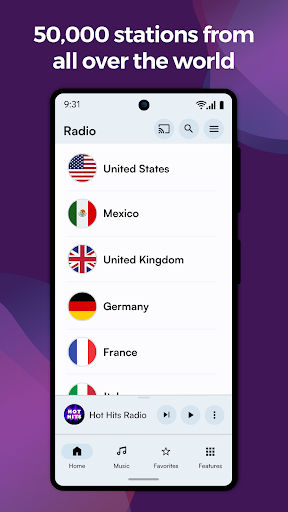
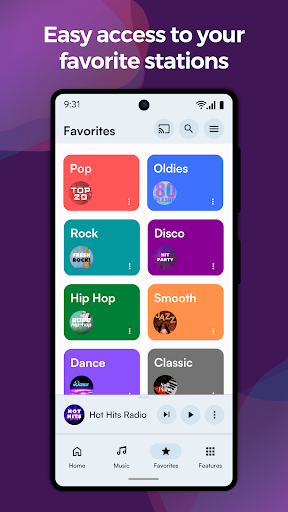
Internet radio FM - Replaio is the only app you need on your phone to listen to radio FM online.
Listen to your FM, AM, and DAB online radio from USA available on the internet. Browse the stations' websites to get more information fast and easily. Discover the world's radio, including music-only stations. P.S. We try so hard to make Replaio Radio really good. Install now and find out for yourself how easy and smooth listening to the radio on your phone or tablet can be.
Replaio Radio
• Over 50,000 stations from around the world
• Internet radio stations by music genres
• Handy and clear Favorites list
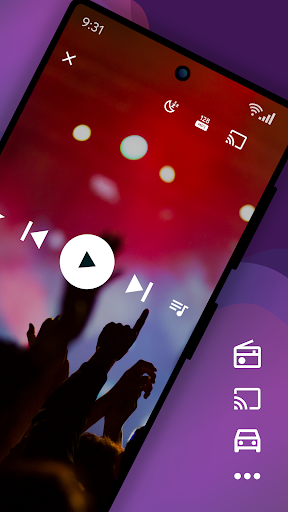
• Google Chromecast and Android Auto support
• Low usage of mobile data and battery
Key features
• Radio alarm clock with snooze function
• Sleep timer to fall asleep easily
• Equalizer improving the sound of the station
• Favorite radio programs reminders
Other features
• Online radio by different genres (pop, rock, EDM, various decades, and more)
• Material Design 3 with Dynamic Colors support
• Color themes and dark mode
• Stream quality selection for 3G/LTE and WiFi (saves data!)
• Possibility of stopping playing when using mobile data
• Adding songs listened to on radio FM online to a playlist on Spotify
• Autostart when connected to Bluetooth
• Easy and fast browsing of radio station websites (schedules, support)
• Ability to add your own URL radio streams
• Your favorite AM, FM radio available even when you are abroad
That's not all! We encourage you to try the rest of the options directly in the app.
Premium add-ons (optional purchase)
• No banners or video ads in the app for life
• Widgets of various sizes, dark and light
• Radio icons on the phone desktop
• Single payment, no subscription
• Pizza (Hawaiian maybe?) for Replaio Radio Team!
Questions and troubleshooting
Replaio Radio does not broadcast any audio ads before launching the radio. Regardless of Replaio, some stations may broadcast such advertisements.
Please note that Replaio is a web browser with audio options, we are not radio broadcasters.
If you have any questions, want to cooperate, or have problems with the app, shoot us a note at support@repla.io or contact us via the contact form in the app. We read all messages.
Replaio Radio is a brand of Replaio sp. z o.o. All other names, brands, and marks that may appear in the app and on this website are the property of their respective owners and are used for information and identification purposes. The services we provide are in no way affiliated with these companies.
もっと見る

1. MEmuインストーラーをダウンロードしてセットアップを完了する

2. MEmuを起動し、デスクトップでのPlayストアを開く

3. PlayストアでReplaio Radioを検索する
Install
4. Replaio Radioをダウンロードしてインストールする
5. インストールが完了したら、アイコンをクリックしてスタート

6. MEmuを使ってパソコンでReplaio Radioを体験する
MEmu Playは現在、最高の無料Androidエミュレーターであり、5,000万人のユーザーが優れたAndroidアプリ体験を楽しんでいます。MEmuの仮想化テクノロジーにより、数千ものAndroidアプリをコンピューターでスムーズに実行できます。
大画面でより精細;無限の待機、電池とドラフィックの極限を超え
キーボード・マウス・コントローラーを全力でサポート、より快適
マルチインスタンスで複数のゲームを同時に実行
Use Replaio Radio on PC by following steps: