Replaio Radio
Aktualisiert
Aktuelle Version
Angeboten von

Machen Sie sich keine Sorgen mehr über überhöhte Gebühren, wenn Sie Replaio Radio auf Ihrem Mobiltelefon verwenden, befreien Sie sich von dem winzigen Bildschirm und genießen Sie die Nutzung der App auf einem viel größeren Display. Von nun an können Sie Ihre App mit Tastatur und Maus im Vollbildmodus nutzen. MEmu bietet Ihnen all die überraschenden Funktionen, die Sie erwartet haben: schnelle Installation und einfache Einrichtung, intuitive Steuerung, keine Einschränkungen mehr durch Batterie, mobile Daten und störende Anrufe. Der brandneue MEmu 9 ist die beste Wahl für die Nutzung von Replaio Radio auf Ihrem Computer. Mit unserer Absorption kodiert, ermöglicht der Multi-Instanz-Manager die Eröffnung von 2 oder mehr Konten zur gleichen Zeit. Und das Wichtigste, unsere exklusive Emulations-Engine kann das volle Potenzial Ihres PCs freisetzen und alles reibungslos und angenehm gestalten.
Mehr anzeigen
Laden Sie Play Replaio Radio auf dem PC mit MEmu Android Emulator. Viel Spaß beim Spielen auf großmundieren. Internet radio FM - Replaio is the only app you need on your phone to listen to radio FM online.
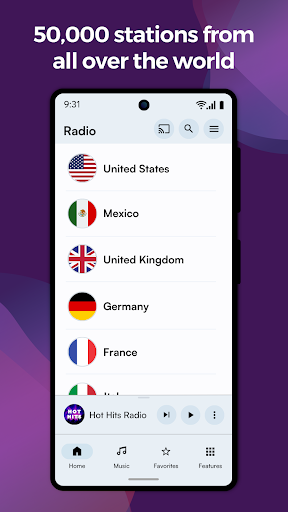
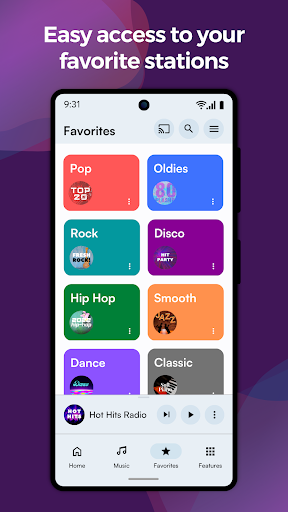
Internet radio FM - Replaio is the only app you need on your phone to listen to radio FM online.
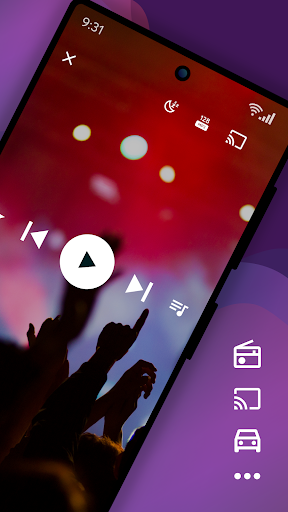
Listen to your FM, AM, and DAB online radio from USA available on the internet. Browse the stations' websites to get more information fast and easily. Discover the world's radio, including music-only stations. P.S. We try so hard to make Replaio Radio really good. Install now and find out for yourself how easy and smooth listening to the radio on your phone or tablet can be.
Replaio Radio
• Over 50,000 stations from around the world
• Internet radio stations by music genres
• Handy and clear Favorites list
• Google Chromecast and Android Auto support
• Low usage of mobile data and battery
Key features
• Radio alarm clock with snooze function
• Sleep timer to fall asleep easily
• Equalizer improving the sound of the station
• Favorite radio programs reminders
Other features
• Online radio by different genres (pop, rock, EDM, various decades, and more)
• Material Design 3 with Dynamic Colors support
• Color themes and dark mode
• Stream quality selection for 3G/LTE and WiFi (saves data!)
• Possibility of stopping playing when using mobile data
• Adding songs listened to on radio FM online to a playlist on Spotify
• Autostart when connected to Bluetooth
• Easy and fast browsing of radio station websites (schedules, support)
• Ability to add your own URL radio streams
• Your favorite AM, FM radio available even when you are abroad
That's not all! We encourage you to try the rest of the options directly in the app.
Premium add-ons (optional purchase)
• No banners or video ads in the app for life
• Widgets of various sizes, dark and light
• Radio icons on the phone desktop
• Single payment, no subscription
• Pizza (Hawaiian maybe?) for Replaio Radio Team!
Questions and troubleshooting
Replaio Radio does not broadcast any audio ads before launching the radio. Regardless of Replaio, some stations may broadcast such advertisements.
Please note that Replaio is a web browser with audio options, we are not radio broadcasters.
If you have any questions, want to cooperate, or have problems with the app, shoot us a note at support@repla.io or contact us via the contact form in the app. We read all messages.
Replaio Radio is a brand of Replaio sp. z o.o. All other names, brands, and marks that may appear in the app and on this website are the property of their respective owners and are used for information and identification purposes. The services we provide are in no way affiliated with these companies.
Mehr anzeigen

1. Laden das MEmu-Installationsprogramm herunter und beenden die Installation

2. MEmu starten und Google Play auf der Homepage öffnen

3. Suchen Replaio Radio in Google Play
Install
4. Herunterladen und Installieren Replaio Radio
5. Klicken nach Abschluss der Installation auf das Symbol, um es zu starten

6. Verwenden Sie MEmu, um Replaio Radio auf Ihrem PC zu nutzen
MEmu Play ist aktuell der beste kostenlose Android-Emulator und bietet 50 Millionen Nutzern ein überragendes Android-App-Erlebnis. Dank der Virtualisierungstechnologie von MEmu können Sie Tausende von Android-Apps problemlos auf Ihrem Computer nutzen, selbst solche mit hohen Grafikanforderungen.
BGrößeres Bild mit besserer Grafik; Keine unterbrechungen, keine sorgen um Akku
Komplette Tastenbelegung unterstützt mit Maus und Tastatur oder Controller
Mit dem „Multi-Instance-Manager“ können Sie mehrere Spielkonten oder Spiele gleichzeitig auf einem PC ausführen.
Use Replaio Radio on PC by following steps: