Replaio Radio
อัปเดตเมื่อ
เวอร์ชันปัจจุบัน
ให้บริการโดย

เมื่อใช้ Replaio Radio บนโทรศัพท์ของคุณไม่ต้องกังวลกับการชาร์จไฟมากเกินไปปลดปล่อยตัวคุณเองจากหน้าจอขนาดเล็กและสนุกกับการใช้แอพนี้บนหน้าจอขนาดใหญ่ จากนี้ไปรับประสบการณ์เต็มหน้าจอของแอปพลิเคชันของคุณด้วยคีย์บอร์ดและเมาส์ MEmu มีคุณสมบัติที่น่าแปลกใจที่คุณคาดหวัง: การติดตั้งที่รวดเร็วและการตั้งค่าที่ง่ายควบคุมได้ง่ายไม่ จำกัด แบตเตอรี่ข้อมูลมือถือและการโทรที่รบกวน MEmu 9 ใหม่ล่าสุดเป็นตัวเลือกที่ดีที่สุดสำหรับการใช้ Meitu – โปรแกรมแก้ไขภาพแนวธรรมชาติ บนคอมพิวเตอร์ของคุณ ด้วยรหัสการดูดซึมของเราผู้จัดการหลายอินสแตนซ์ทำให้สามารถเปิดบัญชี 2 บัญชีขึ้นไปในเวลาเดียวกันได้ และที่สำคัญที่สุดเอ็นจิ้นจำลองพิเศษของเราสามารถปลดปล่อยศักยภาพของPCของคุณและทำให้ทุกอย่างราบรื่นและสนุกสนาน
แสดงเพิ่มเติม
ดาวน์โหลด Replaio Radio บน PC ด้วย MEmu Android Emulator สนุกกับการเล่นบนหน้าจอขนาดใหญ่ Internet radio FM - Replaio is the only app you need on your phone to listen to radio FM online.
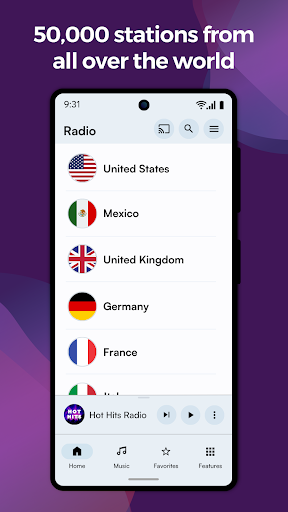
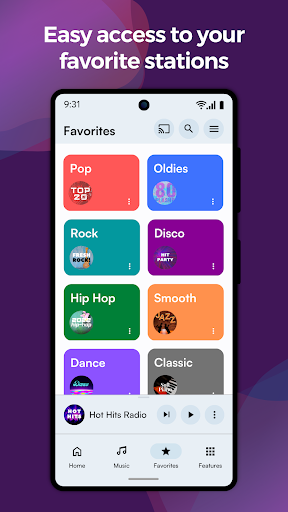
Internet radio FM - Replaio is the only app you need on your phone to listen to radio FM online.
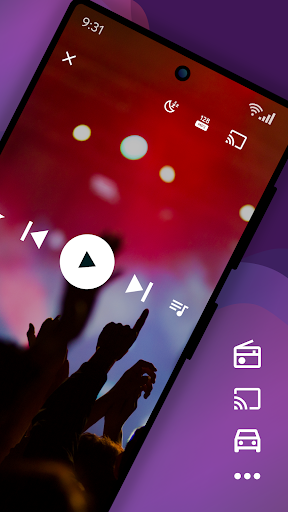
Listen to your FM, AM, and DAB online radio from USA available on the internet. Browse the stations' websites to get more information fast and easily. Discover the world's radio, including music-only stations. P.S. We try so hard to make Replaio Radio really good. Install now and find out for yourself how easy and smooth listening to the radio on your phone or tablet can be.
Replaio Radio
• Over 50,000 stations from around the world
• Internet radio stations by music genres
• Handy and clear Favorites list
• Google Chromecast and Android Auto support
• Low usage of mobile data and battery
Key features
• Radio alarm clock with snooze function
• Sleep timer to fall asleep easily
• Equalizer improving the sound of the station
• Favorite radio programs reminders
Other features
• Online radio by different genres (pop, rock, EDM, various decades, and more)
• Material Design 3 with Dynamic Colors support
• Color themes and dark mode
• Stream quality selection for 3G/LTE and WiFi (saves data!)
• Possibility of stopping playing when using mobile data
• Adding songs listened to on radio FM online to a playlist on Spotify
• Autostart when connected to Bluetooth
• Easy and fast browsing of radio station websites (schedules, support)
• Ability to add your own URL radio streams
• Your favorite AM, FM radio available even when you are abroad
That's not all! We encourage you to try the rest of the options directly in the app.
Premium add-ons (optional purchase)
• No banners or video ads in the app for life
• Widgets of various sizes, dark and light
• Radio icons on the phone desktop
• Single payment, no subscription
• Pizza (Hawaiian maybe?) for Replaio Radio Team!
Questions and troubleshooting
Replaio Radio does not broadcast any audio ads before launching the radio. Regardless of Replaio, some stations may broadcast such advertisements.
Please note that Replaio is a web browser with audio options, we are not radio broadcasters.
If you have any questions, want to cooperate, or have problems with the app, shoot us a note at support@repla.io or contact us via the contact form in the app. We read all messages.
Replaio Radio is a brand of Replaio sp. z o.o. All other names, brands, and marks that may appear in the app and on this website are the property of their respective owners and are used for information and identification purposes. The services we provide are in no way affiliated with these companies.
แสดงเพิ่มเติม

1. ดาวน์โหลดตัวติดตั้ง MEmu และสิ้นสุดการติดตั้ง

2. เริ่ม MEmu จากนั้นเปิด Google Play บนหน้าแรก

3. ค้นหา Replaio Radio ใน Google Play
Install
4. ดาวน์โหลดและติดตั้ง Replaio Radio
5. เมื่อติดตั้งเสร็จให้คลิกที่ไอคอนเพื่อเริ่มใช้งาน

6. ใช้ MEmu เพื่อสัมผัสประสบการณ์ Replaio Radio บนคอมพิวเตอร์ของคุณ
MEmu Play คือโปรแกรมจำลอง Android ที่ดีที่สุด มีผู้ใช้มากกว่า 50 ล้านคน มอบประสบการณ์การใช้งานแอป Android ขั้นสุดยอดให้กับคุณ เทคโนโลยีจำลองเสมือนของ MEmu ช่วยให้คุณรันแอป Android หลายพันแอปบนคอมพิวเตอร์ได้อย่างราบรื่น แม้แอปที่กินทรัพยากรเครื่องสูงที่สุด
จอใหญ่และกราฟฟิกสวยกว่า; เล่นได้นาน, ไม่ต้องใช้แบตเตอรี่โทรศัพท์หรือเน็ตโทรศัพท์.
ระบบปรับแต่งปุ่มคีย์บอร์ดและเม้าส์ตามที่คุณเลือก
เล่นมากกว่าหนึ่งเกมบน PC ในเวลาเดียวกันด้วยระบบหลายจอหรือ Multi-Instance manager.
Use Replaio Radio on PC by following steps: