Replaio Radio
Updated
Current Version
Offered By

Stop worrying about high battery drain when using Replaio Radio on your phone. Free yourself from the tiny screen and enjoy the app on a much larger display. From now on, get a full-screen experience of your app with the convenience of a keyboard and mouse. MEmu offers you all the surprising features you’d expect: quick installation and easy setup, intuitive controls, and no more worries about battery life, mobile data, or unexpected calls. The all-new MEmu 9 is the choice for using Replaio Radio on your computer. With the MEmu multi-instance manager, you can run two or more accounts at the same time. Most importantly, our exclusive emulation engine unlocks your PC’s full potential, delivering smooth and enjoyable performance.
Show more
Enjoy superb experience of using Replaio Radio on PC with MEMU App Player. It's a powerful free Android emulator which provides you with thousands of android apps for their desktop version. Enjoy connecting with friends and polishing your work with higher efficiency! Internet radio FM - Replaio is the only app you need on your phone to listen to radio FM online.
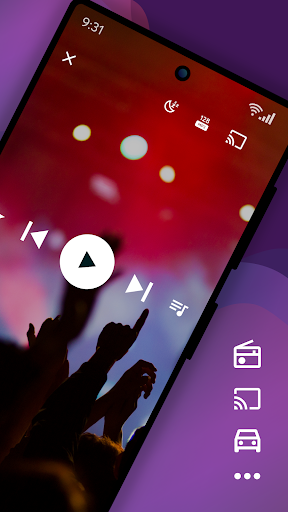
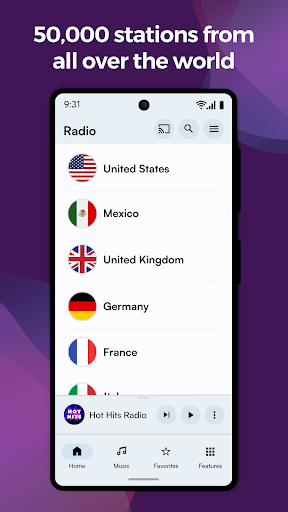
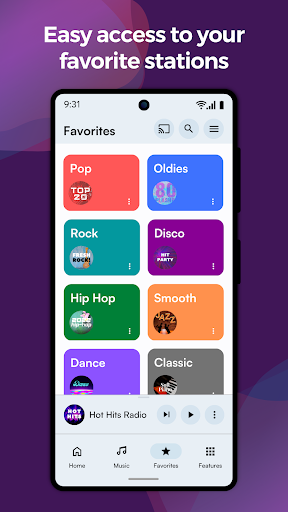
Internet radio FM - Replaio is the only app you need on your phone to listen to radio FM online.
Listen to your FM, AM, and DAB online radio from USA available on the internet. Browse the stations' websites to get more information fast and easily. Discover the world's radio, including music-only stations. P.S. We try so hard to make Replaio Radio really good. Install now and find out for yourself how easy and smooth listening to the radio on your phone or tablet can be.
Replaio Radio
• Over 50,000 stations from around the world
• Internet radio stations by music genres
• Handy and clear Favorites list
• Google Chromecast and Android Auto support
• Low usage of mobile data and battery
Key features
• Radio alarm clock with snooze function
• Sleep timer to fall asleep easily
• Equalizer improving the sound of the station
• Favorite radio programs reminders
Other features
• Online radio by different genres (pop, rock, EDM, various decades, and more)
• Material Design 3 with Dynamic Colors support
• Color themes and dark mode
• Stream quality selection for 3G/LTE and WiFi (saves data!)
• Possibility of stopping playing when using mobile data
• Adding songs listened to on radio FM online to a playlist on Spotify
• Autostart when connected to Bluetooth
• Easy and fast browsing of radio station websites (schedules, support)
• Ability to add your own URL radio streams
• Your favorite AM, FM radio available even when you are abroad
That's not all! We encourage you to try the rest of the options directly in the app.
Premium add-ons (optional purchase)
• No banners or video ads in the app for life
• Widgets of various sizes, dark and light
• Radio icons on the phone desktop
• Single payment, no subscription
• Pizza (Hawaiian maybe?) for Replaio Radio Team!
Questions and troubleshooting
Replaio Radio does not broadcast any audio ads before launching the radio. Regardless of Replaio, some stations may broadcast such advertisements.
Please note that Replaio is a web browser with audio options, we are not radio broadcasters.
If you have any questions, want to cooperate, or have problems with the app, shoot us a note at support@repla.io or contact us via the contact form in the app. We read all messages.
Replaio Radio is a brand of Replaio sp. z o.o. All other names, brands, and marks that may appear in the app and on this website are the property of their respective owners and are used for information and identification purposes. The services we provide are in no way affiliated with these companies.
Show more

1. Download MEmu installer and finish the setup

2. Start MEmu then open Google Play on the desktop

3. Search Replaio Radio in Google Play
Install
4. Download and Install Replaio Radio
5. On install completion click the icon to start

6. Enjoy using Replaio Radio on PC with MEmu
MEmu Play is the best Android emulator, and 100 million users already enjoy its superb Android app experience. Powered by advanced virtualization technology, it lets you enjoy thousands of Android apps smoothly on your PC—including the most graphics-intensive ones.
Bigger screen with better graphics; Long duration, without limitation of battery or mobile data.
Full Keymapping support for precise control of keyboard and mouse or gamepad.
Multiple game accounts or tasks on single PC at one time with Multi-Instance manager.
Use Replaio Radio on PC by following steps: