Hello Neighbor 3
Bijgewerkt
Huidige Versie
Aangeboden door

Met al je passie voor het spelen van Hello Neighbor 3, zouden je handen niet beperkt moeten zijn tot een klein scherm van je telefoon. Speel als een professional en krijg volledige controle over je spel met toetsenbord en muis. MEmu biedt je alles wat je verwacht. Download en speel Hello Neighbor 3 op PC. Speel zo lang als je wilt, geen beperkingen meer van batterij, mobiele data en storende oproepen. De gloednieuwe MEmu 9 is de beste keuze om Hello Neighbor 3 op PC te spelen. Voorbereid met onze expertise, maakt het uitmuntende vooraf ingestelde keymapping systeem van Hello Neighbor 3 een echt PC-spel. MEmu multi-instance manager maakt het spelen van 2 of meer accounts op hetzelfde apparaat mogelijk. En het belangrijkste, onze exclusieve emulatie-engine kan het volledige potentieel van je PC benutten, waardoor alles soepel verloopt.
Meer tonen
Download Hello Neighbor 3 op je pc met de MEmu Android-emulator. Geniet van spelen op een groot scherm. Features:Living town residents - Each character is simulated in real-time, independently of the player.
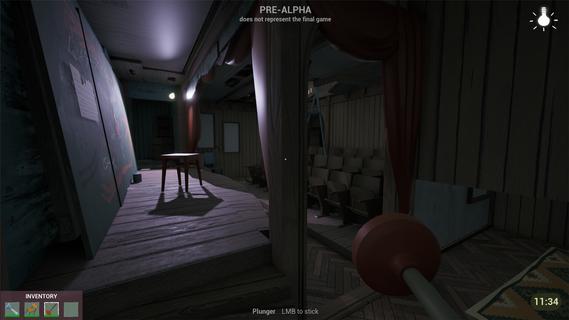
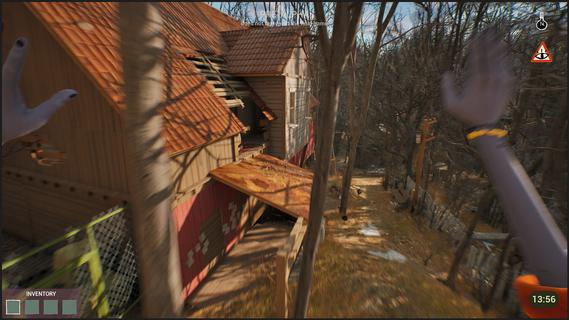


Features:Living town residents - Each character is simulated in real-time, independently of the player. Citizens try to reach their own goals even if the player is not around.Freedom of choice - Approach your goals with curiosity and experimentation, to create unique solutions.Environmental manipulation - Practically anything you see can be used one way or another. Interact with the objects and characters to create new possibilities.Infiltration gameplay - Sneak, stack boxes, break windows and find unique ways to reach places that seem impossible to access.A cozy & eerie town - Explore a familiar yet at the same time uneasy town where everyday life exists with the unknown side by side.Works as your first game! - New to the series? No worries! This game is designed so gameplay and story can be easily understood without prior experience with Hello Neighbor.Depth for those who know - If you have played Hello Neighbor before, you will find extra depth in the story and gameplay.You arrive in Raven Brooks in search of a missing employee - the only person who knows the whereabouts of a critical report.Locals made it clear: they donât trust the corporation you represent and you are not welcome here. Soon you realize that disappearances are common in Raven Brooks.Raven Brooks lives its own life. Residents follow their goals, change things and interact with each other whether you are there or not. Learn how everything works and use it to your advantage.Sneak into houses, run through backyards and climb rooftops to reach your goals.Change the environment and manipulate characters to create opportunities that weren't there before.In Raven Brooks, thereâs always multiple ways to reach your goal.Events in the town unfold within a limited timeframe. When time runs out, the day rewinds - but what youâve learned stays with you. This knowledge opens new possibilities, outcomes and ways to explore mysteries this town hides.The more you explore, the more Raven Brooks reveals.
Meer tonen

1. Download de MEmu-installatie en voltooi de setup

2. Start MEmu en open vervolgens Google Play op het bureaublad

3. Zoek Hello Neighbor 3 in Google Play
Install
4. Download en installeer Hello Neighbor 3
5. Klik op het icoon om te starten na het voltooien van de installatie

6. Geniet van het spelen van Hello Neighbor 3 op PC met MEmu
MEmu Play is de beste Android Emulator en 100 miljoen mensen genieten al van de superieure Android-game-ervaring. De virtualisatietechnologie van MEmu stelt je in staat om duizenden Android-spellen soepel op je PC te spelen, zelfs de meest grafisch intensieve.
Groter scherm met betere graphics; Lange duur, zonder beperking van batterij of mobiele data.
Volledige Keymapping-ondersteuning voor nauwkeurige besturing van toetsenbord en muis of gamepad.
Meerdere game-accounts of taken op één PC tegelijk met Multi-Instance manager.
Speel Hello Neighbor 3 op PC door de volgende stappen te volgen: