
Hello Neighbor 3
อัปเดตเมื่อ
เวอร์ชันปัจจุบัน
ให้บริการโดย

เวลาคุณเล่น Hello Neighbor 3, คุณอาจรู้สึกว่ามือคุณอาจบังจอแล้วทำให้ไม่ได้เล่นแบบเต็มที่. เล่นแบบไร้ขีดจำกัดด้วยเม้าส์และคีย์บอร์ด. MEmu มีตัวเลือกหลายอย่างให้คุณใช้งานเกมที่คุณเล่นแบบที่คุณต้องการ. ดาวน์โหลดและเล่น Hello Neighbor 3 บน PC. เล่นนานแค่ไหนก็ได้, ไม่ต้องชาร์จแบตเตอรี่, หรือเจอคนโทรเข้ามาระหว่างเล่น. MEmu 9 เป็นตัวเลือกสำหรับการเล่น Hello Neighbor 3 บน PC. ทางทีมงานเราได้ปรับแต่งเกม, ปรับให้เล่นเกมบางเกมได้เหมือนเล่น Hello Neighbor 3 เป็นเกม PC เช่นเล็งด้วยเม้าส์หรือใช้คีย์บอร์ด. ระบบของเรายังทำให้คุณสามารถเปิดเล่นได้มากกว่า 2 เกมพร้อมๆกันในคอมของคุณ. และที่สำคัญที่สุด, ระบบโปรแกรมของเราสามารถทำให้คุณใช้ระบบของ PC ทำให้เกมลื่นเหมือนกับใช้โทรศัพท์รุ่นล่าสุด. เราไม่ได้ดูแลเรื่องการเล่นเกม, แต่เราดูแลถึงความสนุกสนานที่คุณได้จากการเล่นด้วย.
แสดงเพิ่มเติม
ดาวน์โหลด Hello Neighbor 3 บน PC ด้วย MEmu Android Emulator สนุกกับการเล่นบนหน้าจอขนาดใหญ่ Features:Living town residents - Each character is simulated in real-time, independently of the player.
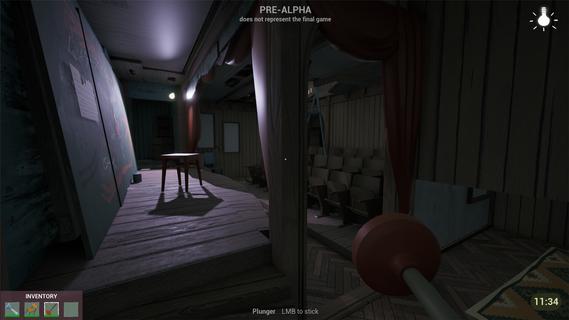
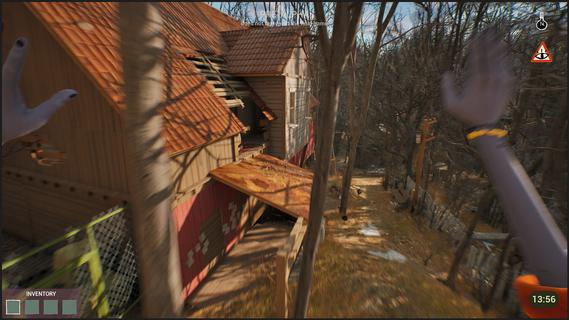


Features:Living town residents - Each character is simulated in real-time, independently of the player. Citizens try to reach their own goals even if the player is not around.Freedom of choice - Approach your goals with curiosity and experimentation, to create unique solutions.Environmental manipulation - Practically anything you see can be used one way or another. Interact with the objects and characters to create new possibilities.Infiltration gameplay - Sneak, stack boxes, break windows and find unique ways to reach places that seem impossible to access.A cozy & eerie town - Explore a familiar yet at the same time uneasy town where everyday life exists with the unknown side by side.Works as your first game! - New to the series? No worries! This game is designed so gameplay and story can be easily understood without prior experience with Hello Neighbor.Depth for those who know - If you have played Hello Neighbor before, you will find extra depth in the story and gameplay.You arrive in Raven Brooks in search of a missing employee - the only person who knows the whereabouts of a critical report.Locals made it clear: they don’t trust the corporation you represent and you are not welcome here. Soon you realize that disappearances are common in Raven Brooks.Raven Brooks lives its own life. Residents follow their goals, change things and interact with each other whether you are there or not. Learn how everything works and use it to your advantage.Sneak into houses, run through backyards and climb rooftops to reach your goals.Change the environment and manipulate characters to create opportunities that weren't there before.In Raven Brooks, there’s always multiple ways to reach your goal.Events in the town unfold within a limited timeframe. When time runs out, the day rewinds - but what you’ve learned stays with you. This knowledge opens new possibilities, outcomes and ways to explore mysteries this town hides.The more you explore, the more Raven Brooks reveals.
แสดงเพิ่มเติม

1. ดาวน์โหลดตัวติดตั้ง MEmu และสิ้นสุดการติดตั้ง

2. เริ่ม MEmu จากนั้นเปิด Google Play บนหน้าแรก

3. ค้นหา Hello Neighbor 3 ใน Google Play
Install
4. ดาวน์โหลดและติดตั้ง Hello Neighbor 3
5. เมื่อติดตั้งเสร็จให้คลิกที่ไอคอนเพื่อเริ่มใช้งาน

6. สนุกกับการเล่น Hello Neighbor 3 บนพีซีด้วย MEmu
MEmu App Player เป็นอีมูเลเตอร์ Android ที่ดีที่สุดและผู้คนกว่า 50 ล้านคนเพลิดเพลินไปกับประสบการณ์การเล่นเกม Android ที่ยอดเยี่ยม เทคโนโลยีการจำลองเสมือนของ MEmu ช่วยให้คุณเล่นเกม Android หลายพันเกมได้อย่างราบรื่นบนพีซีของคุณแม้แต่เกมที่ต้องใช้กราฟิกมากที่สุด
จอใหญ่และกราฟฟิกสวยกว่า; เล่นได้นาน, ไม่ต้องใช้แบตเตอรี่โทรศัพท์หรือเน็ตโทรศัพท์.
ระบบปรับแต่งปุ่มคีย์บอร์ดและเม้าส์ตามที่คุณเลือก
เล่นมากกว่าหนึ่งเกมบน PC ในเวลาเดียวกันด้วยระบบหลายจอหรือ Multi-Instance manager.
Play Hello Neighbor 3 on PC by following steps:



























![[ไกด์เกม] CookieRun Classic แนะนำ 5 คุกกี้น่าปั้น น่าลงทุน ที่มือใหม่ห้ามพลาด! (เล่นบน PC ผ่าน MEmu ให้ลื่นสุด ๆ) PC](https://www.memuplay.com/blog/wp-content/uploads/2026/08/579c01ab-a953-45b3-8115-9b6279b7d6f9.png)