Hello Neighbor 3
Atualizada
Versão atual
Oferecido por

Com toda a sua paixão por jogar Hello Neighbor 3, não deixe os polegares te atrapalharem em uma pequena tela do seu celular. Jogue como um profissional e tenha controle total do seu jogo com teclado e mouse. O MEmu oferece todas as coisas que você está esperando. Baixe e jogue Hello Neighbor 3 no PC. Jogue o tempo que quiser, sem mais limitações de bateria, dados móveis e aquelas ligações enquanto estiver jogando. O novíssimo MEmu 9 é a melhor escolha de jogar Hello Neighbor 3 no PC. Com grandes novidades no sistema de mapeamento que faz Hello Neighbor 3 um jogo de PC real. Nossa equipe melhorou o gerenciamento de várias instâncias do Android, reduzindo tempo de reprodução de 2 ou mais contas no mesmo dispositivo. O mais importante, nosso mecanimos de emulação exclusivo pode liberar todo o potencial do seu PC sem travamentos, rodando tudo liso. Nós nos preocupamos não apenas com você joga, mas com todo o processo de desfrutar de 100% do seu jogo favorito.
Mostre mais
Download do Hello Neighbor 3 no PC com MEmu Android Emulador: Divirta-se jogando na tela grande. Features:Living town residents - Each character is simulated in real-time, independently of the player.
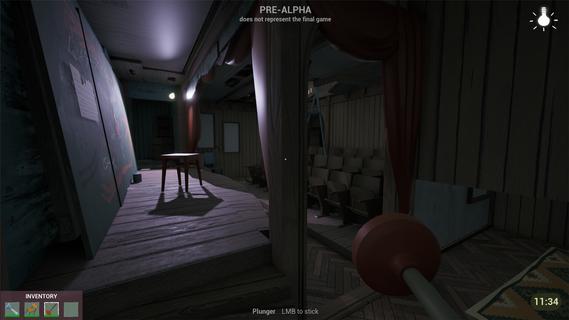
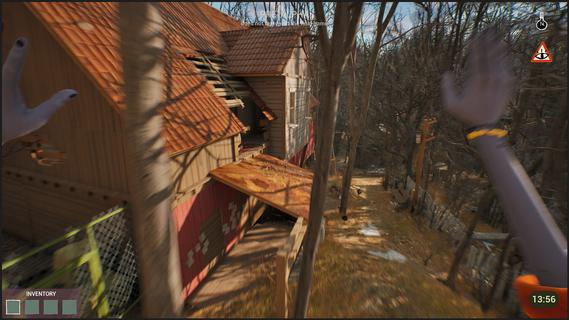


Features:Living town residents - Each character is simulated in real-time, independently of the player. Citizens try to reach their own goals even if the player is not around.Freedom of choice - Approach your goals with curiosity and experimentation, to create unique solutions.Environmental manipulation - Practically anything you see can be used one way or another. Interact with the objects and characters to create new possibilities.Infiltration gameplay - Sneak, stack boxes, break windows and find unique ways to reach places that seem impossible to access.A cozy & eerie town - Explore a familiar yet at the same time uneasy town where everyday life exists with the unknown side by side.Works as your first game! - New to the series? No worries! This game is designed so gameplay and story can be easily understood without prior experience with Hello Neighbor.Depth for those who know - If you have played Hello Neighbor before, you will find extra depth in the story and gameplay.You arrive in Raven Brooks in search of a missing employee - the only person who knows the whereabouts of a critical report.Locals made it clear: they donât trust the corporation you represent and you are not welcome here. Soon you realize that disappearances are common in Raven Brooks.Raven Brooks lives its own life. Residents follow their goals, change things and interact with each other whether you are there or not. Learn how everything works and use it to your advantage.Sneak into houses, run through backyards and climb rooftops to reach your goals.Change the environment and manipulate characters to create opportunities that weren't there before.In Raven Brooks, thereâs always multiple ways to reach your goal.Events in the town unfold within a limited timeframe. When time runs out, the day rewinds - but what youâve learned stays with you. This knowledge opens new possibilities, outcomes and ways to explore mysteries this town hides.The more you explore, the more Raven Brooks reveals.
Mostre mais

1. Faça o download do instalador do MEmu e conclua a instalação

2. Inicie o MEmu e depois abra o Google Play na página inicial

3. Pesquise Hello Neighbor 3 no Google Play
Install
4. Baixe e Instale Hello Neighbor 3
5. Na conclusão da instalação, clique no ícone para iniciar

6. Divirta-se jogando Hello Neighbor 3 no PC com MEmu
O MEmu App Player é o melhor emulador de Android grátis e 50 milhões de pessoas já desfrutam de sua excelente experiência de jogos no Android. A tecnologia de virtualização do MEmu permite que você jogue milhares de jogos do Android sem problemas no seu PC, mesmo os com gráficos mais intensivos.
Tela maior com gráficos melhores; Longa duração e sem limitação de bateria ou dados móveis.
Suporte completo ao Mapaeamento de Teclas para controle preciso do teclado e mouse ou gamepad.
Várias contas de jogos ou tarefas em um único PC de uma só vez com o Gerenciador de várias instâncias.
Play Hello Neighbor 3 on PC by following steps: