Hello Neighbor 3
Aktualisiert
Aktuelle Version
Angeboten von

Bei all Ihrer Leidenschaft für das Spielen von Hello Neighbor 3 sollten Ihre Hände nicht auf einen winzigen Bildschirm Ihres Telefons beschränkt sein. Spielen Sie wie ein Profi und übernehmen Sie die volle Kontrolle über Ihr Spiel mit Tastatur und Maus. MEmu bietet Ihnen all die Dinge, die Sie erwarten. Laden Sie Hello Neighbor 3 herunter und spielen Sie es auf dem PC. Spielen Sie so lange, wie Sie wollen, ohne Grenzwerte für Akku, mobile Daten und störende Anrufe. Das brandneue MEmu 9 ist die beste Wahl, um Hello Neighbor 3 auf dem PC zu spielen. Das exquisite voreingestellte Tastaturbelegungssystem, das mit unserem Fachwissen vorbereitet wurde, macht Hello Neighbor 3 zu einem echten PC-Spiel. Der MEmu Multi-Instanz-Manager ermöglicht das Spielen von 2 oder mehr Konten auf demselben Gerät. Und das Wichtigste: Unsere exklusive Emulations-Engine kann das volle Potenzial Ihres PCs freisetzen und für reibungslose Abläufe sorgen.
Mehr anzeigen
Laden Sie Play Hello Neighbor 3 auf dem PC mit MEmu Android Emulator. Viel Spaß beim Spielen auf großmundieren. Features:Living town residents - Each character is simulated in real-time, independently of the player.
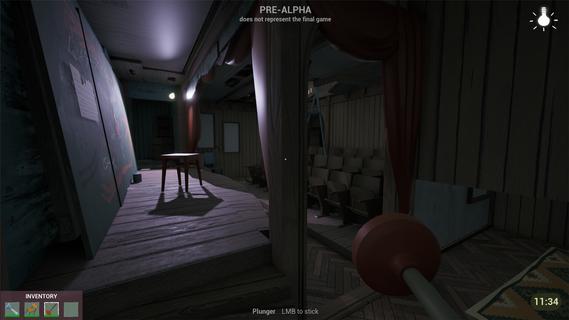
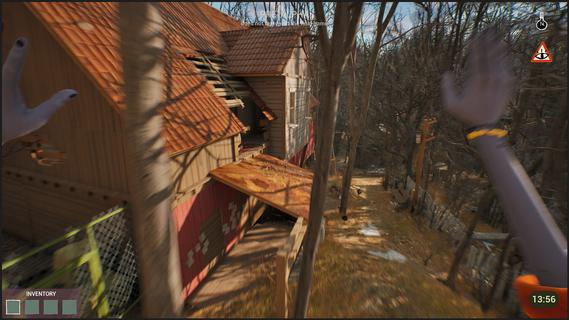


Features:Living town residents - Each character is simulated in real-time, independently of the player. Citizens try to reach their own goals even if the player is not around.Freedom of choice - Approach your goals with curiosity and experimentation, to create unique solutions.Environmental manipulation - Practically anything you see can be used one way or another. Interact with the objects and characters to create new possibilities.Infiltration gameplay - Sneak, stack boxes, break windows and find unique ways to reach places that seem impossible to access.A cozy & eerie town - Explore a familiar yet at the same time uneasy town where everyday life exists with the unknown side by side.Works as your first game! - New to the series? No worries! This game is designed so gameplay and story can be easily understood without prior experience with Hello Neighbor.Depth for those who know - If you have played Hello Neighbor before, you will find extra depth in the story and gameplay.You arrive in Raven Brooks in search of a missing employee - the only person who knows the whereabouts of a critical report.Locals made it clear: they don’t trust the corporation you represent and you are not welcome here. Soon you realize that disappearances are common in Raven Brooks.Raven Brooks lives its own life. Residents follow their goals, change things and interact with each other whether you are there or not. Learn how everything works and use it to your advantage.Sneak into houses, run through backyards and climb rooftops to reach your goals.Change the environment and manipulate characters to create opportunities that weren't there before.In Raven Brooks, there’s always multiple ways to reach your goal.Events in the town unfold within a limited timeframe. When time runs out, the day rewinds - but what you’ve learned stays with you. This knowledge opens new possibilities, outcomes and ways to explore mysteries this town hides.The more you explore, the more Raven Brooks reveals.
Mehr anzeigen

1. Laden das MEmu-Installationsprogramm herunter und beenden die Installation

2. MEmu starten und Google Play auf der Homepage öffnen

3. Suchen Hello Neighbor 3 in Google Play
Install
4. Herunterladen und Installieren Hello Neighbor 3
5. Klicken nach Abschluss der Installation auf das Symbol, um es zu starten

6. Viel Spaß beim Spielen von Hello Neighbor 3 auf dem PC mit MEmu
MEmu App Player ist der beste kostenlose Android-Emulator und 50 Millionen Menschen genießen bereits seine hervorragende Android-Gaming-Erfahrung. Mit der MEmu-Virtualisierungstechnologie können Sie Tausende von Android-Spielen problemlos auf Ihrem PC spielen, selbst bei grafikintensiven Spielen.
BGrößeres Bild mit besserer Grafik; Keine unterbrechungen, keine sorgen um Akku
Komplette Tastenbelegung unterstützt mit Maus und Tastatur oder Controller
Mit dem „Multi-Instance-Manager“ können Sie mehrere Spielkonten oder Spiele gleichzeitig auf einem PC ausführen.
Play Hello Neighbor 3 on PC by following steps: