Hello Neighbor 3
Updated
Current Version
Offered By

With your passion for Hello Neighbor 3, you shouldn’t have to limit yourself to the small screen of a phone. Play like a pro and take full control of the game using a keyboard and mouse. MEmu gives you everything you’re looking for. Download and play Hello Neighbor 3 on PC. Play as long as you want — no more worries about battery life, mobile data, or unexpected calls. The all-new MEmu 9 is the best way to play Hello Neighbor 3 on PC. With our expertly designed keymapping system, Hello Neighbor 3 feels just like a real PC game. The MEmu multi-instance manager lets you run two or more accounts on the same device at the same time. Most importantly, our exclusive emulation engine unlocks your PC’s full potential, delivering smooth and seamless performance.
Show more
Download Hello Neighbor 3 on PC with MEmu Android Emulator. Enjoy playing on big screen. Features: Living town residents - Each character is simulated in real-time, independently of the player.
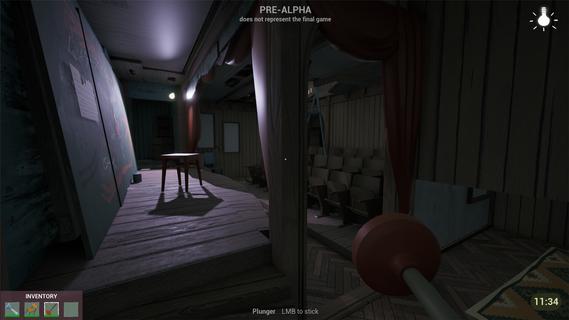
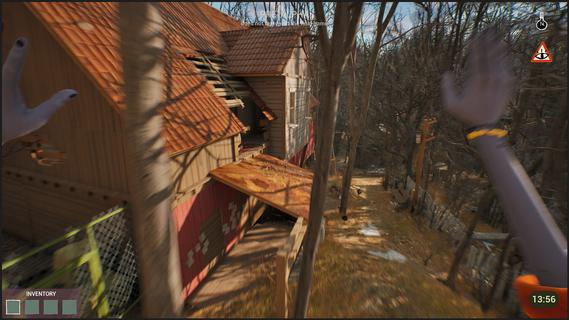


Features: Living town residents - Each character is simulated in real-time, independently of the player. Citizens try to reach their own goals even if the player is not around.Freedom of choice - Approach your goals with curiosity and experimentation, to create unique solutions.Environmental manipulation - Practically anything you see can be used one way or another. Interact with the objects and characters to create new possibilities.Infiltration gameplay - Sneak, stack boxes, break windows and find unique ways to reach places that seem impossible to access.A cozy & eerie town - Explore a familiar yet at the same time uneasy town where everyday life exists with the unknown side by side.Works as your first game! - New to the series? No worries! This game is designed so gameplay and story can be easily understood without prior experience with Hello Neighbor.Depth for those who know - If you have played Hello Neighbor before, you will find extra depth in the story and gameplay. You arrive in Raven Brooks in search of a missing employee - the only person who knows the whereabouts of a critical report. Locals made it clear: they don’t trust the corporation you represent and you are not welcome here. Soon you realize that disappearances are common in Raven Brooks. Raven Brooks lives its own life. Residents follow their goals, change things and interact with each other whether you are there or not. Learn how everything works and use it to your advantage. Sneak into houses, run through backyards and climb rooftops to reach your goals. Change the environment and manipulate characters to create opportunities that weren't there before. In Raven Brooks, there’s always multiple ways to reach your goal. Events in the town unfold within a limited timeframe. When time runs out, the day rewinds - but what you’ve learned stays with you. This knowledge opens new possibilities, outcomes and ways to explore mysteries this town hides. The more you explore, the more Raven Brooks reveals.
Show more

1. Download MEmu installer and finish the setup

2. Start MEmu then open Google Play on the desktop

3. Search Hello Neighbor 3 in Google Play
Install
4. Download and Install Hello Neighbor 3
5. On install completion click the icon to start

6. Enjoy playing Hello Neighbor 3 on PC with MEmu
MEmu Play is the best Android emulator and 100 million people already enjoy its superb Android gaming experience. The MEmu virtualization technology empowers you to play thousands of Android games smoothly on your PC, even the most graphic-intensive ones.
Bigger screen with better graphics; Long duration, without limitation of battery or mobile data.
Full Keymapping support for precise control of keyboard and mouse or gamepad.
Multiple game accounts or tasks on single PC at one time with Multi-Instance manager.
Play Hello Neighbor 3 on PC by following steps: