Hello Neighbor 3
Actualizada
Versión actual
Ofrecida por

Con toda tu pasión para jugar Hello Neighbor 3, no se supone que tus manos estén limitadas en una pequeña pantalla de tu teléfono. Juega como un profesional y obtén el control total de tu juego con el teclado y el mouse. MEmu le ofrece todas las cosas que espera. Descargar y jugar Hello Neighbor 3 en PC. Juega todo el tiempo que quieras, sin más limitaciones de batería, datos móviles y llamadas molestas. El nuevo MEmu 9 es la mejor opción para jugar Hello Neighbor 3 en PC. Preparado con nuestra experiencia, el exquisito sistema de keymapping preestablecido convierte a Hello Neighbor 3 en un verdadero juego de PC. Codificado con nuestra absorción, el administrador de instancias múltiples hace posible jugar 2 o más cuentas en el mismo dispositivo. Y lo más importante, nuestro exclusivo motor de emulación puede liberar todo el potencial de su PC, hacer que todo sea más fluido. Nos importa no solo cómo juegas, sino también todo el proceso de disfrutar de la felicidad de los juegos.
Más detalles
Descargar Hello Neighbor 3 en PC con MEmu Android Emulador. Disfruta jugando en la pentalla grande. Features:Living town residents - Each character is simulated in real-time, independently of the player.
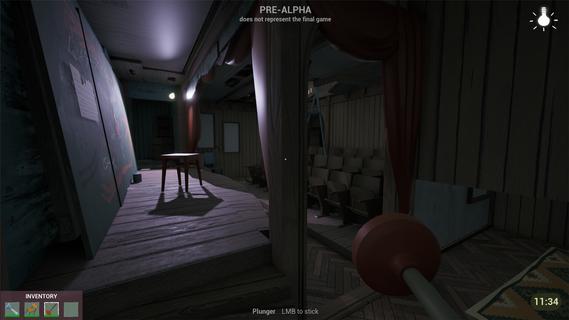
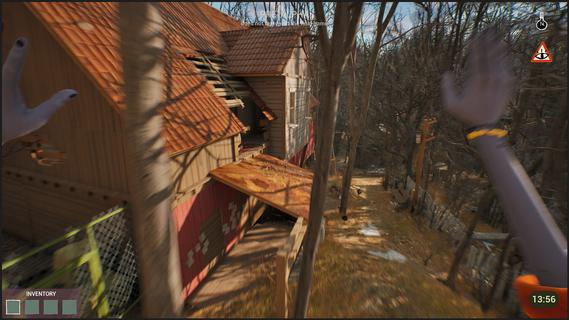


Features:Living town residents - Each character is simulated in real-time, independently of the player. Citizens try to reach their own goals even if the player is not around.Freedom of choice - Approach your goals with curiosity and experimentation, to create unique solutions.Environmental manipulation - Practically anything you see can be used one way or another. Interact with the objects and characters to create new possibilities.Infiltration gameplay - Sneak, stack boxes, break windows and find unique ways to reach places that seem impossible to access.A cozy & eerie town - Explore a familiar yet at the same time uneasy town where everyday life exists with the unknown side by side.Works as your first game! - New to the series? No worries! This game is designed so gameplay and story can be easily understood without prior experience with Hello Neighbor.Depth for those who know - If you have played Hello Neighbor before, you will find extra depth in the story and gameplay.You arrive in Raven Brooks in search of a missing employee - the only person who knows the whereabouts of a critical report.Locals made it clear: they donât trust the corporation you represent and you are not welcome here. Soon you realize that disappearances are common in Raven Brooks.Raven Brooks lives its own life. Residents follow their goals, change things and interact with each other whether you are there or not. Learn how everything works and use it to your advantage.Sneak into houses, run through backyards and climb rooftops to reach your goals.Change the environment and manipulate characters to create opportunities that weren't there before.In Raven Brooks, thereâs always multiple ways to reach your goal.Events in the town unfold within a limited timeframe. When time runs out, the day rewinds - but what youâve learned stays with you. This knowledge opens new possibilities, outcomes and ways to explore mysteries this town hides.The more you explore, the more Raven Brooks reveals.
Más detalles

1. Descargar el instalador de MEmu y finalice la instalación

2. Iniciar MEmu y abrir Google Play en la página de inicio

3. Buscar Hello Neighbor 3 en Google Play
Install
4. Descargar y instalar Hello Neighbor 3
5. Hacer click al icono para iniciar

6. Disfruta jugando Hello Neighbor 3 en PC con MEmu
MEmu App Player es el mejor emulador de Android gratuito y 50 millones de personas ya están disfrutando su magnífica experiencia jugando en Android. La tecnología de virtualización de MEmu te permite jugar a miles de juegos Android suavemente en tu PC, incluso los más intensivos gráficamente.
Pantalla más grande con mejores gráficos; Larga duración, sin limitación de batería o datos móviles.
Soporte completo de keymapping para un control preciso del teclado y el mouse o gamepad.
Múltiples cuentas de juegos o tareas en una sola PC a la vez con el administrador de instancias múltiples.
Play Hello Neighbor 3 on PC by following steps: