SUPER ZSNES
Bijgewerkt
Huidige Versie
0.110
Aangeboden door

Met al je passie voor het spelen van SUPER ZSNES, zouden je handen niet beperkt moeten zijn tot een klein scherm van je telefoon. Speel als een professional en krijg volledige controle over je spel met toetsenbord en muis. MEmu biedt je alles wat je verwacht. Download en speel SUPER ZSNES op PC. Speel zo lang als je wilt, geen beperkingen meer van batterij, mobiele data en storende oproepen. De gloednieuwe MEmu 9 is de beste keuze om SUPER ZSNES op PC te spelen. Voorbereid met onze expertise, maakt het uitmuntende vooraf ingestelde keymapping systeem van SUPER ZSNES een echt PC-spel. MEmu multi-instance manager maakt het spelen van 2 of meer accounts op hetzelfde apparaat mogelijk. En het belangrijkste, onze exclusieve emulatie-engine kan het volledige potentieel van je PC benutten, waardoor alles soepel verloopt.
Meer tonen
Download SUPER ZSNES op je pc met de MEmu Android-emulator. Geniet van spelen op een groot scherm. Welkom bij SUPER ZSNES.
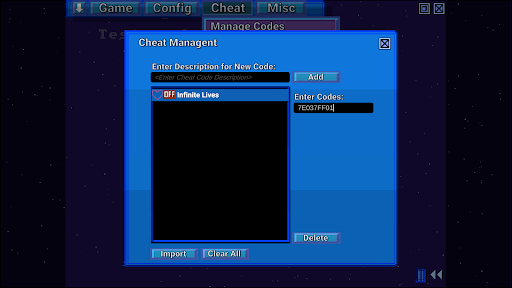
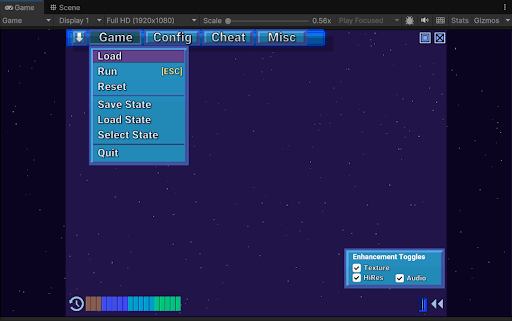
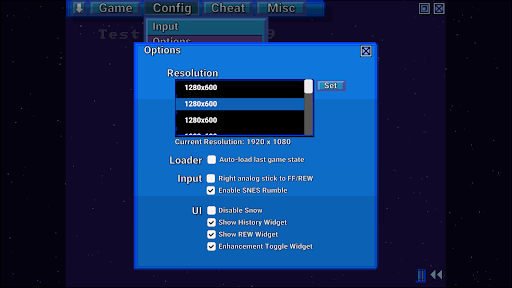
Welkom bij SUPER ZSNES
De twee oorspronkelijke ontwikkelaars van ZSNES zijn eindelijk weer samen! Maak kennis met SUPER ZSNES! Deze GPU-gestuurde SNES-emulator is volledig opnieuw geschreven en biedt je het volgende: een mix van bekende elementen, nieuwe functies en nog veel meer. Deze emulator bevindt zich nog in een vroeg ontwikkelingsstadium en zal continu worden verbeterd.
LET OP: ROM's kunnen momenteel alleen vanuit de interne app-map worden geladen, dus kopieer ze daarheen. We werken momenteel aan een verbetering hiervan.
Belangrijkste functies
- Veel nauwkeurigere CPU- en audiocores dan de originele ZSNES
- GPU-gestuurde PPU-core voor Mode 7 in hoge resolutie en speciale verbeteringen per spel
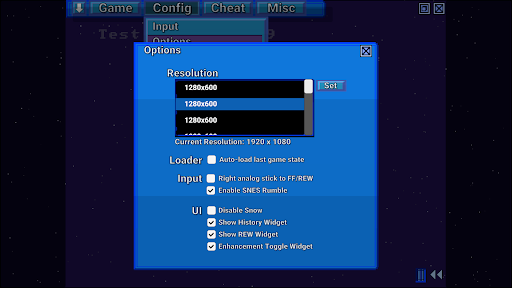
- Klassieke gebruikersinterface met vallende sneeuw, gemoderniseerd met een hogere resolutie en verbeterde gebruikerservaring
- Snel vooruitspoelen, terugspoelen, save states, automatisch opslaan van de geschiedenis, bladwijzers opslaan, cheatcodes, snel laden en meer
- Geen Vibe Coding. Klassieke ontwikkelstijl.
- Super Enhancement Engine, waarmee de ZSNES-ontwikkelaars de games één voor één verbeteren.
De Super Enhancement Engine is momenteel geïmplementeerd met ondersteuning voor 7 populaire games. De ondersteuning voor meer games zal blijven toenemen naarmate deze emulator verder wordt ontwikkeld:
Hoge resolutie - Niet alleen een automatische opschaling, maar er wordt een intern tekenprogramma gebruikt om ervoor te zorgen dat de details in hogere resolutie handmatig kunnen worden getekend voor een mooie en scherpe weergave.
Textuur/Normaalmap - Voegt mooie details toe aan de achtergronden voor een hogere resolutie.
Overklokken - Bepaalde games die vaak haperen, worden overgeklokt.
Breedbeeld (indien beschikbaar) - We schakelen breedbeeld in wanneer de game intern is gecodeerd om gedeeltelijk of volledig breedbeeld te ondersteunen.
Vervanging van ongecomprimeerde audio - We selecteren ongecomprimeerde audiosamples om de originele, sterk gecomprimeerde audiosamples te vervangen.
3D - Momenteel alleen ondersteund in perspectiefmodus 7, vervangt tegels door 3D-hoogtegegevens.
Alle verbeteringen kunnen individueel worden uitgeschakeld om aan uw speelstijl aan te passen.
Let op: De uitbreidingsgegevens bevatten geen ROM's of auteursrechtelijk beschermde gegevens. U dient zelf de ROM's aan te leveren. Vraag de ontwikkelaars niet om ROM's.
Wat komt eraan
- Bugfixes
- Emulatie van speciale chips (DSP1, SuperFX, enz.)
- Verdere optimalisatie
- Meer soorten uitbreidingen
- Netplay
- Andere functies
Opmerkingen
Dit is een vroege versie, dus er zijn nog steeds emulatiebugs en speciale chips (DSP1, SuperFX, enz.) moeten nog worden geïmplementeerd. Er moet nog veel optimalisatiewerk worden verricht, dus de prestaties kunnen wat traag zijn.
Meer tonen

1. Download de MEmu-installatie en voltooi de setup

2. Start MEmu en open vervolgens Google Play op het bureaublad

3. Zoek SUPER ZSNES in Google Play
Install
4. Download en installeer SUPER ZSNES
5. Klik op het icoon om te starten na het voltooien van de installatie

6. Geniet van het spelen van SUPER ZSNES op PC met MEmu
MEmu Play is de beste Android Emulator en 100 miljoen mensen genieten al van de superieure Android-game-ervaring. De virtualisatietechnologie van MEmu stelt je in staat om duizenden Android-spellen soepel op je PC te spelen, zelfs de meest grafisch intensieve.
Groter scherm met betere graphics; Lange duur, zonder beperking van batterij of mobiele data.
Volledige Keymapping-ondersteuning voor nauwkeurige besturing van toetsenbord en muis of gamepad.
Meerdere game-accounts of taken op één PC tegelijk met Multi-Instance manager.
Speel SUPER ZSNES op PC door de volgende stappen te volgen: