SUPER ZSNES
Обновлено
Текущая версия
0.103
Продавец

При всей вашей страсти к игре в ххх, ваши руки не должны быть ограничены на крошечном экране вашего телефона. Играйте как профессионал и получите полный контроль над игрой с помощью клавиатуры и мыши. MEmu предлагает вам все то, что вы ожидаете. Скачайте и играйте ххх на ПК. Играйте сколько угодно, никаких ограничений по батарее, мобильным данным и звонкам. Совершенно новый MEmu 9 - лучший выбор для игры в ххх на ПК. Благодаря изысканной системе предустановки клавиш, ххх превращается в настоящую игру для ПК. Менеджер нескольких экземпляров делает возможным игру с двумя или более учетными записями на одном устройстве. И самое главное, наш эксклюзивный механизм эмуляции может полностью раскрыть потенциал вашего ПК, сделать все гладко. Нам важно не только то, как вы играете, но и весь процесс наслаждения игровым счастьем.
Показать больше
Скачайте SUPER ZSNES на ПК с помощью Андроид эмулятора MEmu. Наслаждайтесь на большом экране. Добро пожаловать в SUPER ZSNES!
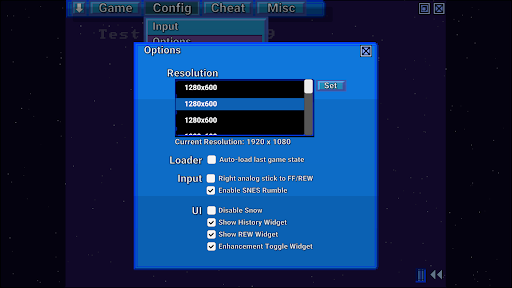
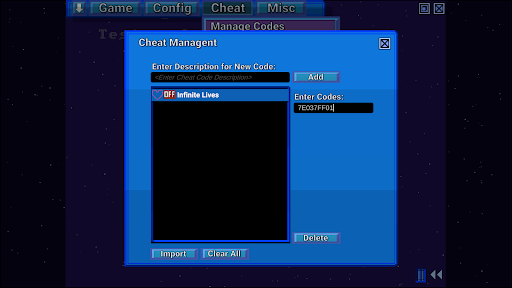
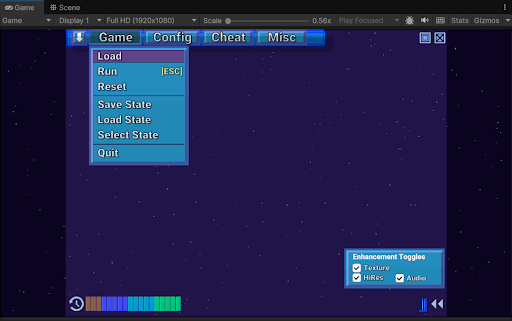
Добро пожаловать в SUPER ZSNES!
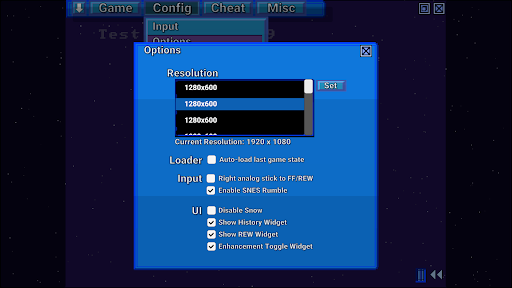
Два оригинальных разработчика ZSNES наконец-то снова объединились! Представляем SUPER ZSNES! Полностью переписанный с нуля, этот эмулятор SNES на базе графического процессора предлагает вам следующее: что-то знакомое, что-то новое, а также кое-что, выходящее за рамки обычного. Этот эмулятор находится на ранней стадии разработки и будет постоянно улучшаться.
ПРИМЕЧАНИЕ: В настоящее время ROM-файлы можно загружать только из внутренней папки приложения, поэтому, пожалуйста, скопируйте их туда. В настоящее время мы работаем над улучшением этого.
Ключевые особенности:
- Гораздо более точные ядра ЦП и аудио, чем в оригинальном ZSNES
- Ядро PPU на базе графического процессора для поддержки режима высокого разрешения Mode 7 и специальных функций улучшения для каждой игры
- Классический пользовательский интерфейс с падающим снегом, модернизированный с более высоким разрешением и улучшенным пользовательским опытом
- Быстрая перемотка вперед, назад, сохранение состояний, история автосохранения, сохранение закладок, чит-коды, быстрая загрузка и многое другое
- Отсутствие Vibe Coding. Классический стиль разработки.
Примечание: - Super Enhancement Engine, где разработчики ZSNES улучшают игры одну за другой
В настоящее время Super Enhancement Engine поддерживает 7 популярных игр. Поддержка новых игр будет постоянно расширяться по мере разработки эмулятора:
Высокое разрешение - не просто автоматическое масштабирование, а внутренняя программа отрисовки, позволяющая вручную отображать детали высокого разрешения для получения четкого и качественного изображения.
Текстуры/карты нормалей - добавляют детали к фону, придавая ему более высокое разрешение.
Разгон - некоторые игры, часто тормозящие игру, разгоняются.
Широкоэкранный режим (где доступно) - мы включаем широкоэкранный режим, если игра внутренне поддерживает частичный или полный широкоэкранный режим.
Замена несжатого звука - мы подбираем и используем несжатые аудиосэмплы для замены оригинальных сильно сжатых аудиосэмплов.
3D - в настоящее время поддерживается только в режиме перспективы Mode 7, заменяет тайлы данными с 3D-картой высот.
Все улучшения можно отключить по отдельности в соответствии с вашим стилем игры.
Примечание: Данные улучшений не содержат ROM-файлов или данных, защищенных авторским правом. Вам потребуется предоставить ROM-файлы самостоятельно. Не запрашивайте ROM-файлы у разработчиков.
Что будет дальше
- Исправлены ошибки
- Эмуляция специальных чипов (DSP1, SuperFX и т. д.)
- Дополнительная работа по оптимизации
- Дополнительные типы улучшений
- Сетевая игра
- Другие функции
Примечания
Это ранняя версия, поэтому в ней еще есть ошибки эмуляции, и поддержка специальных чипов (DSP1, SuperFX и т. д.) еще не реализована. Предстоит еще много работы по оптимизации, поэтому производительность может быть несколько низкой.
Показать больше

1. Скачать инсталлятор MEmu и завершайте установку

2. Запускайте MEmu, затем откройте Google Play на главной странице

3. Ищите SUPER ZSNES в Google Play
Install
4. Скачайте и установите SUPER ZSNES
5. При завершении установки, нажмите на значок для старта

6. Наслаждайтесь SUPER ZSNES на своем компьютере с помощью MEmu
MEmu App Player лучший бесплатный андроид эмулятор и 50 миллионов людей уже наслаждаются превосходным игровым опытом в андроид. Технология виртуализации MEmu позволяет вам запускать тысячи игр андроида на вашем ПК без тормозов, даже самые графически насыщенные.
Большой экран с лучшей графикой; Большая продолжительность, без ограничения батареи или мобильных данных.
Полная поддержка установки клавиш для точного управления клавиатурой и мышью или геймпадом.
Несколько игровых учетных записей или задач на одном компьютере одновременно с менеджером нескольких экземпляров.
Play SUPER ZSNES on PC by following steps: