SUPER ZSNES
Оновлено
Поточна версія
0.103
Постачальник

Перестаньте турбуватися про надмірні витрати, використовуючи ххх на своєму мобільному телефоні, звільніться від крихітного екрану і насолоджуйтеся використанням програми на набагато більшому дисплеї. Відтепер отримуйте повний екран свого додатка за допомогою клавіатури та миші. MEmu пропонує вам усі дивовижні функції, які ви очікували: швидка установка та просте налаштування, інтуїтивно зрозумілі елементи керування, більше обмежень від акумулятора, мобільних даних та тривожних дзвінків. Новий MEmu 9 - найкращий вибір використання SUPER ZSNES на вашому комп’ютері. За допомогою нашого поглинання менеджер із кількома примірниками одночасно дозволяє відкрити 2 або більше рахунків. І найголовніше, наш ексклюзивний емуляційний двигун може вивільнити весь потенціал вашого ПК, зробити все гладким і приємним.
Show more
Насолоджуйтесь чудовим досвідом SUPER ZSNES гри на ПК за допомогою програми MEMU App Player. Це потужний безкоштовний емулятор Android, який дозволяє вам грати в тисячі ігор Android. Ласкаво просимо до SUPER ZSNES.
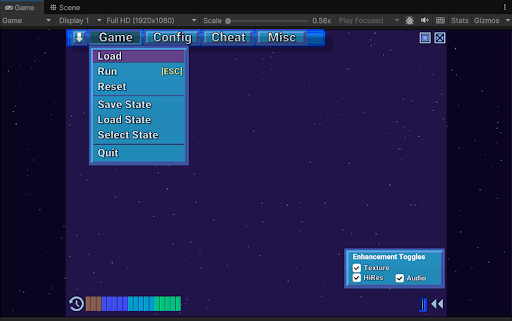
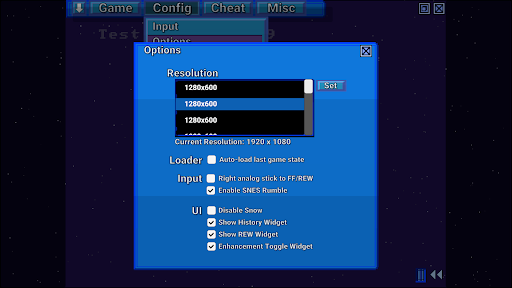
Ласкаво просимо до SUPER ZSNES
Два оригінальних розробники ZSNES нарешті знову разом! Представляємо SUPER ZSNES! Повністю переписаний з нуля, цей емулятор SNES на базі GPU пропонує вам наступне: дещо з знайомого, дещо з нового, а також дещо з того, що виходить за рамки попереднього. Цей емулятор перебуває на ранній стадії розробки та буде продовжувати вдосконалюватися.
ПРИМІТКА: ROM-и наразі можна завантажувати лише з внутрішньої папки програми, тому скопіюйте їх туди. Наразі ми працюємо над покращенням цього.
Основні характеристики
- Набагато точніші ядра процесора та аудіо, ніж в оригінальному ZSNES
- Ядро PPU на базі GPU для роботи в режимі високої роздільної здатності 7 та спеціальних функціях покращення кожної гри
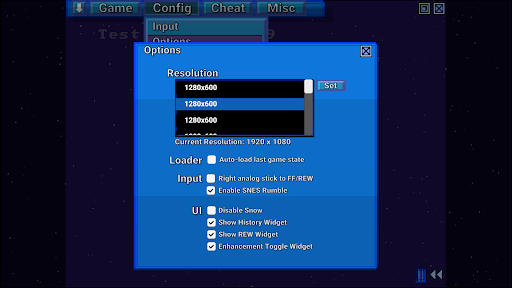
- Класичний інтерфейс користувача зі снігопадом, модернізований з вищою чіткістю та покращеним UX
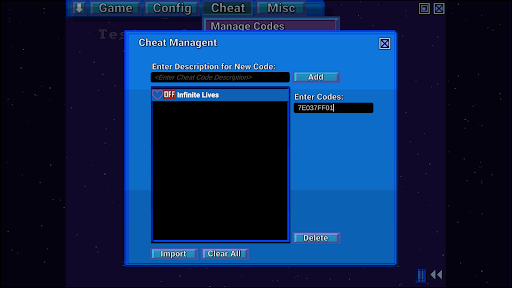
- Перемотування вперед, назад, збереження станів, автоматичне збереження історії, збереження закладок, чіт-коди, швидке завантаження тощо
- Без Vibe-кодування. Класичний стиль розробки.
- Двигун Super Enhancement Engine, де розробники ZSNES покращують ігри по одній.
Двигун Super Enhancement Engine наразі реалізовано з підтримкою 7 популярних ігор. Підтримка більшої кількості ігор продовжуватиме зростати, оскільки цей емулятор перебуває в розробці:
Висока роздільна здатність - використовується не просто автоматичне збільшення роздільної здатності, а внутрішня програма малювання, щоб деталі з вищою роздільною здатністю можна було намалювати вручну, щоб вони виглядали гарно та чітко.
Карта текстур/нормальних зображень - додає деякі приємні деталі до фонів, щоб надати їм вигляду вищої роздільної здатності.
Розгін - вибрані ігри, які часто мають уповільнення, розганяються.
Широкоекранний режим (де доступно) - ми вмикаємо широкоекранний режим, коли гра внутрішньо закодована для підтримки часткового або повного широкоекранного режиму.
Заміна нестисненого аудіо - ми куруємо та вибираємо нестиснені аудіосемпли для заміни оригінальних високостислих аудіосемплів.
3D - наразі підтримується лише в режимі перспективи 7, замінює плитки даними 3D-картографії висоти.
Усі покращення можна окремо вимкнути відповідно до вашого стилю гри.
Примітка: Дані покращень не містять даних ROM або даних, захищених авторським правом. Вам потрібно буде надати ПЗП. Не просіть розробників про ПЗП.
Що буде далі
- Виправлення помилок
- Емуляція спеціальних чіпів (DSP1, SuperFX тощо)
- Додаткова робота з оптимізації
- Більше типів покращень
- Netplay
- Інші функції
Примітки
Це рання збірка, тому все ще є помилки емуляції, а спеціальні чіпи (DSP1, SuperFX тощо) ще не реалізовані. Багато роботи з оптимізації ще не виконано, тому продуктивність може бути трохи повільною.
Show more

1. Download MEmu installer and finish the setup

2. Start MEmu then open Google Play on the desktop

3. Search SUPER ZSNES in Google Play
Install
4. Download and Install SUPER ZSNES
5. On install completion click the icon to start

6. Enjoy playing SUPER ZSNES on PC with MEmu
MEmu App Player є кращим безкоштовним емулятором Android, і 50 мільйонів людей вже користуються його чудовим ігровим досвідом Android. Технологія віртуалізації MEmu дає вам змогу відтворювати тисячі ігор Android на вашому комп'ютері, навіть найбільш насичених графікою.
Bigger screen with better graphics; Long duration, without limitation of battery or mobile data.
Full Keymapping support for precise control of keyboard and mouse or gamepad.
Multiple game accounts or tasks on single PC at one time with Multi-Instance manager.
Play SUPER ZSNES on PC by following steps: