SUPER ZSNES
Aktualisiert
Aktuelle Version
0.110
Angeboten von

Bei all Ihrer Leidenschaft für das Spielen von SUPER ZSNES sollten Ihre Hände nicht auf einen winzigen Bildschirm Ihres Telefons beschränkt sein. Spielen Sie wie ein Profi und übernehmen Sie die volle Kontrolle über Ihr Spiel mit Tastatur und Maus. MEmu bietet Ihnen all die Dinge, die Sie erwarten. Laden Sie SUPER ZSNES herunter und spielen Sie es auf dem PC. Spielen Sie so lange, wie Sie wollen, ohne Grenzwerte für Akku, mobile Daten und störende Anrufe. Das brandneue MEmu 9 ist die beste Wahl, um SUPER ZSNES auf dem PC zu spielen. Das exquisite voreingestellte Tastaturbelegungssystem, das mit unserem Fachwissen vorbereitet wurde, macht SUPER ZSNES zu einem echten PC-Spiel. Der MEmu Multi-Instanz-Manager ermöglicht das Spielen von 2 oder mehr Konten auf demselben Gerät. Und das Wichtigste: Unsere exklusive Emulations-Engine kann das volle Potenzial Ihres PCs freisetzen und für reibungslose Abläufe sorgen.
Mehr anzeigen
Laden Sie Play SUPER ZSNES auf dem PC mit MEmu Android Emulator. Viel Spaß beim Spielen auf großmundieren. Willkommen bei SUPER ZSNES.
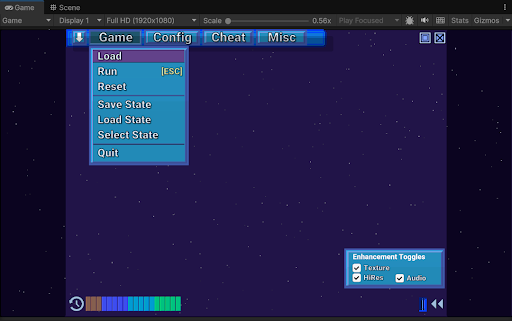
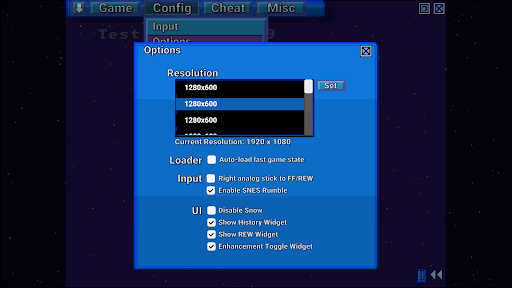
Willkommen bei SUPER ZSNES
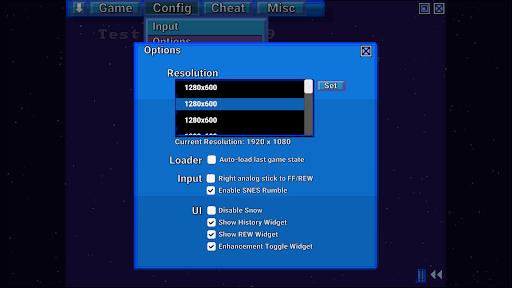
Die beiden ursprünglichen Entwickler von ZSNES sind endlich wieder vereint! Wir präsentieren SUPER ZSNES! Dieser von Grund auf neu entwickelte, GPU-basierte SNES-Emulator bietet Ihnen: Bekanntes, Neues und noch vieles mehr. Der Emulator befindet sich noch in der frühen Entwicklungsphase und wird kontinuierlich verbessert.
HINWEIS: ROMs können derzeit nur aus dem internen App-Ordner geladen werden. Bitte kopieren Sie sie dorthin. Wir arbeiten an einer Verbesserung.
Hauptmerkmale
- Deutlich präzisere CPU- und Audio-Kerne als das Original-ZSNES
- GPU-basierter PPU-Kern für hochauflösenden Mode 7 und spezielle Spielverbesserungen
- Klassische Benutzeroberfläche mit fallendem Schnee, modernisiert mit höherer Auflösung und verbesserter Benutzerfreundlichkeit
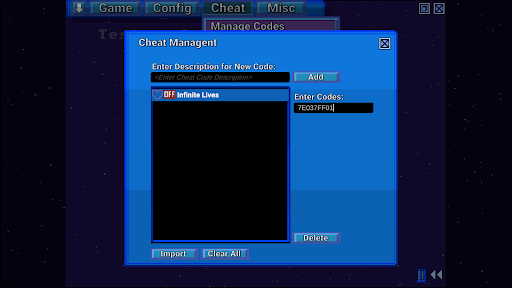
- Vor- und Zurückspulen, Speicherstände, automatisches Speichern, Lesezeichen, Cheat-Codes, Schnellladen und mehr
- Keine Vibe-Codierung. Klassischer Entwicklungsstil.
- Super Enhancement Engine: Die ZSNES-Entwickler verbessern die Spiele nacheinander.
Die Super Enhancement Engine unterstützt aktuell 7 beliebte Spiele. Die Unterstützung für weitere Spiele wird im Zuge der Entwicklung des Emulators stetig erweitert:
Hohe Auflösung: Nicht nur automatisches Upscaling, sondern ein internes Zeichenprogramm sorgt dafür, dass die hochauflösenden Details manuell und scharf dargestellt werden. Textur-/Normal-Map: Fügt den Hintergründen Details hinzu und verleiht ihnen so eine höhere Auflösung. Übertaktung: Ausgewählte Spiele, die häufig zu Rucklern führen, werden übertaktet. Breitbild (sofern verfügbar): Breitbild wird aktiviert, sobald das Spiel intern für teilweises oder vollständiges Breitbild programmiert ist. Unkomprimierte Audioausgabe: Wir wählen unkomprimierte Audiodateien aus, um die originalen, hochkomprimierten Audiodateien zu ersetzen. 3D: Aktuell nur im Perspektivmodus 7 unterstützt; ersetzt Kacheln durch 3D-Höhendaten. Alle Verbesserungen können individuell deaktiviert werden, um den eigenen Spielstil anzupassen.
Hinweis: Die Erweiterungsdaten enthalten keine ROMs oder urheberrechtlich geschützte Daten. Sie müssen die ROMs selbst bereitstellen. Bitte fragen Sie die Entwickler nicht nach ROMs.
Was kommt?
- Fehlerbehebungen
- Emulation spezieller Chips (DSP1, SuperFX usw.)
- Weitere Optimierungen
- Weitere Erweiterungen
- Netzwerkspiel
- Weitere Funktionen
Hinweise: Dies ist eine frühe Version. Daher können noch Emulationsfehler auftreten und die Emulation spezieller Chips (DSP1, SuperFX usw.) ist noch nicht implementiert. Es sind noch einige Optimierungen erforderlich, daher kann die Performance etwas langsam sein.
Mehr anzeigen

1. Laden das MEmu-Installationsprogramm herunter und beenden die Installation

2. MEmu starten und Google Play auf der Homepage öffnen

3. Suchen SUPER ZSNES in Google Play
Install
4. Herunterladen und Installieren SUPER ZSNES
5. Klicken nach Abschluss der Installation auf das Symbol, um es zu starten

6. Viel Spaß beim Spielen von SUPER ZSNES auf dem PC mit MEmu
MEmu App Player ist der beste kostenlose Android-Emulator und 50 Millionen Menschen genießen bereits seine hervorragende Android-Gaming-Erfahrung. Mit der MEmu-Virtualisierungstechnologie können Sie Tausende von Android-Spielen problemlos auf Ihrem PC spielen, selbst bei grafikintensiven Spielen.
BGrößeres Bild mit besserer Grafik; Keine unterbrechungen, keine sorgen um Akku
Komplette Tastenbelegung unterstützt mit Maus und Tastatur oder Controller
Mit dem „Multi-Instance-Manager“ können Sie mehrere Spielkonten oder Spiele gleichzeitig auf einem PC ausführen.
Play SUPER ZSNES on PC by following steps: