Last Valkyrie: Gunlily
Zaktualizowano
Aktualna wersja
Sprzedawca

Przy całej swojej pasji do grania w Last Valkyrie: Gunlily, twoje ręce nie powinny być ograniczone na małym ekranie telefonu. Graj jak zawodowiec i uzyskaj pełną kontrolę nad grą za pomocą klawiatury i myszy. MEmu oferuje ci wszystko, czego oczekujesz. Pobierz i graj Last Valkyrie: Gunlily na PC. Graj tak długo, jak chcesz, bez ograniczeń baterii, danych komórkowych i niepokojących połączeń. Zupełnie nowy MEmu 9 to najlepszy wybór do grania w Last Valkyrie: Gunlily na PC. Przygotowany dzięki naszej wiedzy, znakomity, wstępnie ustawiony system mapowania klawiszy sprawia, że Last Valkyrie: Gunlily jest prawdziwą grą na PC. Zakodowany naszą absorpcją, menedżer wielu instancji umożliwia granie na 2 lub więcej kontach na tym samym urządzeniu. A co najważniejsze, nasz emulator może uwolnić pełny potencjał twojego komputera, sprawić, że wszystko będzie płynne. Dbamy nie tylko o to, jak grasz, ale także o cały proces czerpania radości z grania.
Pokaż więcej
Ciesz się wspaniałym doświadczeniem podczas grania w Last Valkyrie: Gunlily na komputerze z aplikacją MEMU App Player. Jest to potężny darmowy emulator Androida pozwalający grać w tysiące gier na Androida. ast Valkyrie: Gunlily.



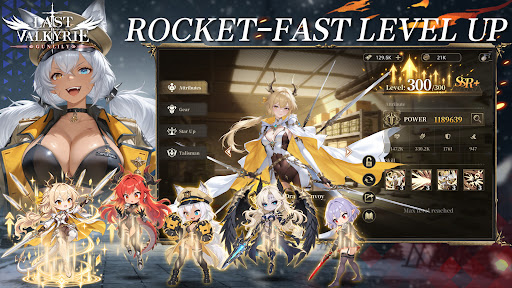
ast Valkyrie: Gunlily
Welcome to a world shattered by apocalypse.
Alien technology reshaped human civilization. The old empire forged the Valkyrie corps through brutal human modification programs. Countless young girls were turned into living weapons, while the truth of these atrocities was buried deep beneath ruins. Gather the surviving fugitive valkyries. Journey across frozen tundras, vast oceans and fractured city states, collect incriminating archives and stand against the formidable New Order regime.
【Game Features】
▸ Relaxed Idle RPG Gameplay Gain resources even while offline. Build your combat squad wisely and advance through stages with auto battle. Experience the full grand storyline during your spare fragmented time.
▸ Deep Post apocalyptic Story driven Experience Immersive motion comic style main story. Multiple conflicting factions: Templar Knights, the reclusive Hellsing clan, and the neutral Silver Union trade syndicate. Each valkyrie has her own unique back story. Uncover the dreadful conspiracy behind the Tyrant Purge Protocol.
▸ Strategic Squad Building Collect dozens of valkyrie heroines with one of a kind modified combat powers. Mix faction synergies, equipment and exclusive special skills to build your squad for PVE dungeons and tough boss encounters.
▸ Cinematic Hand drawn 2D Anime Cut scenes Key story moments brought to life with hand drawn 2D anime PV. Grim dark wasteland art style, delivering an authentic motion comic viewing experience.
▸ Comprehensive Character Progression Level up, awakening, equipment refinement and affinity systems unlock personal character episodes. Uncover the tragic past hidden under each heroine’s experimental scars.
Beneath the false golden age built upon lies, the doomsday clock keeps ticking. Flight is over, and resistance begins. Travel from frozen tundra to storm ravaged northern seas. Lead your valkyries and fight for all those who yearn to survive.
Pokaż więcej

1. Pobierz instalator MEmu i zakończ instalację

2. Uruchom MEmu, a następnie otwórz Google Play na pulpicie

3. Wyszukaj Last Valkyrie: Gunlily w Google Play
Install
4. Pobierz i zainstaluj Last Valkyrie: Gunlily
5. Po zakończeniu instalacji kliknij ikonę, aby rozpocząć

6. Ciesz się grą Last Valkyrie: Gunlily na PC z MEmu
MEmu Play to najlepszy emulator Androida, a 100 milionów ludzi już korzysta z jego i dosta doskonałe wrażenia z gier na Androida. Technologia wirtualizacji MEmu umożliwia płynne granie w tysiące gier Androida na komputerze, nawet tych najbardziej wymagających grafiki.
Większy ekran z lepszą grafiką; Długi czas, bez ograniczeń baterii lub danych mobilnych.
Pełna obsługa mapowania klawiszy dla precyzyjnego sterowania klawiaturą i myszą lub gamepadem.
Wiele kont gier lub zadań na jednym komputerze jednocześnie z menedżerem wielu instancji.
Play Last Valkyrie: Gunlily on PC by following steps: