ALLfiring
อัปเดตเมื่อ
เวอร์ชันปัจจุบัน
1.1.19
ให้บริการโดย

เวลาคุณเล่น ALLfiring, คุณอาจรู้สึกว่ามือคุณอาจบังจอแล้วทำให้ไม่ได้เล่นแบบเต็มที่. เล่นแบบไร้ขีดจำกัดด้วยเม้าส์และคีย์บอร์ด. MEmu มีตัวเลือกหลายอย่างให้คุณใช้งานเกมที่คุณเล่นแบบที่คุณต้องการ. ดาวน์โหลดและเล่น ALLfiring บน PC. เล่นนานแค่ไหนก็ได้, ไม่ต้องชาร์จแบตเตอรี่, หรือเจอคนโทรเข้ามาระหว่างเล่น. MEmu 9 เป็นตัวเลือกสำหรับการเล่น ALLfiring บน PC. ทางทีมงานเราได้ปรับแต่งเกม, ปรับให้เล่นเกมบางเกมได้เหมือนเล่น ALLfiring เป็นเกม PC เช่นเล็งด้วยเม้าส์หรือใช้คีย์บอร์ด. ระบบของเรายังทำให้คุณสามารถเปิดเล่นได้มากกว่า 2 เกมพร้อมๆกันในคอมของคุณ. และที่สำคัญที่สุด, ระบบโปรแกรมของเราสามารถทำให้คุณใช้ระบบของ PC ทำให้เกมลื่นเหมือนกับใช้โทรศัพท์รุ่นล่าสุด. เราไม่ได้ดูแลเรื่องการเล่นเกม, แต่เราดูแลถึงความสนุกสนานที่คุณได้จากการเล่นด้วย.
แสดงเพิ่มเติม
ดาวน์โหลด ALLfiring บน PC ด้วย MEmu Android Emulator สนุกกับการเล่นบนหน้าจอขนาดใหญ่ ALLfiring – Carry the Flame of Hope.
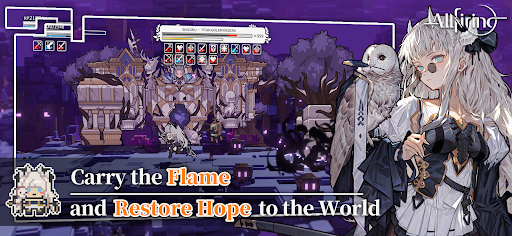
ALLfiring – Carry the Flame of Hope
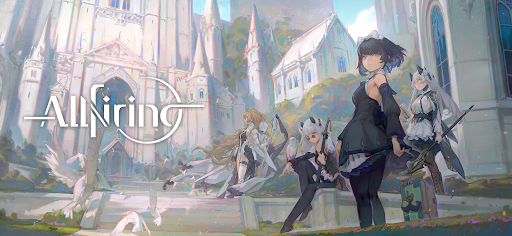
Enter a beautiful anime-style action RPG set in a world consumed by darkness.
Explore mysterious lands, battle powerful enemies, and fight alongside unique companions in an epic adventure.
As the last keeper of a fading flame, your journey will uncover forgotten history and bring hope back to a shattered world.
Explore a Vast Fantasy World
Travel across diverse landscapes filled with danger and mystery.
From frozen wilderness to ancient forests and bustling cities, every region holds secrets waiting to be discovered.
Discover hidden paths, forgotten ruins, and stories buried in the past as you journey across the world.
Voxel Sandbox Exploration
Experience unique voxel-style sandbox maps where every area is designed for exploration.
• Jump across layered environments
• Discover hidden routes and treasure
• Solve environmental puzzles
• Interact with objects throughout the world
Adventure awaits around every corner.
Fast-Paced Action Combat
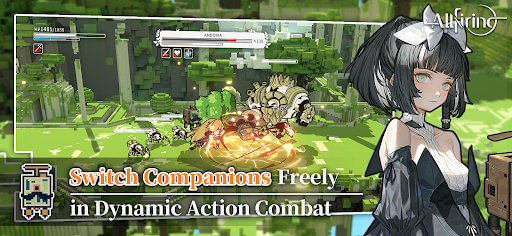
Enjoy smooth side-scrolling action combat with a three-character switching system.
Switch between teammates in real time, combine attacks, and unleash powerful abilities to defeat dangerous enemies.
Build your team and master the flow of battle.
Memorable Anime Characters
Meet a diverse cast of companions with unique personalities and abilities.
Each character features beautiful artwork, expressive animations, and their own personal story waiting to unfold.
Choose your allies and begin your adventure together.
Even in a world covered by shadow, the flame of hope still burns.
Step forward, explore the unknown, and carry the flame into the future.
Your adventure begins now......
Follow ALLfiring on our official channels for the latest updates:
Facebook:https://www.facebook.com/profile.php?id=61585042701755
Discord:https://discord.gg/Bps5JRkSgQ
แสดงเพิ่มเติม

1. ดาวน์โหลดตัวติดตั้ง MEmu และสิ้นสุดการติดตั้ง

2. เริ่ม MEmu จากนั้นเปิด Google Play บนหน้าแรก

3. ค้นหา ALLfiring ใน Google Play
Install
4. ดาวน์โหลดและติดตั้ง ALLfiring
5. เมื่อติดตั้งเสร็จให้คลิกที่ไอคอนเพื่อเริ่มใช้งาน

6. สนุกกับการเล่น ALLfiring บนพีซีด้วย MEmu
MEmu App Player เป็นอีมูเลเตอร์ Android ที่ดีที่สุดและผู้คนกว่า 50 ล้านคนเพลิดเพลินไปกับประสบการณ์การเล่นเกม Android ที่ยอดเยี่ยม เทคโนโลยีการจำลองเสมือนของ MEmu ช่วยให้คุณเล่นเกม Android หลายพันเกมได้อย่างราบรื่นบนพีซีของคุณแม้แต่เกมที่ต้องใช้กราฟิกมากที่สุด
จอใหญ่และกราฟฟิกสวยกว่า; เล่นได้นาน, ไม่ต้องใช้แบตเตอรี่โทรศัพท์หรือเน็ตโทรศัพท์.
ระบบปรับแต่งปุ่มคีย์บอร์ดและเม้าส์ตามที่คุณเลือก
เล่นมากกว่าหนึ่งเกมบน PC ในเวลาเดียวกันด้วยระบบหลายจอหรือ Multi-Instance manager.
Play ALLfiring on PC by following steps: