Batomon Showdown
อัปเดตเมื่อ
เวอร์ชันปัจจุบัน
1.4.1
ให้บริการโดย

เวลาคุณเล่น Batomon Showdown, คุณอาจรู้สึกว่ามือคุณอาจบังจอแล้วทำให้ไม่ได้เล่นแบบเต็มที่. เล่นแบบไร้ขีดจำกัดด้วยเม้าส์และคีย์บอร์ด. MEmu มีตัวเลือกหลายอย่างให้คุณใช้งานเกมที่คุณเล่นแบบที่คุณต้องการ. ดาวน์โหลดและเล่น Batomon Showdown บน PC. เล่นนานแค่ไหนก็ได้, ไม่ต้องชาร์จแบตเตอรี่, หรือเจอคนโทรเข้ามาระหว่างเล่น. MEmu 9 เป็นตัวเลือกสำหรับการเล่น Batomon Showdown บน PC. ทางทีมงานเราได้ปรับแต่งเกม, ปรับให้เล่นเกมบางเกมได้เหมือนเล่น Batomon Showdown เป็นเกม PC เช่นเล็งด้วยเม้าส์หรือใช้คีย์บอร์ด. ระบบของเรายังทำให้คุณสามารถเปิดเล่นได้มากกว่า 2 เกมพร้อมๆกันในคอมของคุณ. และที่สำคัญที่สุด, ระบบโปรแกรมของเราสามารถทำให้คุณใช้ระบบของ PC ทำให้เกมลื่นเหมือนกับใช้โทรศัพท์รุ่นล่าสุด. เราไม่ได้ดูแลเรื่องการเล่นเกม, แต่เราดูแลถึงความสนุกสนานที่คุณได้จากการเล่นด้วย.
แสดงเพิ่มเติม
ดาวน์โหลด Batomon Showdown บน PC ด้วย MEmu Android Emulator สนุกกับการเล่นบนหน้าจอขนาดใหญ่ เกมวางแผนสะสมโปเกมอนแบบออโต้แบทเทิลที่มีบาโตมอนมากกว่า 100 ตัวและความสนุกไม่รู้จบ!
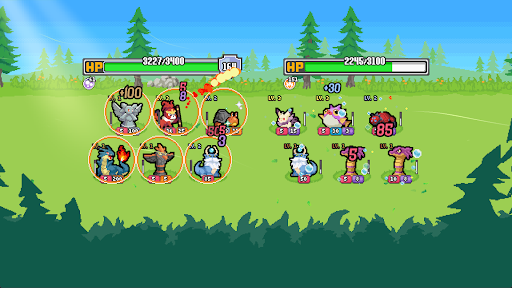
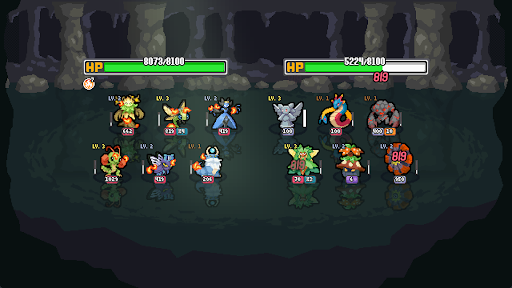
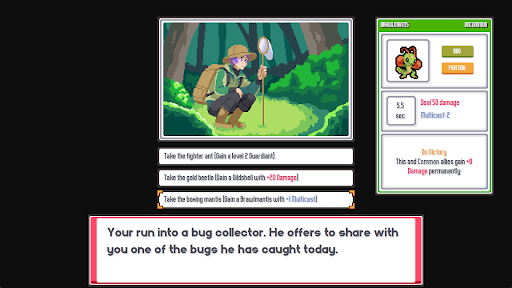
เกมวางแผนสะสมโปเกมอนแบบออโต้แบทเทิลที่มีบาโตมอนมากกว่า 100 ตัวและความสนุกไม่รู้จบ!
รวบรวมทีมบาโตมอนและค้นพบการผสมผสานและการทำงานร่วมกันที่พลิกเกม!
【สร้างทีมสุดยอด】
สร้างทีมผ่านการผสมผสานที่ไม่มีที่สิ้นสุดของบาโตมอน เทรนเนอร์ การเผชิญหน้า เครื่องประดับ และไอเท็ม ใช้ประโยชน์จากการทำงานร่วมกันและการผสมผสานของบาโตมอนที่พลิกเกมและทำให้คุณแข็งแกร่งขึ้น ต่อสู้และเอาชนะผู้เล่นคนอื่น ๆ บนเส้นทางของคุณสู่การเป็นแชมป์
【เลือกเทรนเนอร์ของคุณ】
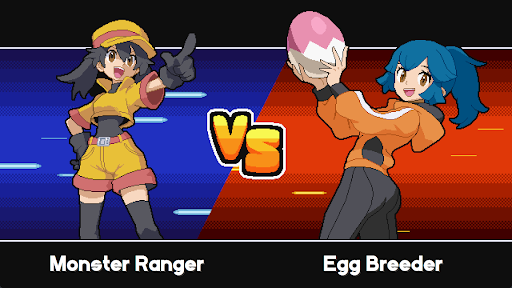
เชี่ยวชาญเทรนเนอร์ที่หลากหลาย แต่ละคนนำความสามารถที่เปลี่ยนแปลงเกมมาสู่สนาม ตั้งแต่ผู้จับแมลงสุดแปลกและผู้กระซิบมังกรไปจนถึงเชฟที่สามารถปรุงอาหารประเภทใหม่ให้กับบาโตมอนของคุณ เทรนเนอร์แต่ละคนนำเสนอเส้นทางใหม่สู่การเป็นแชมป์
【เพิ่มเลเวลบาโตมอนของคุณ】
บาโตมอนทุกตัวมีศักยภาพที่ไม่มีที่สิ้นสุด ด้วยระบบความสามารถ เครื่องประดับ และไอเท็มเฉพาะตัว คุณสามารถผลักดันทีมของคุณให้ก้าวข้ามขีดจำกัด วางแผนกลยุทธ์เพื่อคว้าชัยชนะ เพราะ Batomon ทุกตัวสามารถกลายเป็นตัวทำลายล้างเมตาได้
【ต่อสู้กับผู้เล่นคนอื่น】
ทุกการต่อสู้คือการค้นพบใหม่ ดำดิ่งสู่โหมดผู้เล่นหลายคนแบบไม่พร้อมกันเพื่อเผชิญหน้ากับทีมที่สร้างขึ้นโดยผู้เล่นหลากหลายรูปแบบ เล่นในจังหวะสบายๆ ของคุณเองโดยไม่มีตัวจับเวลามาเร่งการตัดสินใจ สร้างทีมสุดยอดเพื่อให้โลกได้ลองทำลายมัน
แสดงเพิ่มเติม

1. ดาวน์โหลดตัวติดตั้ง MEmu และสิ้นสุดการติดตั้ง

2. เริ่ม MEmu จากนั้นเปิด Google Play บนหน้าแรก

3. ค้นหา Batomon Showdown ใน Google Play
Install
4. ดาวน์โหลดและติดตั้ง Batomon Showdown
5. เมื่อติดตั้งเสร็จให้คลิกที่ไอคอนเพื่อเริ่มใช้งาน

6. สนุกกับการเล่น Batomon Showdown บนพีซีด้วย MEmu
MEmu App Player เป็นอีมูเลเตอร์ Android ที่ดีที่สุดและผู้คนกว่า 50 ล้านคนเพลิดเพลินไปกับประสบการณ์การเล่นเกม Android ที่ยอดเยี่ยม เทคโนโลยีการจำลองเสมือนของ MEmu ช่วยให้คุณเล่นเกม Android หลายพันเกมได้อย่างราบรื่นบนพีซีของคุณแม้แต่เกมที่ต้องใช้กราฟิกมากที่สุด
จอใหญ่และกราฟฟิกสวยกว่า; เล่นได้นาน, ไม่ต้องใช้แบตเตอรี่โทรศัพท์หรือเน็ตโทรศัพท์.
ระบบปรับแต่งปุ่มคีย์บอร์ดและเม้าส์ตามที่คุณเลือก
เล่นมากกว่าหนึ่งเกมบน PC ในเวลาเดียวกันด้วยระบบหลายจอหรือ Multi-Instance manager.
Play Batomon Showdown on PC by following steps:





















![[ไกด์เกม] CookieRun Classic แนะนำ 5 คุกกี้น่าปั้น น่าลงทุน ที่มือใหม่ห้ามพลาด! (เล่นบน PC ผ่าน MEmu ให้ลื่นสุด ๆ) PC](https://www.memuplay.com/blog/wp-content/uploads/2026/08/579c01ab-a953-45b3-8115-9b6279b7d6f9.png)