Jigsaw Crossword
อัปเดตเมื่อ
เวอร์ชันปัจจุบัน
3.2.2
ให้บริการโดย

เวลาคุณเล่น Jigsaw Crossword, คุณอาจรู้สึกว่ามือคุณอาจบังจอแล้วทำให้ไม่ได้เล่นแบบเต็มที่. เล่นแบบไร้ขีดจำกัดด้วยเม้าส์และคีย์บอร์ด. MEmu มีตัวเลือกหลายอย่างให้คุณใช้งานเกมที่คุณเล่นแบบที่คุณต้องการ. ดาวน์โหลดและเล่น Jigsaw Crossword บน PC. เล่นนานแค่ไหนก็ได้, ไม่ต้องชาร์จแบตเตอรี่, หรือเจอคนโทรเข้ามาระหว่างเล่น. MEmu 9 เป็นตัวเลือกสำหรับการเล่น Jigsaw Crossword บน PC. ทางทีมงานเราได้ปรับแต่งเกม, ปรับให้เล่นเกมบางเกมได้เหมือนเล่น Jigsaw Crossword เป็นเกม PC เช่นเล็งด้วยเม้าส์หรือใช้คีย์บอร์ด. ระบบของเรายังทำให้คุณสามารถเปิดเล่นได้มากกว่า 2 เกมพร้อมๆกันในคอมของคุณ. และที่สำคัญที่สุด, ระบบโปรแกรมของเราสามารถทำให้คุณใช้ระบบของ PC ทำให้เกมลื่นเหมือนกับใช้โทรศัพท์รุ่นล่าสุด. เราไม่ได้ดูแลเรื่องการเล่นเกม, แต่เราดูแลถึงความสนุกสนานที่คุณได้จากการเล่นด้วย.
แสดงเพิ่มเติม
ดาวน์โหลด Jigsaw Crossword บน PC ด้วย MEmu Android Emulator สนุกกับการเล่นบนหน้าจอขนาดใหญ่ Recreate a crossword with jigsaw pieces.
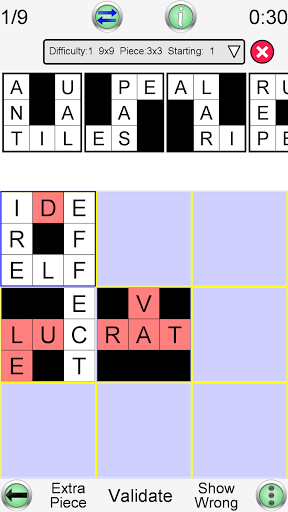
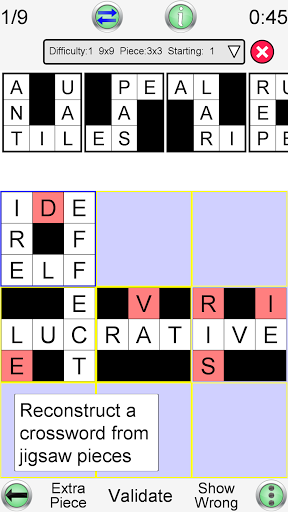
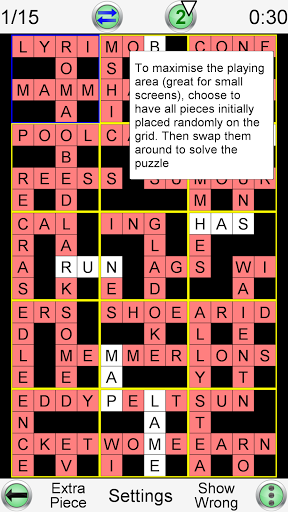
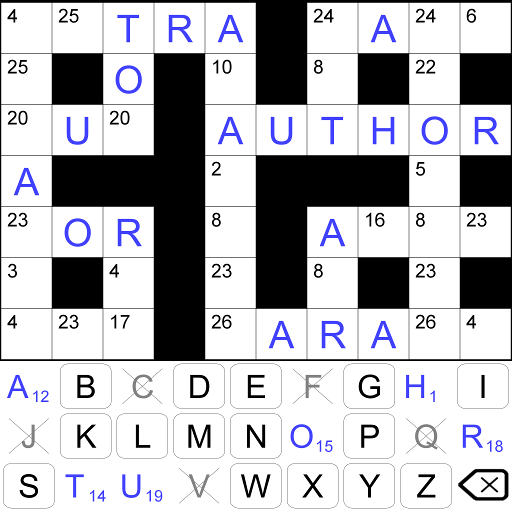
Recreate a crossword with jigsaw pieces. The letters on the pieces help you complete the puzzle. Easy to use interface, drag and drop puzzle pieces across the screen.
This game is also known as pieceword, bits & pieces, jigcross, jigsnip and building blocks.
The words to find are in English, or you can play in 35 other languages.
• Play an unlimited number of different puzzles!!
• Multiple difficulty options. Play one of 10 built in difficulty levels, or use the custom mode to configure the difficulty of the game to exactly what you want
• Four different sizes of puzzle piece are possible
• Pieces can start outside the grid (classic version), or all are randomly placed on the grid and are then swapped to find the solution (ideal for smaller screens)
• Designed for fun games from the smallest mobile phones up to the largest tablets
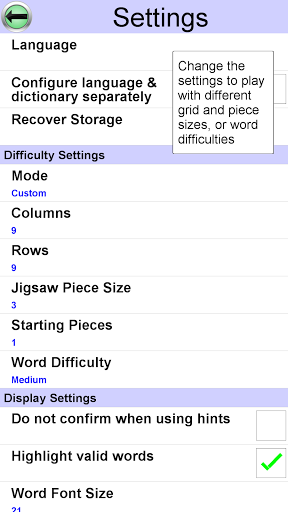
You can configure:
1) Grid size
Specify exactly how many columns and rows to use (from 3 to 20). Even non square grids (e.g. 12x15) are possible
2) Difficulty settings
Change the difficulty of the puzzles, from easy to very difficult
3) Language
Choose the language of the word list, from a large range of downloadable dictionaries. 36 languages are currently available (see below)
4) Orientation
Can be played in portrait or landscape mode. Just rotate your device and the display adjusts automatically
This app gives you the ultimate power to play the game just the way you want.
Game aids:
1) As words are formed, then valid words are highlighted
2) You can choose to have one or more pieces placed into their correct position at the beginning of the game
3) During the game, you can request a random puzzle piece to be placed into its correct position
4) You can ask the game if a selected puzzle piece is in the correct position
Each game is assigned a difficulty level from 0 (easy) to 9 (very hard). The difficulty level is determined by the settings or the difficulty selector. Each difficulty level maintains the high scores (measured by fastest time to complete the game). The game displays the best 20 scores for each difficulty level.
Other features unique to this app:
1) View the definition of the word from an online dictionary (internet connection required)
2) When you play with a word list in a foreign language, the word definition will (where possible) be in your own language. This is great for language learning!
You can play this app in the following languages: English, French, German, Spanish, Portuguese, Italian, Dutch, Swedish, Danish, Norwegian, Finnish, Polish, Hungarian, Czech, Russian, Arabic, Bulgarian, Croatian, Greek, Indonesian, Romanian, Serbian, Serbo-Croatian, Slovak, Slovene, Turkish, Ukrainian, Afrikaans, Albanian, Azeri, Estonian, Latvian, Lithuanian, Catalan, Galician, Tagalog
แสดงเพิ่มเติม

1. ดาวน์โหลดตัวติดตั้ง MEmu และสิ้นสุดการติดตั้ง

2. เริ่ม MEmu จากนั้นเปิด Google Play บนหน้าแรก

3. ค้นหา Jigsaw Crossword ใน Google Play
Install
4. ดาวน์โหลดและติดตั้ง Jigsaw Crossword
5. เมื่อติดตั้งเสร็จให้คลิกที่ไอคอนเพื่อเริ่มใช้งาน

6. สนุกกับการเล่น Jigsaw Crossword บนพีซีด้วย MEmu
MEmu App Player เป็นอีมูเลเตอร์ Android ที่ดีที่สุดและผู้คนกว่า 50 ล้านคนเพลิดเพลินไปกับประสบการณ์การเล่นเกม Android ที่ยอดเยี่ยม เทคโนโลยีการจำลองเสมือนของ MEmu ช่วยให้คุณเล่นเกม Android หลายพันเกมได้อย่างราบรื่นบนพีซีของคุณแม้แต่เกมที่ต้องใช้กราฟิกมากที่สุด
จอใหญ่และกราฟฟิกสวยกว่า; เล่นได้นาน, ไม่ต้องใช้แบตเตอรี่โทรศัพท์หรือเน็ตโทรศัพท์.
ระบบปรับแต่งปุ่มคีย์บอร์ดและเม้าส์ตามที่คุณเลือก
เล่นมากกว่าหนึ่งเกมบน PC ในเวลาเดียวกันด้วยระบบหลายจอหรือ Multi-Instance manager.
Play Jigsaw Crossword on PC by following steps: