Make Words
อัปเดตเมื่อ
เวอร์ชันปัจจุบัน
7.5_appod
ให้บริการโดย

เวลาคุณเล่น Make Words, คุณอาจรู้สึกว่ามือคุณอาจบังจอแล้วทำให้ไม่ได้เล่นแบบเต็มที่. เล่นแบบไร้ขีดจำกัดด้วยเม้าส์และคีย์บอร์ด. MEmu มีตัวเลือกหลายอย่างให้คุณใช้งานเกมที่คุณเล่นแบบที่คุณต้องการ. ดาวน์โหลดและเล่น Make Words บน PC. เล่นนานแค่ไหนก็ได้, ไม่ต้องชาร์จแบตเตอรี่, หรือเจอคนโทรเข้ามาระหว่างเล่น. MEmu 9 เป็นตัวเลือกสำหรับการเล่น Make Words บน PC. ทางทีมงานเราได้ปรับแต่งเกม, ปรับให้เล่นเกมบางเกมได้เหมือนเล่น Make Words เป็นเกม PC เช่นเล็งด้วยเม้าส์หรือใช้คีย์บอร์ด. ระบบของเรายังทำให้คุณสามารถเปิดเล่นได้มากกว่า 2 เกมพร้อมๆกันในคอมของคุณ. และที่สำคัญที่สุด, ระบบโปรแกรมของเราสามารถทำให้คุณใช้ระบบของ PC ทำให้เกมลื่นเหมือนกับใช้โทรศัพท์รุ่นล่าสุด. เราไม่ได้ดูแลเรื่องการเล่นเกม, แต่เราดูแลถึงความสนุกสนานที่คุณได้จากการเล่นด้วย.
แสดงเพิ่มเติม
ดาวน์โหลด Make Words บน PC ด้วย MEmu Android Emulator สนุกกับการเล่นบนหน้าจอขนาดใหญ่ Make Words is a classic brain teasing addictive word game.
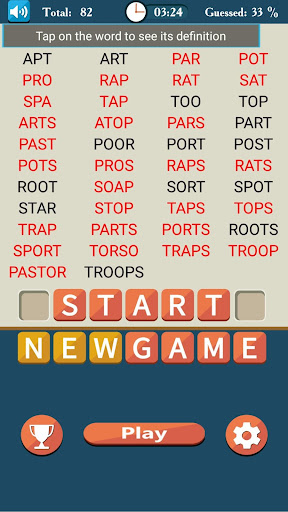
Make Words is a classic brain teasing addictive word game.
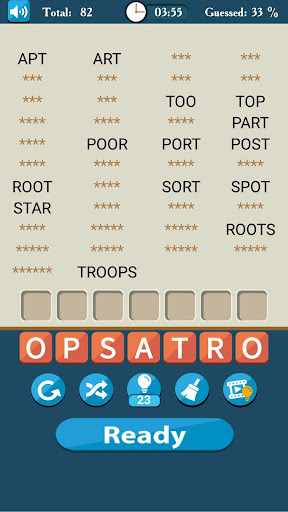
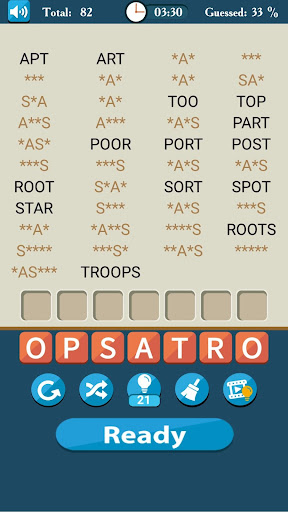
The goal of the word game is to create as many words as you can from given 7 letters .
If you find all hidden words you will beat uncrossed word puzzles and get bonus points.
Connect letters and try to find all hidden uncrossed words.
How many words can you find?
Play our word game and improve you vocabulary.
Find new words and improve your spelling.
Make Words game main features.
* Different dictionary types.
* Different difficulty levels
* More than 15000 different uncrossed word brain games
* Hint options
* Complete description for each word
* Automatic Save/Continue game option
* Global Scoring system
* Nice graphics
Start your word hunt and find all hidden words.
To beat the level place the letters in correct order and solve the anagram
There are three different dictionaries in the game, you can select the one, that matches you the most.
Basic Dictionary - only the basic English words. This dictionary is the best option for non native English speakers , kids. This will be a real word relax game.
Standard Dictionary - the most common and widely used English words. This is the best choice for native speakers and for those who want to improve their English spelling and vocabulary.
Extended Dictionary - besides most used words contains also very rare and archaic words. This will be an interesting choice for English Professionals and for those you wants to train their mind with word brain games.
Make Words will provide you many and many hours of entertainment and relaxed gameplay while you are solving uncrossed word puzzles.
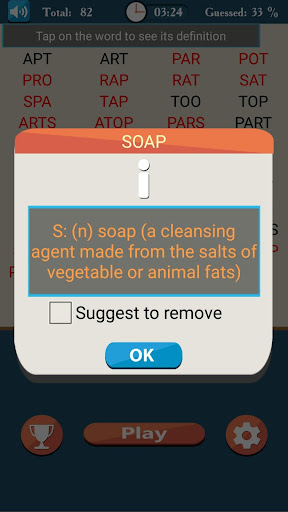
When you guess a word, you get some points and additional game time for search of other hidden words. If you have opened some words and can't guess anything else, you can press the "Give Up" button and the board with hidden words will be opened. The words you have not guessed are marked in red. If the word is unfamiliar to You, You can tap the word to see its definition.
You can compete with dozens of other Make Words fans by Global Scoring System.
It can be a fantastic challenge for you.
There is a Hint option to help you to continue your word search and find the hidden words. It will open a single random letter from each hidden word. You can earn hints when you guess and find all the words on the board.
This game will be helpful for people who want to improve their English.
If you like word games you will definitely love Make Words.
Make Words uses dictionary which contain nouns, verbs, plurals and also some rare words. Find words complete level and move on.
There is no need to search definition of words you can look up the definition of every word you want by tapping on unfamiliar word.
When you form a 3 letter words, you get 3 points and additional 10 seconds.
Similarly 4 letter words gives you 4 points and additional 15 seconds.
5 letter words gives you 5 points and additional 20 seconds.
6 letter words gives you 6 points and additional 25 seconds.
To find a 7 letter words you will need to solve anagrams in each level.
If you are looking for a good word game like boggle games, word search games Make Words is the game you need!
This game is like a word unscrambler, there you need to rearrange letters to form new words.
If you like word brain games, word search games, if you like to solve crosswords and anagrams than this word guessing games is just for you.
Have fun with this word relax game.
Expand you vocabulary.
แสดงเพิ่มเติม

1. ดาวน์โหลดตัวติดตั้ง MEmu และสิ้นสุดการติดตั้ง

2. เริ่ม MEmu จากนั้นเปิด Google Play บนหน้าแรก

3. ค้นหา Make Words ใน Google Play
Install
4. ดาวน์โหลดและติดตั้ง Make Words
5. เมื่อติดตั้งเสร็จให้คลิกที่ไอคอนเพื่อเริ่มใช้งาน

6. สนุกกับการเล่น Make Words บนพีซีด้วย MEmu
MEmu App Player เป็นอีมูเลเตอร์ Android ที่ดีที่สุดและผู้คนกว่า 50 ล้านคนเพลิดเพลินไปกับประสบการณ์การเล่นเกม Android ที่ยอดเยี่ยม เทคโนโลยีการจำลองเสมือนของ MEmu ช่วยให้คุณเล่นเกม Android หลายพันเกมได้อย่างราบรื่นบนพีซีของคุณแม้แต่เกมที่ต้องใช้กราฟิกมากที่สุด
จอใหญ่และกราฟฟิกสวยกว่า; เล่นได้นาน, ไม่ต้องใช้แบตเตอรี่โทรศัพท์หรือเน็ตโทรศัพท์.
ระบบปรับแต่งปุ่มคีย์บอร์ดและเม้าส์ตามที่คุณเลือก
เล่นมากกว่าหนึ่งเกมบน PC ในเวลาเดียวกันด้วยระบบหลายจอหรือ Multi-Instance manager.
Play Make Words on PC by following steps: