Planted!
อัปเดตเมื่อ
เวอร์ชันปัจจุบัน
ให้บริการโดย

เวลาคุณเล่น Planted!, คุณอาจรู้สึกว่ามือคุณอาจบังจอแล้วทำให้ไม่ได้เล่นแบบเต็มที่. เล่นแบบไร้ขีดจำกัดด้วยเม้าส์และคีย์บอร์ด. MEmu มีตัวเลือกหลายอย่างให้คุณใช้งานเกมที่คุณเล่นแบบที่คุณต้องการ. ดาวน์โหลดและเล่น Planted! บน PC. เล่นนานแค่ไหนก็ได้, ไม่ต้องชาร์จแบตเตอรี่, หรือเจอคนโทรเข้ามาระหว่างเล่น. MEmu 9 เป็นตัวเลือกสำหรับการเล่น Planted! บน PC. ทางทีมงานเราได้ปรับแต่งเกม, ปรับให้เล่นเกมบางเกมได้เหมือนเล่น Planted! เป็นเกม PC เช่นเล็งด้วยเม้าส์หรือใช้คีย์บอร์ด. ระบบของเรายังทำให้คุณสามารถเปิดเล่นได้มากกว่า 2 เกมพร้อมๆกันในคอมของคุณ. และที่สำคัญที่สุด, ระบบโปรแกรมของเราสามารถทำให้คุณใช้ระบบของ PC ทำให้เกมลื่นเหมือนกับใช้โทรศัพท์รุ่นล่าสุด. เราไม่ได้ดูแลเรื่องการเล่นเกม, แต่เราดูแลถึงความสนุกสนานที่คุณได้จากการเล่นด้วย.
แสดงเพิ่มเติม
ดาวน์โหลด Planted! บน PC ด้วย MEmu Android Emulator สนุกกับการเล่นบนหน้าจอขนาดใหญ่ Sow.
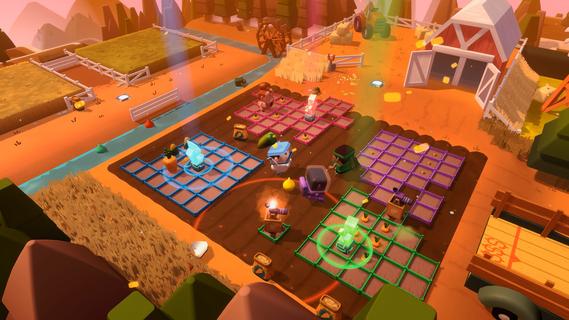
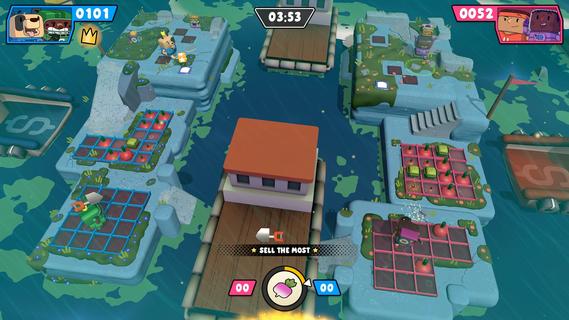
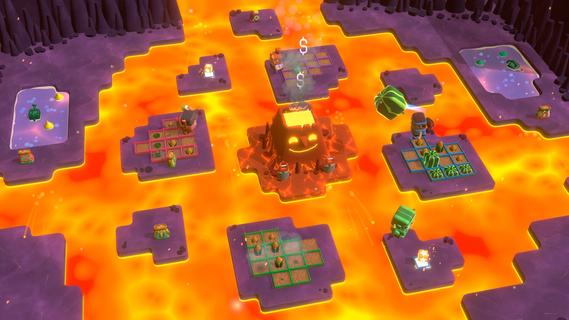
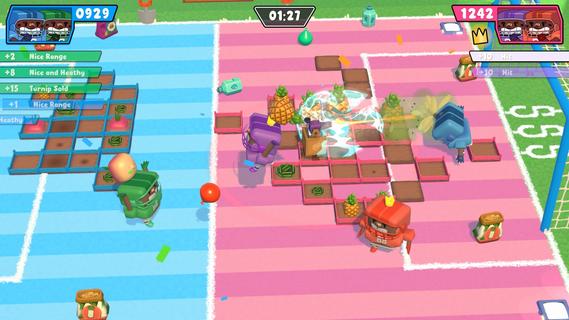
Sow. Grow. Throw. Planted! is a chaotic 1-4 player combat game where gardens are arenas, plants are weapons, and grudges are settled one harvest at a time.Extreme gardening is a competitive sport now. You're welcome.Planted! Is a horticultural combat party game where gardens are arenas, plants become weapons, and the gap between "tending your crops" and "launching them at your opponents" is smaller than you'd think.SOWClaim your patch, plant your crops, and stake your territory before your rivals do. Every seed you sow could be a decision play it safe with a steady harvest, or gamble on a high-risk, high-reward crop that could change everything... or just let your friends do all the hard work and steal their stuff tooGROWFertilise strategically, grow colossal crops, and maximise your haul, but watch your back! That person you thought was your friend? They're probably eyeing your patch. The bigger the crop, the bigger the target on your back, so grow smart, grow fast, and never let your guard down.THROWLaunch your produce, score your points... whilst detonate weed bombs, dodging spud turrets and all that other pure cultivated chaos that's ongoing. With 12 powerups at your disposal and mayhem around every corner, the garden is never as innocent as it looks. FeaturesãUp to 4 Players â Online, offline, split screen, bots and cross-play supportedã8 Diverse Biomes â Each with unique twists, hazards and...CHAOSã12 Powerups â Because apparently a garden isn't dangerous enough on its own!ãSolo Campaign â A handcrafted story mode for lone green thumbsãAn Unlikely Cast â Pick from a cast of 12 unlikely gardening rivals
แสดงเพิ่มเติม

1. ดาวน์โหลดตัวติดตั้ง MEmu และสิ้นสุดการติดตั้ง

2. เริ่ม MEmu จากนั้นเปิด Google Play บนหน้าแรก

3. ค้นหา Planted! ใน Google Play
Install
4. ดาวน์โหลดและติดตั้ง Planted!
5. เมื่อติดตั้งเสร็จให้คลิกที่ไอคอนเพื่อเริ่มใช้งาน

6. สนุกกับการเล่น Planted! บนพีซีด้วย MEmu
MEmu App Player เป็นอีมูเลเตอร์ Android ที่ดีที่สุดและผู้คนกว่า 50 ล้านคนเพลิดเพลินไปกับประสบการณ์การเล่นเกม Android ที่ยอดเยี่ยม เทคโนโลยีการจำลองเสมือนของ MEmu ช่วยให้คุณเล่นเกม Android หลายพันเกมได้อย่างราบรื่นบนพีซีของคุณแม้แต่เกมที่ต้องใช้กราฟิกมากที่สุด
จอใหญ่และกราฟฟิกสวยกว่า; เล่นได้นาน, ไม่ต้องใช้แบตเตอรี่โทรศัพท์หรือเน็ตโทรศัพท์.
ระบบปรับแต่งปุ่มคีย์บอร์ดและเม้าส์ตามที่คุณเลือก
เล่นมากกว่าหนึ่งเกมบน PC ในเวลาเดียวกันด้วยระบบหลายจอหรือ Multi-Instance manager.
Play Planted! on PC by following steps:























![[ไกด์เกม] CookieRun Classic แนะนำ 5 คุกกี้น่าปั้น น่าลงทุน ที่มือใหม่ห้ามพลาด! (เล่นบน PC ผ่าน MEmu ให้ลื่นสุด ๆ) PC](https://www.memuplay.com/blog/wp-content/uploads/2026/08/579c01ab-a953-45b3-8115-9b6279b7d6f9.png)


















