Project Drift 2.0 : Online
อัปเดตเมื่อ
เวอร์ชันปัจจุบัน
122
ให้บริการโดย

เวลาคุณเล่น Project Drift 2.0 : Online, คุณอาจรู้สึกว่ามือคุณอาจบังจอแล้วทำให้ไม่ได้เล่นแบบเต็มที่. เล่นแบบไร้ขีดจำกัดด้วยเม้าส์และคีย์บอร์ด. MEmu มีตัวเลือกหลายอย่างให้คุณใช้งานเกมที่คุณเล่นแบบที่คุณต้องการ. ดาวน์โหลดและเล่น Project Drift 2.0 : Online บน PC. เล่นนานแค่ไหนก็ได้, ไม่ต้องชาร์จแบตเตอรี่, หรือเจอคนโทรเข้ามาระหว่างเล่น. MEmu 9 เป็นตัวเลือกสำหรับการเล่น Project Drift 2.0 : Online บน PC. ทางทีมงานเราได้ปรับแต่งเกม, ปรับให้เล่นเกมบางเกมได้เหมือนเล่น Project Drift 2.0 : Online เป็นเกม PC เช่นเล็งด้วยเม้าส์หรือใช้คีย์บอร์ด. ระบบของเรายังทำให้คุณสามารถเปิดเล่นได้มากกว่า 2 เกมพร้อมๆกันในคอมของคุณ. และที่สำคัญที่สุด, ระบบโปรแกรมของเราสามารถทำให้คุณใช้ระบบของ PC ทำให้เกมลื่นเหมือนกับใช้โทรศัพท์รุ่นล่าสุด. เราไม่ได้ดูแลเรื่องการเล่นเกม, แต่เราดูแลถึงความสนุกสนานที่คุณได้จากการเล่นด้วย.
แสดงเพิ่มเติม
ดาวน์โหลด Project Drift 2.0 : Online บน PC ด้วย MEmu Android Emulator สนุกกับการเล่นบนหน้าจอขนาดใหญ่ Design your own car and show the difference!
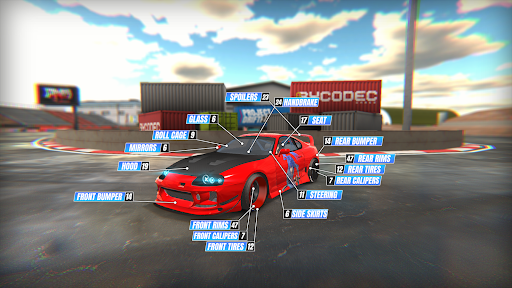
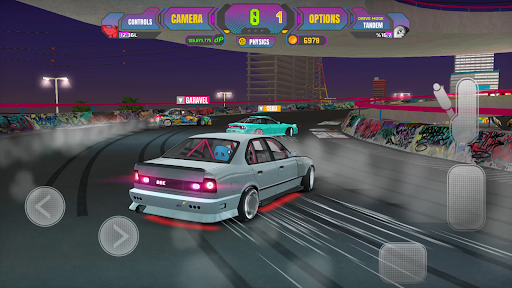
Design your own car and show the difference!
Super drift cars with powerful engines offer you admirable performances on asphalt.
5 different driving modes. Choose the one that suits you best!
Get ready to play this game for hours!
COMPETITIVE DRIFT MOBILE RACING GAME
- Custom JDM cars
- Unlimited vehicle designs
- More than thirty drift cars
- Unique drift maps
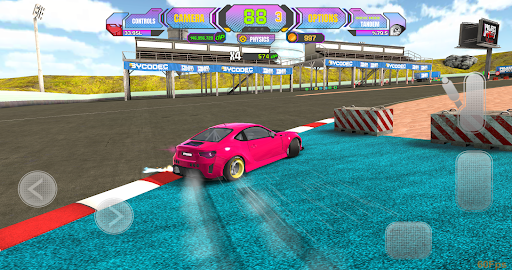
- Smoke and speed animation while drifting
- Customize controls by player
- Hundreds of attachments for each vehicle
MULTIPLAYER MOD
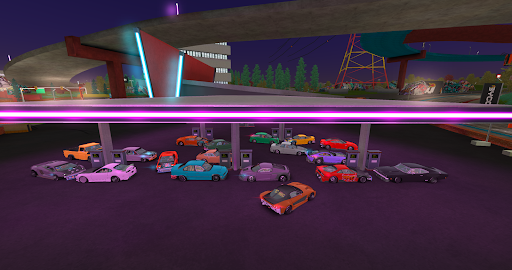
- Rooms full of real players
- Choose your room and enter the game
- Show off your skills and challenge your friends in online rooms
- Earn points and rewards while drifting
- Show off your car by changing parts, colors and decals
DRIFT MAPS
- Unique driving experience in different roads and cities
- Race tracks
- Tunnels, parking lots and tandem runway areas
VEHICLE CUSTOMIZATION
- Replace bumpers, lights, hoods, mirrors, wheels, car paint, decals, neons and more
- Use the photo studio to see and share changes of your vehicle
CAR TUNING
- Upgrade your car's engine, gearbox, turbo, top speed and brakes
- Make your car drift better by choosing its suspension, wheel angle, air pressure and more
PHYSICS MODES
- Racing
- Arcade
- Drift
- Pro Arcade
- Pro Drift
AND REMEMBER
- Make sure you are connected to the internet
- When starting the game please register
- All earned game money and purchased cars are saved in your profile
แสดงเพิ่มเติม

1. ดาวน์โหลดตัวติดตั้ง MEmu และสิ้นสุดการติดตั้ง

2. เริ่ม MEmu จากนั้นเปิด Google Play บนหน้าแรก

3. ค้นหา Project Drift 2.0 : Online ใน Google Play
Install
4. ดาวน์โหลดและติดตั้ง Project Drift 2.0 : Online
5. เมื่อติดตั้งเสร็จให้คลิกที่ไอคอนเพื่อเริ่มใช้งาน

6. สนุกกับการเล่น Project Drift 2.0 : Online บนพีซีด้วย MEmu
MEmu App Player เป็นอีมูเลเตอร์ Android ที่ดีที่สุดและผู้คนกว่า 50 ล้านคนเพลิดเพลินไปกับประสบการณ์การเล่นเกม Android ที่ยอดเยี่ยม เทคโนโลยีการจำลองเสมือนของ MEmu ช่วยให้คุณเล่นเกม Android หลายพันเกมได้อย่างราบรื่นบนพีซีของคุณแม้แต่เกมที่ต้องใช้กราฟิกมากที่สุด
จอใหญ่และกราฟฟิกสวยกว่า; เล่นได้นาน, ไม่ต้องใช้แบตเตอรี่โทรศัพท์หรือเน็ตโทรศัพท์.
ระบบปรับแต่งปุ่มคีย์บอร์ดและเม้าส์ตามที่คุณเลือก
เล่นมากกว่าหนึ่งเกมบน PC ในเวลาเดียวกันด้วยระบบหลายจอหรือ Multi-Instance manager.
Play Project Drift 2.0 : Online on PC by following steps: