
Rogue Streets: Beat 'Em Up
อัปเดตเมื่อ
เวอร์ชันปัจจุบัน
ให้บริการโดย

เวลาคุณเล่น Rogue Streets: Beat 'Em Up, คุณอาจรู้สึกว่ามือคุณอาจบังจอแล้วทำให้ไม่ได้เล่นแบบเต็มที่. เล่นแบบไร้ขีดจำกัดด้วยเม้าส์และคีย์บอร์ด. MEmu มีตัวเลือกหลายอย่างให้คุณใช้งานเกมที่คุณเล่นแบบที่คุณต้องการ. ดาวน์โหลดและเล่น Rogue Streets: Beat 'Em Up บน PC. เล่นนานแค่ไหนก็ได้, ไม่ต้องชาร์จแบตเตอรี่, หรือเจอคนโทรเข้ามาระหว่างเล่น. MEmu 9 เป็นตัวเลือกสำหรับการเล่น Rogue Streets: Beat 'Em Up บน PC. ทางทีมงานเราได้ปรับแต่งเกม, ปรับให้เล่นเกมบางเกมได้เหมือนเล่น Rogue Streets: Beat 'Em Up เป็นเกม PC เช่นเล็งด้วยเม้าส์หรือใช้คีย์บอร์ด. ระบบของเรายังทำให้คุณสามารถเปิดเล่นได้มากกว่า 2 เกมพร้อมๆกันในคอมของคุณ. และที่สำคัญที่สุด, ระบบโปรแกรมของเราสามารถทำให้คุณใช้ระบบของ PC ทำให้เกมลื่นเหมือนกับใช้โทรศัพท์รุ่นล่าสุด. เราไม่ได้ดูแลเรื่องการเล่นเกม, แต่เราดูแลถึงความสนุกสนานที่คุณได้จากการเล่นด้วย.
แสดงเพิ่มเติม
ดาวน์โหลด Rogue Streets: Beat 'Em Up บน PC ด้วย MEmu Android Emulator สนุกกับการเล่นบนหน้าจอขนาดใหญ่ Fight dirty.
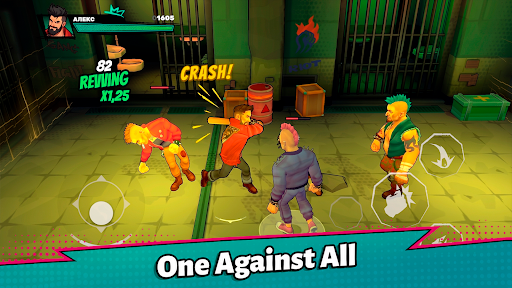
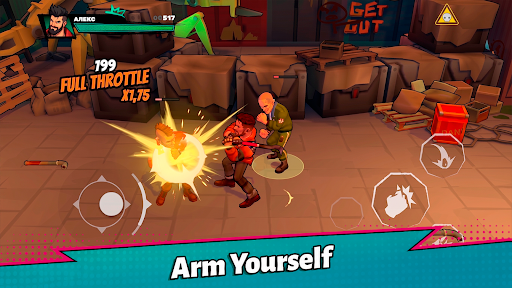
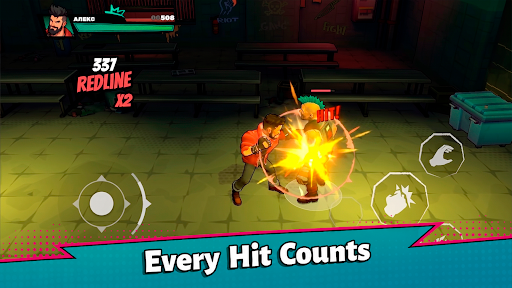
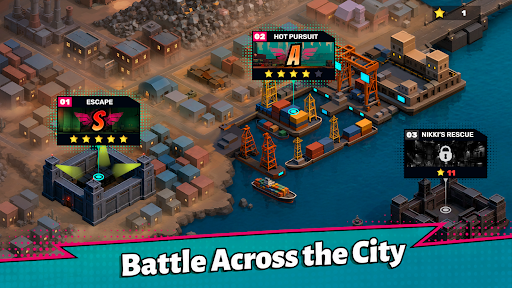
Fight dirty. Fight smart. Fight your way through the streets.
Rogue Streets: Beat 'Em Up is a fast-paced side-scrolling action game where every fight is a brutal street brawl. Face overwhelming groups of enemies, master powerful combos, grab anything you can use as a weapon, and survive one intense encounter after another.
You're not a superhero. You're not a martial arts master.
You're just the toughest fighter on the street.
Brutal Street Combat
Take on gangs of enemies using an easy-to-learn yet satisfying combat system. Chain together punches, kicks, grabs, throws, dash attacks, and devastating finishers to dominate every fight.
Stay aggressive, control the crowd, and never let your enemies surround you.
Everything Can Become a Weapon
The streets are full of opportunities.
Pick up bats, pipes, knives, crowbars, and other improvised weapons to gain the upper hand. Every weapon changes the way you fight and eventually breaks, forcing you to adapt and improvise.
Throw weapons at enemies, smash them into walls, or simply beat your opponents into submission.
Fight Smarter
Victory isn't just about dealing damage.
Use the environment to your advantage, launch enemies into the air, slam them into walls, knock them into each other, and create devastating chain reactions.
Every encounter rewards creativity and aggressive play.
The streets belong to whoever is strong enough to take them.
Are you ready to fight?
แสดงเพิ่มเติม

1. ดาวน์โหลดตัวติดตั้ง MEmu และสิ้นสุดการติดตั้ง

2. เริ่ม MEmu จากนั้นเปิด Google Play บนหน้าแรก

3. ค้นหา Rogue Streets: Beat 'Em Up ใน Google Play
Install
4. ดาวน์โหลดและติดตั้ง Rogue Streets: Beat 'Em Up
5. เมื่อติดตั้งเสร็จให้คลิกที่ไอคอนเพื่อเริ่มใช้งาน

6. สนุกกับการเล่น Rogue Streets: Beat 'Em Up บนพีซีด้วย MEmu
MEmu App Player เป็นอีมูเลเตอร์ Android ที่ดีที่สุดและผู้คนกว่า 50 ล้านคนเพลิดเพลินไปกับประสบการณ์การเล่นเกม Android ที่ยอดเยี่ยม เทคโนโลยีการจำลองเสมือนของ MEmu ช่วยให้คุณเล่นเกม Android หลายพันเกมได้อย่างราบรื่นบนพีซีของคุณแม้แต่เกมที่ต้องใช้กราฟิกมากที่สุด
จอใหญ่และกราฟฟิกสวยกว่า; เล่นได้นาน, ไม่ต้องใช้แบตเตอรี่โทรศัพท์หรือเน็ตโทรศัพท์.
ระบบปรับแต่งปุ่มคีย์บอร์ดและเม้าส์ตามที่คุณเลือก
เล่นมากกว่าหนึ่งเกมบน PC ในเวลาเดียวกันด้วยระบบหลายจอหรือ Multi-Instance manager.
Play Rogue Streets: Beat 'Em Up on PC by following steps:

























![[ไกด์เกม] CookieRun Classic แนะนำ 5 คุกกี้น่าปั้น น่าลงทุน ที่มือใหม่ห้ามพลาด! (เล่นบน PC ผ่าน MEmu ให้ลื่นสุด ๆ) PC](https://www.memuplay.com/blog/wp-content/uploads/2026/08/579c01ab-a953-45b3-8115-9b6279b7d6f9.png)