
Shoe it All!
อัปเดตเมื่อ
เวอร์ชันปัจจุบัน
1.1.0
ให้บริการโดย

เวลาคุณเล่น Shoe it All!, คุณอาจรู้สึกว่ามือคุณอาจบังจอแล้วทำให้ไม่ได้เล่นแบบเต็มที่. เล่นแบบไร้ขีดจำกัดด้วยเม้าส์และคีย์บอร์ด. MEmu มีตัวเลือกหลายอย่างให้คุณใช้งานเกมที่คุณเล่นแบบที่คุณต้องการ. ดาวน์โหลดและเล่น Shoe it All! บน PC. เล่นนานแค่ไหนก็ได้, ไม่ต้องชาร์จแบตเตอรี่, หรือเจอคนโทรเข้ามาระหว่างเล่น. MEmu 9 เป็นตัวเลือกสำหรับการเล่น Shoe it All! บน PC. ทางทีมงานเราได้ปรับแต่งเกม, ปรับให้เล่นเกมบางเกมได้เหมือนเล่น Shoe it All! เป็นเกม PC เช่นเล็งด้วยเม้าส์หรือใช้คีย์บอร์ด. ระบบของเรายังทำให้คุณสามารถเปิดเล่นได้มากกว่า 2 เกมพร้อมๆกันในคอมของคุณ. และที่สำคัญที่สุด, ระบบโปรแกรมของเราสามารถทำให้คุณใช้ระบบของ PC ทำให้เกมลื่นเหมือนกับใช้โทรศัพท์รุ่นล่าสุด. เราไม่ได้ดูแลเรื่องการเล่นเกม, แต่เราดูแลถึงความสนุกสนานที่คุณได้จากการเล่นด้วย.
แสดงเพิ่มเติม
ดาวน์โหลด Shoe it All! บน PC ด้วย MEmu Android Emulator สนุกกับการเล่นบนหน้าจอขนาดใหญ่ การเติบโตเป็นสิ่งที่หลีกเลี่ยงไม่ได้ แต่การเป็นคนน่าเบื่อไม่ใช่.

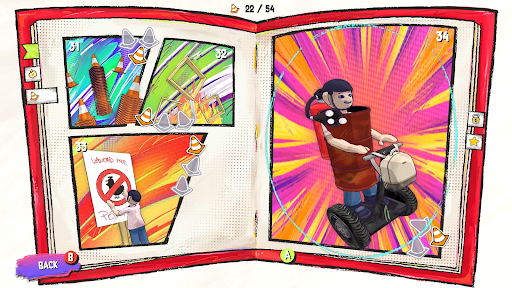


การเติบโตเป็นสิ่งที่หลีกเลี่ยงไม่ได้ แต่การเป็นคนน่าเบื่อไม่ใช่
เล่นเป็น Lace วัยรุ่นหัวรั้นที่ไม่ยอมเข้ากับโลกแห่งกฎระเบียบ ความเป็นระเบียบ และอำนาจที่น่าเบื่อ ด้วยชิงช้าและกองรองเท้า เธอจะท้าทายทุกคนที่พยายามบอกเธอว่าควรเป็นอย่างไร
แกว่ง เล็ง และขว้างรองเท้าของคุณผ่านปริศนาฟิสิกส์ที่สร้างขึ้นด้วยมือ ดูเหมือนง่าย แต่ทุกด่านต้องการความคิดสร้างสรรค์ ความแม่นยำ และจังหวะที่สมบูรณ์แบบ ฝึกฝนการขว้างที่สมบูรณ์แบบเพื่อ "โชว์ทุกอย่าง!"
ท้าทายระบบ!
เอาชนะเพื่อนบ้านขี้บ่น ผู้ใหญ่ที่ยึดติดกับกฎ และเจ้านายโลภในโลกที่มีสีสันซึ่งทุกอุปสรรคคือโอกาสที่จะสร้างความวุ่นวายเล็กน้อย
เล่นในแบบของคุณ!
ผ่านด่านในแบบของคุณ ปริศนาทุกอย่างให้รางวัลแก่การทดลอง ไม่ใช่แค่คำตอบที่ถูกต้องเพียงคำตอบเดียว ค้นพบทางลัดที่สร้างสรรค์ ยิงลูกเล่นที่เป็นไปไม่ได้ และหาวิธีแก้ปัญหาที่ชาญฉลาดกว่าด้วยการขว้างที่น้อยลง
เล่นแบบเร็วหรือสำรวจ!
แข่งเพื่อทำเวลาให้เร็วที่สุดในโหมด Speedrun หรือจะเล่นช้าลงเพื่อค้นพบเส้นทางลับ ด่านโบนัส และของสะสมทั้งหมดก็ได้
คุณสมบัติ
ปริศนาฟิสิกส์ที่สร้างขึ้นด้วยมือกว่า 65 ด่าน พร้อมวิธีแก้หลายแบบ
สติกเกอร์สะสมเกือบ 200 ชิ้น เพื่อเติมเต็มสมุดบันทึกของคุณ
ลูกเล่นสุดสร้างสรรค์และปฏิกิริยาลูกโซ่ที่น่าพึงพอใจ
ด่านที่ท้าทายมากขึ้นเรื่อยๆ ที่จะให้รางวัลแก่ผู้ที่เชี่ยวชาญ
โหมด Speedrun โดยเฉพาะ
ด่านโบนัสที่ซ่อนอยู่ซึ่งเต็มไปด้วยความลับ
บอสที่น่าจดจำในโลกที่ได้รับแรงบันดาลใจจากหนังสือการ์ตูน
เพลงประกอบแนวพังก์สุดมันส์
แสดงเพิ่มเติม

1. ดาวน์โหลดตัวติดตั้ง MEmu และสิ้นสุดการติดตั้ง

2. เริ่ม MEmu จากนั้นเปิด Google Play บนหน้าแรก

3. ค้นหา Shoe it All! ใน Google Play
Install
4. ดาวน์โหลดและติดตั้ง Shoe it All!
5. เมื่อติดตั้งเสร็จให้คลิกที่ไอคอนเพื่อเริ่มใช้งาน

6. สนุกกับการเล่น Shoe it All! บนพีซีด้วย MEmu
MEmu App Player เป็นอีมูเลเตอร์ Android ที่ดีที่สุดและผู้คนกว่า 50 ล้านคนเพลิดเพลินไปกับประสบการณ์การเล่นเกม Android ที่ยอดเยี่ยม เทคโนโลยีการจำลองเสมือนของ MEmu ช่วยให้คุณเล่นเกม Android หลายพันเกมได้อย่างราบรื่นบนพีซีของคุณแม้แต่เกมที่ต้องใช้กราฟิกมากที่สุด
จอใหญ่และกราฟฟิกสวยกว่า; เล่นได้นาน, ไม่ต้องใช้แบตเตอรี่โทรศัพท์หรือเน็ตโทรศัพท์.
ระบบปรับแต่งปุ่มคีย์บอร์ดและเม้าส์ตามที่คุณเลือก
เล่นมากกว่าหนึ่งเกมบน PC ในเวลาเดียวกันด้วยระบบหลายจอหรือ Multi-Instance manager.
Play Shoe it All! on PC by following steps:



























![[ไกด์เกม] CookieRun Classic แนะนำ 5 คุกกี้น่าปั้น น่าลงทุน ที่มือใหม่ห้ามพลาด! (เล่นบน PC ผ่าน MEmu ให้ลื่นสุด ๆ) PC](https://www.memuplay.com/blog/wp-content/uploads/2026/08/579c01ab-a953-45b3-8115-9b6279b7d6f9.png)