
Twilight of the Pantheon
อัปเดตเมื่อ
เวอร์ชันปัจจุบัน
ให้บริการโดย

เวลาคุณเล่น Twilight of the Pantheon, คุณอาจรู้สึกว่ามือคุณอาจบังจอแล้วทำให้ไม่ได้เล่นแบบเต็มที่. เล่นแบบไร้ขีดจำกัดด้วยเม้าส์และคีย์บอร์ด. MEmu มีตัวเลือกหลายอย่างให้คุณใช้งานเกมที่คุณเล่นแบบที่คุณต้องการ. ดาวน์โหลดและเล่น Twilight of the Pantheon บน PC. เล่นนานแค่ไหนก็ได้, ไม่ต้องชาร์จแบตเตอรี่, หรือเจอคนโทรเข้ามาระหว่างเล่น. MEmu 9 เป็นตัวเลือกสำหรับการเล่น Twilight of the Pantheon บน PC. ทางทีมงานเราได้ปรับแต่งเกม, ปรับให้เล่นเกมบางเกมได้เหมือนเล่น Twilight of the Pantheon เป็นเกม PC เช่นเล็งด้วยเม้าส์หรือใช้คีย์บอร์ด. ระบบของเรายังทำให้คุณสามารถเปิดเล่นได้มากกว่า 2 เกมพร้อมๆกันในคอมของคุณ. และที่สำคัญที่สุด, ระบบโปรแกรมของเราสามารถทำให้คุณใช้ระบบของ PC ทำให้เกมลื่นเหมือนกับใช้โทรศัพท์รุ่นล่าสุด. เราไม่ได้ดูแลเรื่องการเล่นเกม, แต่เราดูแลถึงความสนุกสนานที่คุณได้จากการเล่นด้วย.
แสดงเพิ่มเติม
ดาวน์โหลด Twilight of the Pantheon บน PC ด้วย MEmu Android Emulator สนุกกับการเล่นบนหน้าจอขนาดใหญ่ The gods have gone silent.
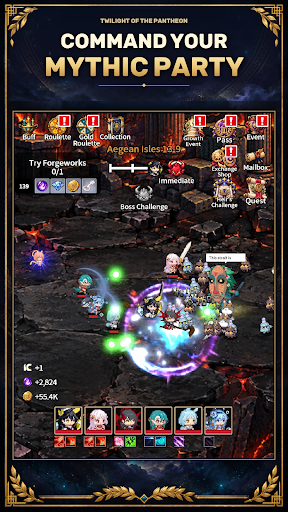
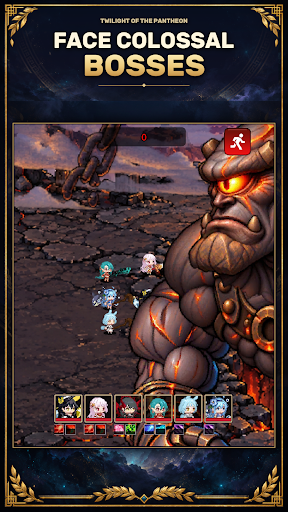
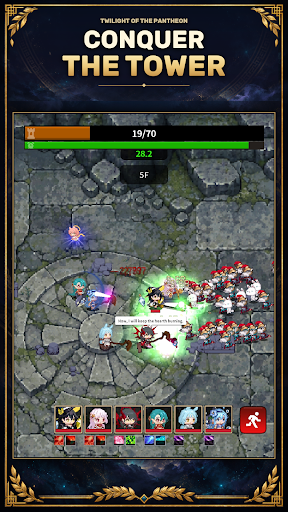
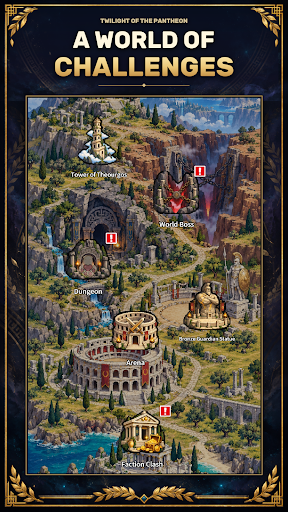
The gods have gone silent. The seal of Tartarus is cracking. And the Titans are waking up.
As the last heir of the Oracle of Delphi, you don't swing the sword. You command the heroes who do. Summon legendary Partners from Greek myth, build a squad that counters whatever stands in your way, and seal the Titans away for good.
SUMMON YOUR MYTHIC SQUAD
• Collect Partners with different roles and elements
• Set your Front Row and Back Row to play to each hero's strengths
• Use elemental advantages (Fire, Ice, Lightning) to turn a losing fight around
FIGHT ON AUTO. GROW EVEN WHEN YOU'RE AWAY.
• Wave battles run automatically, so there's no endless tapping
• Earn idle rewards while you're offline and come back stronger
• Power up your Partners and push through tougher stages
BREAK BOSSES WITH SMART TEAM BUILDING
• Hit a wall? Farm, level up, tweak your lineup, and try again
• The right team composition beats raw power
CHALLENGES THAT KEEP COMING
• Dungeons for steady rewards
• Tower of Theourgos: climb higher with every floor
• World Boss: go for the highest damage and climb the rankings
• Arena: test your squad against other players' squads
Ready to end the age of silent gods?
Summon your legend and take back the pantheon.
แสดงเพิ่มเติม

1. ดาวน์โหลดตัวติดตั้ง MEmu และสิ้นสุดการติดตั้ง

2. เริ่ม MEmu จากนั้นเปิด Google Play บนหน้าแรก

3. ค้นหา Twilight of the Pantheon ใน Google Play
Install
4. ดาวน์โหลดและติดตั้ง Twilight of the Pantheon
5. เมื่อติดตั้งเสร็จให้คลิกที่ไอคอนเพื่อเริ่มใช้งาน

6. สนุกกับการเล่น Twilight of the Pantheon บนพีซีด้วย MEmu
MEmu App Player เป็นอีมูเลเตอร์ Android ที่ดีที่สุดและผู้คนกว่า 50 ล้านคนเพลิดเพลินไปกับประสบการณ์การเล่นเกม Android ที่ยอดเยี่ยม เทคโนโลยีการจำลองเสมือนของ MEmu ช่วยให้คุณเล่นเกม Android หลายพันเกมได้อย่างราบรื่นบนพีซีของคุณแม้แต่เกมที่ต้องใช้กราฟิกมากที่สุด
จอใหญ่และกราฟฟิกสวยกว่า; เล่นได้นาน, ไม่ต้องใช้แบตเตอรี่โทรศัพท์หรือเน็ตโทรศัพท์.
ระบบปรับแต่งปุ่มคีย์บอร์ดและเม้าส์ตามที่คุณเลือก
เล่นมากกว่าหนึ่งเกมบน PC ในเวลาเดียวกันด้วยระบบหลายจอหรือ Multi-Instance manager.
Play Twilight of the Pantheon on PC by following steps:























![[ไกด์เกม] CookieRun Classic แนะนำ 5 คุกกี้น่าปั้น น่าลงทุน ที่มือใหม่ห้ามพลาด! (เล่นบน PC ผ่าน MEmu ให้ลื่นสุด ๆ) PC](https://www.memuplay.com/blog/wp-content/uploads/2026/08/579c01ab-a953-45b3-8115-9b6279b7d6f9.png)


















