
Winter Burrow
อัปเดตเมื่อ
เวอร์ชันปัจจุบัน
1792100069
ให้บริการโดย

เวลาคุณเล่น Winter Burrow, คุณอาจรู้สึกว่ามือคุณอาจบังจอแล้วทำให้ไม่ได้เล่นแบบเต็มที่. เล่นแบบไร้ขีดจำกัดด้วยเม้าส์และคีย์บอร์ด. MEmu มีตัวเลือกหลายอย่างให้คุณใช้งานเกมที่คุณเล่นแบบที่คุณต้องการ. ดาวน์โหลดและเล่น Winter Burrow บน PC. เล่นนานแค่ไหนก็ได้, ไม่ต้องชาร์จแบตเตอรี่, หรือเจอคนโทรเข้ามาระหว่างเล่น. MEmu 9 เป็นตัวเลือกสำหรับการเล่น Winter Burrow บน PC. ทางทีมงานเราได้ปรับแต่งเกม, ปรับให้เล่นเกมบางเกมได้เหมือนเล่น Winter Burrow เป็นเกม PC เช่นเล็งด้วยเม้าส์หรือใช้คีย์บอร์ด. ระบบของเรายังทำให้คุณสามารถเปิดเล่นได้มากกว่า 2 เกมพร้อมๆกันในคอมของคุณ. และที่สำคัญที่สุด, ระบบโปรแกรมของเราสามารถทำให้คุณใช้ระบบของ PC ทำให้เกมลื่นเหมือนกับใช้โทรศัพท์รุ่นล่าสุด. เราไม่ได้ดูแลเรื่องการเล่นเกม, แต่เราดูแลถึงความสนุกสนานที่คุณได้จากการเล่นด้วย.
แสดงเพิ่มเติม
ดาวน์โหลด Winter Burrow บน PC ด้วย MEmu Android Emulator สนุกกับการเล่นบนหน้าจอขนาดใหญ่ Winter Burrow คือเกมเอาชีวิตรอดในป่าแสนอบอุ่น สำรวจ รวบรวมทรัพยากร สร้างเครื่องมือ ถักเสื้อกันหนาว อบพาย และพบปะผู้คนในท้องถิ่น!
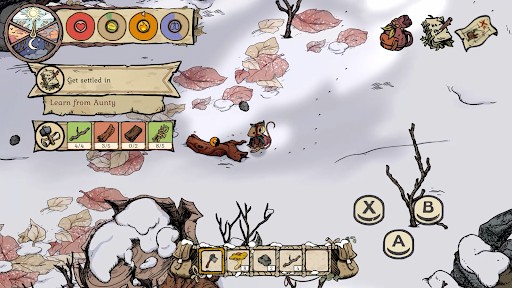
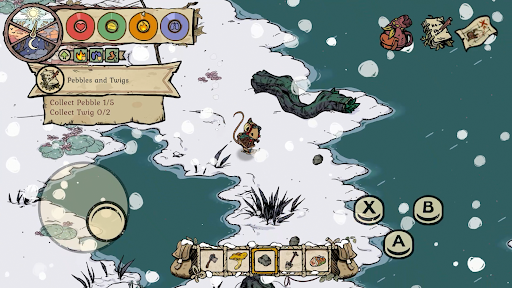
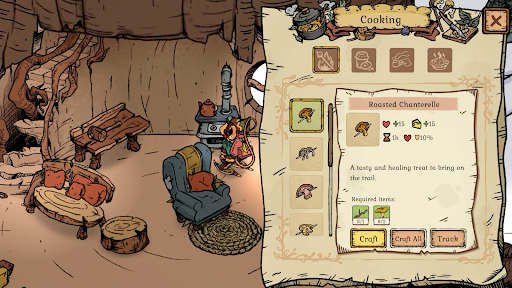
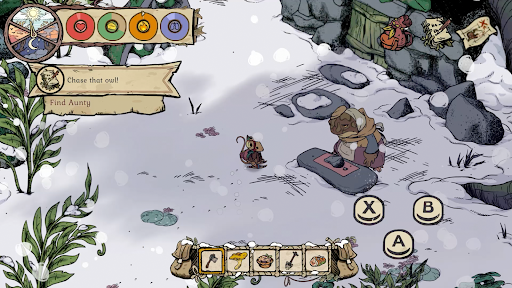
Winter Burrow คือเกมเอาชีวิตรอดในป่าแสนอบอุ่น สำรวจ รวบรวมทรัพยากร สร้างเครื่องมือ ถักเสื้อกันหนาว อบพาย และพบปะผู้คนในท้องถิ่น!
ใน Winter Burrow คุณจะรับบทเป็นหนูที่กลับมาจากเมืองใหญ่และพบว่าบ้านในวัยเด็กของเธอพังทลายลง ยิ่งไปกว่านั้น ป้าของคุณ (ที่ควรจะดูแลบ้าน) ก็หายตัวไป ฟื้นฟูโพรงในวัยเด็กที่ทรุดโทรมของคุณให้กลับมาสวยงามเหมือนเดิม เพื่อที่คุณจะได้พักผ่อนหน้าเตาผิง
เผชิญหน้ากับสภาพอากาศที่เลวร้ายและออกเดินทางไปยังป่าอันหนาวเหน็บเพื่อรวบรวมทรัพยากรที่จำเป็นสำหรับตัวคุณเองและบ้านหลังใหม่ ระวังแมลงป่า และจำไว้ว่าไม่มีใครอยู่รอดได้ด้วยตัวคนเดียว หาเพื่อนใหม่ ขยายคู่มือการเอาชีวิตรอดของคุณ และไขปริศนาว่าเกิดอะไรขึ้นกับป้าของคุณ
Winter Burrow เป็นเกมเอาชีวิตรอดที่คุณเล่นได้ตามจังหวะของคุณเอง ปรับแต่งตัวละคร ตกแต่งโพรงของคุณ และเลือกเส้นทางที่เหมาะกับสไตล์การเล่นของคุณ เรื่องราวนี้เป็นของคุณที่จะเล่า
แสดงเพิ่มเติม

1. ดาวน์โหลดตัวติดตั้ง MEmu และสิ้นสุดการติดตั้ง

2. เริ่ม MEmu จากนั้นเปิด Google Play บนหน้าแรก

3. ค้นหา Winter Burrow ใน Google Play
Install
4. ดาวน์โหลดและติดตั้ง Winter Burrow
5. เมื่อติดตั้งเสร็จให้คลิกที่ไอคอนเพื่อเริ่มใช้งาน

6. สนุกกับการเล่น Winter Burrow บนพีซีด้วย MEmu
MEmu App Player เป็นอีมูเลเตอร์ Android ที่ดีที่สุดและผู้คนกว่า 50 ล้านคนเพลิดเพลินไปกับประสบการณ์การเล่นเกม Android ที่ยอดเยี่ยม เทคโนโลยีการจำลองเสมือนของ MEmu ช่วยให้คุณเล่นเกม Android หลายพันเกมได้อย่างราบรื่นบนพีซีของคุณแม้แต่เกมที่ต้องใช้กราฟิกมากที่สุด
จอใหญ่และกราฟฟิกสวยกว่า; เล่นได้นาน, ไม่ต้องใช้แบตเตอรี่โทรศัพท์หรือเน็ตโทรศัพท์.
ระบบปรับแต่งปุ่มคีย์บอร์ดและเม้าส์ตามที่คุณเลือก
เล่นมากกว่าหนึ่งเกมบน PC ในเวลาเดียวกันด้วยระบบหลายจอหรือ Multi-Instance manager.
Play Winter Burrow on PC by following steps:
































![[ไกด์เกม] CookieRun Classic แนะนำ 5 คุกกี้น่าปั้น น่าลงทุน ที่มือใหม่ห้ามพลาด! (เล่นบน PC ผ่าน MEmu ให้ลื่นสุด ๆ) PC](https://www.memuplay.com/blog/wp-content/uploads/2026/08/579c01ab-a953-45b3-8115-9b6279b7d6f9.png)