1800 Contacts - Lens Store
อัปเดตเมื่อ
เวอร์ชันปัจจุบัน
10.8.6
ให้บริการโดย

เมื่อใช้ 1800 Contacts - Lens Store บนโทรศัพท์ของคุณไม่ต้องกังวลกับการชาร์จไฟมากเกินไปปลดปล่อยตัวคุณเองจากหน้าจอขนาดเล็กและสนุกกับการใช้แอพนี้บนหน้าจอขนาดใหญ่ จากนี้ไปรับประสบการณ์เต็มหน้าจอของแอปพลิเคชันของคุณด้วยคีย์บอร์ดและเมาส์ MEmu มีคุณสมบัติที่น่าแปลกใจที่คุณคาดหวัง: การติดตั้งที่รวดเร็วและการตั้งค่าที่ง่ายควบคุมได้ง่ายไม่ จำกัด แบตเตอรี่ข้อมูลมือถือและการโทรที่รบกวน MEmu 9 ใหม่ล่าสุดเป็นตัวเลือกที่ดีที่สุดสำหรับการใช้ Meitu – โปรแกรมแก้ไขภาพแนวธรรมชาติ บนคอมพิวเตอร์ของคุณ ด้วยรหัสการดูดซึมของเราผู้จัดการหลายอินสแตนซ์ทำให้สามารถเปิดบัญชี 2 บัญชีขึ้นไปในเวลาเดียวกันได้ และที่สำคัญที่สุดเอ็นจิ้นจำลองพิเศษของเราสามารถปลดปล่อยศักยภาพของPCของคุณและทำให้ทุกอย่างราบรื่นและสนุกสนาน
แสดงเพิ่มเติม
ดาวน์โหลด 1800 Contacts - Lens Store บน PC ด้วย MEmu Android Emulator สนุกกับการเล่นบนหน้าจอขนาดใหญ่ The 1-800 Contacts app is the fastest, easiest, and most enjoyable way to order contact lenses.
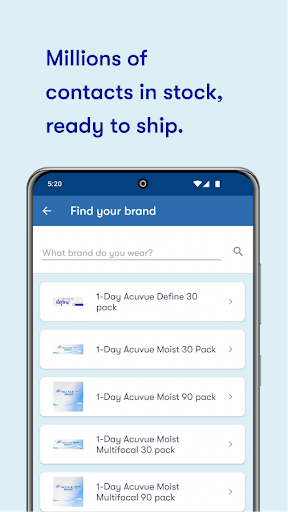
The 1-800 Contacts app is the fastest, easiest, and most enjoyable way to order contact lenses.
WE HAVE ALL THE CONTACTS
We have millions of contact lenses in stock and ready to ship. They’re the same contacts your doctor prescribed but they cost less and you don’t have to go into a doctor’s office to buy them. Same Prescription. Better Experience. ™
SUPER SIMPLE ORDERING
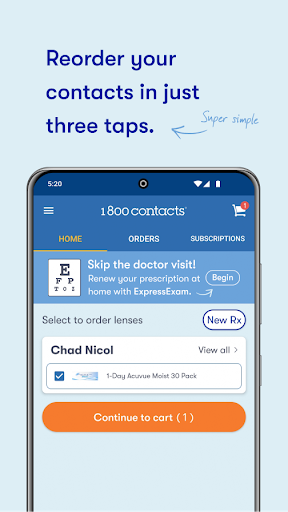
Ordering for the first time? Enter your prescription information or simply scan the lens box to import your prescription. Done. Ordered with us before? Re-order in three simple taps. (Pssst. Protip: Get faster shipping when you upload a picture of your paper prescription.)
RENEW YOUR PRESCRIPTION WITH EXPRESSEXAM™
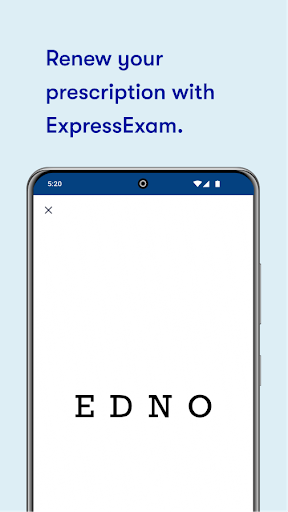
Tired of paying for an exam every year just to get the same prescription? Want to skip the trip to the doctor’s office? Use our app to take a quick vision exam with ExpressExam. A board-certified eye doctor will issue a new prescription within a couple of hours.
FIND THE CONTACTS THAT WORK BEST FOR YOU
With ExpressExam you can receive multiple prescriptions so you can find the contacts that work best for your eyes, lifestyle, and budget. Try something new. Returns and exchanges are free – including shipping.
DON’T LEAVE MONEY ON THE TABLE
We’ve partnered with major vision insurance companies so we can quickly find and apply your benefits when you order from the app.
MANAGE YOUR SUBSCRIPTION
If you’ve subscribed you can easily manage your orders: snooze, cancel, update a prescription, etc.
OUR GAJILLION PERCENT PROMISE
(Because “100% satisfaction guaranteed” doesn’t cut it.)
• Free shipping and returns? Always.
• Tear a lens? We'll replace it for free.
• Still have contacts from your old prescription? We'll exchange them for free.
• Find a lower price? We’ll beat it.
• And the best customer service in the industry…
WE’RE AVAILABLE TO HELP 24/7
Call, email, or text us right from the app. You’ll receive a prompt reply from a real, live person with an adorable Utah accent who really wants to help you. (NOTE: You only get the adorable accent if you call).
Yup. Downloading the 1-800 Contacts app could be the best choice you make today.
PRIVACY
In order to provide great features, and to continually make the app better, some privacy-related data may be collected. Specifically, we request your location if you take our ExpressExam (since it’s only available in certain states), or when searching for your doctor. ExpressExam also needs to use your camera and microphone so we can verify you are reading the letters from an eye chart correctly. Any time we need to access this data, we make sure to request your permission first! In addition, you can choose to send us a photo of your prescription as a convenience. If you choose to enter your purchase information, we will save it so that you don’t have to re-enter it again. We also support Apple Pay! We only keep the purchase history of products you buy from us -- we don’t have access to any other purchase information. These features are all optional and you don’t need to give the app access to them if you are not comfortable doing so. We value your privacy.
แสดงเพิ่มเติม

1. ดาวน์โหลดตัวติดตั้ง MEmu และสิ้นสุดการติดตั้ง

2. เริ่ม MEmu จากนั้นเปิด Google Play บนหน้าแรก

3. ค้นหา 1800 Contacts - Lens Store ใน Google Play
Install
4. ดาวน์โหลดและติดตั้ง 1800 Contacts - Lens Store
5. เมื่อติดตั้งเสร็จให้คลิกที่ไอคอนเพื่อเริ่มใช้งาน

6. ใช้ MEmu เพื่อสัมผัสประสบการณ์ 1800 Contacts - Lens Store บนคอมพิวเตอร์ของคุณ
MEmu Play คือโปรแกรมจำลอง Android ที่ดีที่สุด มีผู้ใช้มากกว่า 50 ล้านคน มอบประสบการณ์การใช้งานแอป Android ขั้นสุดยอดให้กับคุณ เทคโนโลยีจำลองเสมือนของ MEmu ช่วยให้คุณรันแอป Android หลายพันแอปบนคอมพิวเตอร์ได้อย่างราบรื่น แม้แอปที่กินทรัพยากรเครื่องสูงที่สุด
จอใหญ่และกราฟฟิกสวยกว่า; เล่นได้นาน, ไม่ต้องใช้แบตเตอรี่โทรศัพท์หรือเน็ตโทรศัพท์.
ระบบปรับแต่งปุ่มคีย์บอร์ดและเม้าส์ตามที่คุณเลือก
เล่นมากกว่าหนึ่งเกมบน PC ในเวลาเดียวกันด้วยระบบหลายจอหรือ Multi-Instance manager.
Use 1800 Contacts - Lens Store on PC by following steps: