Contraction Timer
อัปเดตเมื่อ
เวอร์ชันปัจจุบัน
2.4
ให้บริการโดย

เมื่อใช้ Contraction Timer บนโทรศัพท์ของคุณไม่ต้องกังวลกับการชาร์จไฟมากเกินไปปลดปล่อยตัวคุณเองจากหน้าจอขนาดเล็กและสนุกกับการใช้แอพนี้บนหน้าจอขนาดใหญ่ จากนี้ไปรับประสบการณ์เต็มหน้าจอของแอปพลิเคชันของคุณด้วยคีย์บอร์ดและเมาส์ MEmu มีคุณสมบัติที่น่าแปลกใจที่คุณคาดหวัง: การติดตั้งที่รวดเร็วและการตั้งค่าที่ง่ายควบคุมได้ง่ายไม่ จำกัด แบตเตอรี่ข้อมูลมือถือและการโทรที่รบกวน MEmu 9 ใหม่ล่าสุดเป็นตัวเลือกที่ดีที่สุดสำหรับการใช้ Meitu – โปรแกรมแก้ไขภาพแนวธรรมชาติ บนคอมพิวเตอร์ของคุณ ด้วยรหัสการดูดซึมของเราผู้จัดการหลายอินสแตนซ์ทำให้สามารถเปิดบัญชี 2 บัญชีขึ้นไปในเวลาเดียวกันได้ และที่สำคัญที่สุดเอ็นจิ้นจำลองพิเศษของเราสามารถปลดปล่อยศักยภาพของPCของคุณและทำให้ทุกอย่างราบรื่นและสนุกสนาน
แสดงเพิ่มเติม
ดาวน์โหลด Contraction Timer บน PC ด้วย MEmu Android Emulator สนุกกับการเล่นบนหน้าจอขนาดใหญ่ Contraction Timer allows you to track the start and stop of your contractions and automatically calculates their duration and frequency.
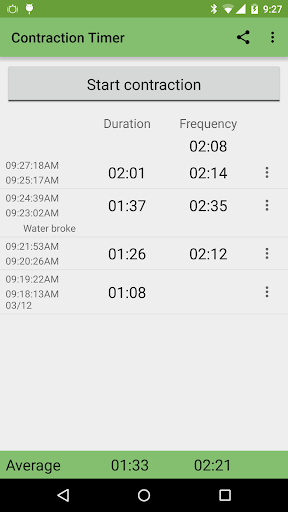
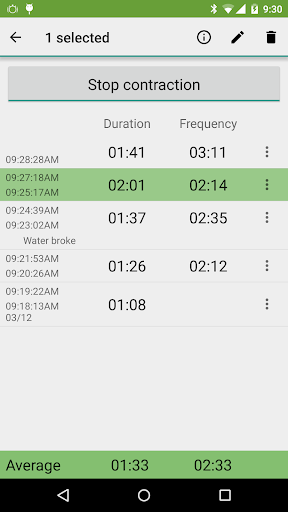
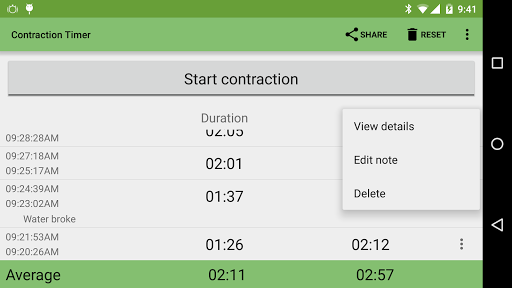
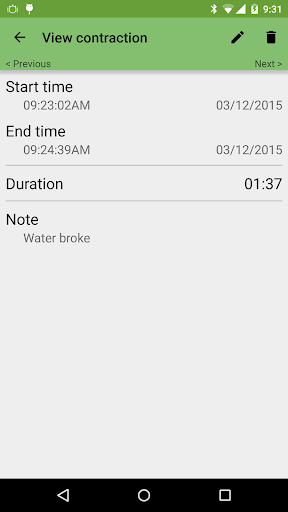
Contraction Timer allows you to track the start and stop of your contractions and automatically calculates their duration and frequency.
Feature list:
- Easy starting and stopping of contraction timer with visual indicator
- Live duration timer during a contraction
- Notification while timing contractions, providing start/stop and add/edit note actions and many Android Wear optimizations including note voice input
- Add a note via 'OK Google, take a note' voice input
- Automatically saves your information - will continue to time contractions if you open another application with no battery consumption
- Automatically calculates contraction duration and start to start contraction frequency over last hour
- Provides average duration and frequency over a controllable time frame from 30 minutes to all contractions
- Ability to manually add contractions
- Can edit times of existing contractions to hh:mm:ss resolution
- Ability to add notes to individual contractions via long click menu
- Ability to delete individual contractions via long click menu, recalculating frequency as needed
- Includes Contextual Action Bar, allowing multiple contractions to be deleted.
- Easy reset functionality to clear all contractions
- Share average duration/frequency via Twitter, Gmail, Google+ and many other applications (note that the Facebook application does not support sharing anything but links)
- Export and import contractions as CSV using Google Drive
- Option to keep screen on when application is open
- Option to lock screen in portrait orientation
- Contraction Toggle homescreen widget (1x1) to easily start and stop contractions with either a light or dark background
- Contraction Controls homescreen widget (4x1) to allow quick launching of the application, view the last hour's average duration and start to start freqency, and start/stop contractions with either a light or dark background
- Contraction Detail home screen and lock screen widget (4x2+) for Android 3.0+ devices gives all functionality of Contraction Controls widget plus a resizeable view of your latest contractions.
- Supports 'move to SD card' functionality
- Supports all Android 2.3+ devices, including tablets and Ice Cream Sandwich devices
- No Ads, all functionality unlocked without additional purchases
NOTE: Due to a limitation in Android, homescreen widgets cannot be used when the application is moved to the SD card. Please move the application to internal storage if you wish to use the homescreen widgets!
Note: Internet permission is used for Google Analytics collection, which has been made fully anonymous and sends no details about you or your device. Can be disabled completely in Settings.
Please rate or donate (via Menu->Donate) via Paypal or Google In App Billing if you like what you see!
Connect with other users on our Google+ page: https://plus.google.com/u/0/b/117146023144055713672/117146023144055713672/
For issues or more information:
http://dft.ba/-ContractionTimer
แสดงเพิ่มเติม

1. ดาวน์โหลดตัวติดตั้ง MEmu และสิ้นสุดการติดตั้ง

2. เริ่ม MEmu จากนั้นเปิด Google Play บนหน้าแรก

3. ค้นหา Contraction Timer ใน Google Play
Install
4. ดาวน์โหลดและติดตั้ง Contraction Timer
5. เมื่อติดตั้งเสร็จให้คลิกที่ไอคอนเพื่อเริ่มใช้งาน

6. ใช้ MEmu เพื่อสัมผัสประสบการณ์ Contraction Timer บนคอมพิวเตอร์ของคุณ
MEmu Play คือโปรแกรมจำลอง Android ที่ดีที่สุด มีผู้ใช้มากกว่า 50 ล้านคน มอบประสบการณ์การใช้งานแอป Android ขั้นสุดยอดให้กับคุณ เทคโนโลยีจำลองเสมือนของ MEmu ช่วยให้คุณรันแอป Android หลายพันแอปบนคอมพิวเตอร์ได้อย่างราบรื่น แม้แอปที่กินทรัพยากรเครื่องสูงที่สุด
จอใหญ่และกราฟฟิกสวยกว่า; เล่นได้นาน, ไม่ต้องใช้แบตเตอรี่โทรศัพท์หรือเน็ตโทรศัพท์.
ระบบปรับแต่งปุ่มคีย์บอร์ดและเม้าส์ตามที่คุณเลือก
เล่นมากกว่าหนึ่งเกมบน PC ในเวลาเดียวกันด้วยระบบหลายจอหรือ Multi-Instance manager.
Use Contraction Timer on PC by following steps: