Blood Pressure(BP) Diary
อัปเดตเมื่อ
เวอร์ชันปัจจุบัน
5.1.9
ให้บริการโดย

เมื่อใช้ Blood Pressure(BP) Diary บนโทรศัพท์ของคุณไม่ต้องกังวลกับการชาร์จไฟมากเกินไปปลดปล่อยตัวคุณเองจากหน้าจอขนาดเล็กและสนุกกับการใช้แอพนี้บนหน้าจอขนาดใหญ่ จากนี้ไปรับประสบการณ์เต็มหน้าจอของแอปพลิเคชันของคุณด้วยคีย์บอร์ดและเมาส์ MEmu มีคุณสมบัติที่น่าแปลกใจที่คุณคาดหวัง: การติดตั้งที่รวดเร็วและการตั้งค่าที่ง่ายควบคุมได้ง่ายไม่ จำกัด แบตเตอรี่ข้อมูลมือถือและการโทรที่รบกวน MEmu 9 ใหม่ล่าสุดเป็นตัวเลือกที่ดีที่สุดสำหรับการใช้ Meitu – โปรแกรมแก้ไขภาพแนวธรรมชาติ บนคอมพิวเตอร์ของคุณ ด้วยรหัสการดูดซึมของเราผู้จัดการหลายอินสแตนซ์ทำให้สามารถเปิดบัญชี 2 บัญชีขึ้นไปในเวลาเดียวกันได้ และที่สำคัญที่สุดเอ็นจิ้นจำลองพิเศษของเราสามารถปลดปล่อยศักยภาพของPCของคุณและทำให้ทุกอย่างราบรื่นและสนุกสนาน
แสดงเพิ่มเติม
ดาวน์โหลด Blood Pressure(BP) Diary บน PC ด้วย MEmu Android Emulator สนุกกับการเล่นบนหน้าจอขนาดใหญ่ Please manage your Blood Pressure, weight and blood glucose at once by “BP Diary”!
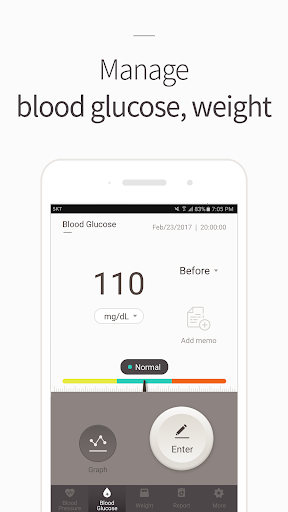
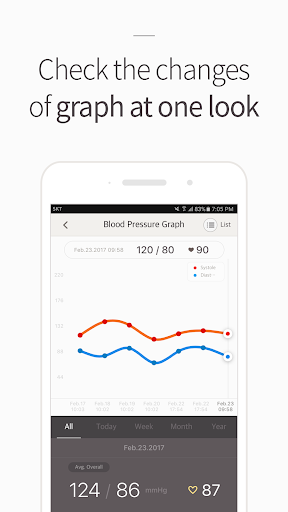
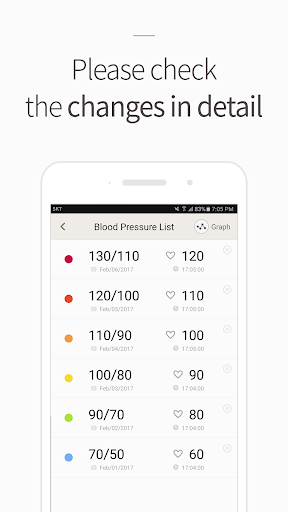
Please manage your Blood Pressure, weight and blood glucose at once by “BP Diary”!
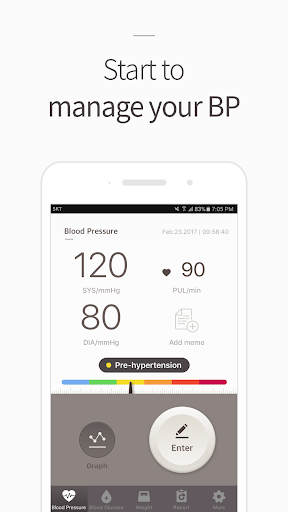
With only one app, you are able to receive the analyzed report of your Blood Pressure, weight and blood glucose anytime and anywhere.
BP Diary has been made for the people who need constant management for Blood Pressure, weight and blood glucose.
Please start to manage your health conveniently by hands with Blood Pressure Diary
★Main Features★
- Data Record : You are able to enter your BP, weight and blood glucose data and view those records in graphs and lists.
- Report: BP Diary announces the analyzed changes and the average value of your total entered data in 7 days, 30 days, and 60 days.
- Bluetooth Connection: When you connect to the bluetooth Blood Pressure meter and scale, your measured Blood Pressure and weight data will be sent to BP Diary immediately.
- Goal setting: You are able to set the target for your Blood Pressure and weight value.
- Graph : You are able to view the measured data as a whole graph divided by year, month, week and day.
- History : You are able to check the measured data by the list
- Diary & Memo : By entering a memo in the recorded data, you are able to record your thought at the moment of measurement
- Alarm : Do you keep forgetting to take the medicine? BP Diary provides a time alarm to take a medicine and a notification for recording time.
- Backup: Provides the ability to back up and archive measured data.
[Essential authority]
- Location: It is used to find a blood pressure meter and a scale through Bluetooth.
- Bluetooth: It is used to connect the blood pressure meter and the scale through Bluetooth.
[Right to choose]
- Storage space: Access to storage is required for file processing of user blood pressure, blood sugar, weight, and report information.
※ If you send us any improvement or opinions while using BP Diary to help@openit.co.kr, we will listen and review it carefully,
※ openit Inc. will try our best to provide better services for you.
=======================================================
This app has been developed for personal blood pressure control.
For medical diagnoses and treatments, be sure to consult a doctor.
=======================================================
แสดงเพิ่มเติม

1. ดาวน์โหลดตัวติดตั้ง MEmu และสิ้นสุดการติดตั้ง

2. เริ่ม MEmu จากนั้นเปิด Google Play บนหน้าแรก

3. ค้นหา Blood Pressure(BP) Diary ใน Google Play
Install
4. ดาวน์โหลดและติดตั้ง Blood Pressure(BP) Diary
5. เมื่อติดตั้งเสร็จให้คลิกที่ไอคอนเพื่อเริ่มใช้งาน

6. ใช้ MEmu เพื่อสัมผัสประสบการณ์ Blood Pressure(BP) Diary บนคอมพิวเตอร์ของคุณ
MEmu Play คือโปรแกรมจำลอง Android ที่ดีที่สุด มีผู้ใช้มากกว่า 50 ล้านคน มอบประสบการณ์การใช้งานแอป Android ขั้นสุดยอดให้กับคุณ เทคโนโลยีจำลองเสมือนของ MEmu ช่วยให้คุณรันแอป Android หลายพันแอปบนคอมพิวเตอร์ได้อย่างราบรื่น แม้แอปที่กินทรัพยากรเครื่องสูงที่สุด
จอใหญ่และกราฟฟิกสวยกว่า; เล่นได้นาน, ไม่ต้องใช้แบตเตอรี่โทรศัพท์หรือเน็ตโทรศัพท์.
ระบบปรับแต่งปุ่มคีย์บอร์ดและเม้าส์ตามที่คุณเลือก
เล่นมากกว่าหนึ่งเกมบน PC ในเวลาเดียวกันด้วยระบบหลายจอหรือ Multi-Instance manager.
Use Blood Pressure(BP) Diary on PC by following steps: