Chord ai - learn any song
อัปเดตเมื่อ
เวอร์ชันปัจจุบัน
2.7.73
ให้บริการโดย

เมื่อใช้ Chord ai - learn any song บนโทรศัพท์ของคุณไม่ต้องกังวลกับการชาร์จไฟมากเกินไปปลดปล่อยตัวคุณเองจากหน้าจอขนาดเล็กและสนุกกับการใช้แอพนี้บนหน้าจอขนาดใหญ่ จากนี้ไปรับประสบการณ์เต็มหน้าจอของแอปพลิเคชันของคุณด้วยคีย์บอร์ดและเมาส์ MEmu มีคุณสมบัติที่น่าแปลกใจที่คุณคาดหวัง: การติดตั้งที่รวดเร็วและการตั้งค่าที่ง่ายควบคุมได้ง่ายไม่ จำกัด แบตเตอรี่ข้อมูลมือถือและการโทรที่รบกวน MEmu 9 ใหม่ล่าสุดเป็นตัวเลือกที่ดีที่สุดสำหรับการใช้ Meitu – โปรแกรมแก้ไขภาพแนวธรรมชาติ บนคอมพิวเตอร์ของคุณ ด้วยรหัสการดูดซึมของเราผู้จัดการหลายอินสแตนซ์ทำให้สามารถเปิดบัญชี 2 บัญชีขึ้นไปในเวลาเดียวกันได้ และที่สำคัญที่สุดเอ็นจิ้นจำลองพิเศษของเราสามารถปลดปล่อยศักยภาพของPCของคุณและทำให้ทุกอย่างราบรื่นและสนุกสนาน
แสดงเพิ่มเติม
ดาวน์โหลด Chord ai - learn any song บน PC ด้วย MEmu Android Emulator สนุกกับการเล่นบนหน้าจอขนาดใหญ่ Chord ai ใช้ความก้าวหน้าล่าสุดในปัญญาประดิษฐ์ (ai) เพื่อให้คอร์ดของเพลงต่างๆ แก่คุณโดยอัตโนมัติและเชื่อถือได้ คุณไม่จำเป็นต้องค้นหาคอร์ดเพลงบนเว็บอีกต่อไป!
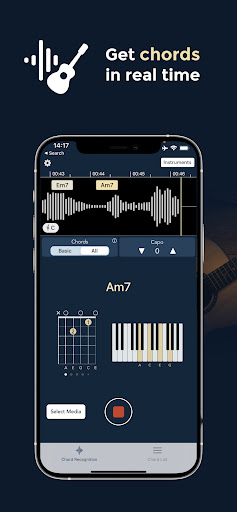
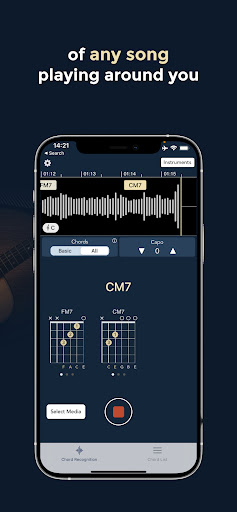
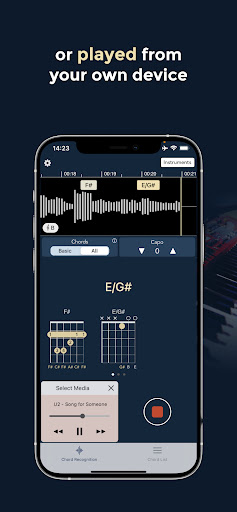
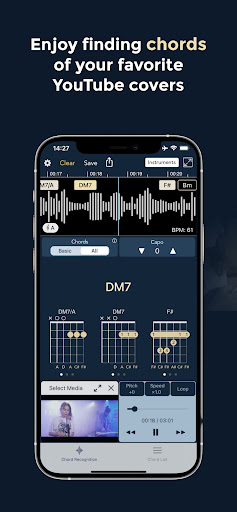
Chord ai ใช้ความก้าวหน้าล่าสุดในปัญญาประดิษฐ์ (ai) เพื่อให้คอร์ดของเพลงต่างๆ แก่คุณโดยอัตโนมัติและเชื่อถือได้ คุณไม่จำเป็นต้องค้นหาคอร์ดเพลงบนเว็บอีกต่อไป!
Chord ai ฟังเพลงที่เล่นจากอุปกรณ์ของคุณ จากบริการสตรีมมิ่งวิดีโอ/เสียง หรือเล่นสดรอบตัวคุณ และตรวจจับคอร์ดได้ทันที จากนั้นจะแสดงตำแหน่งนิ้วเพื่อเล่นเพลงบนกีตาร์ เปียโน หรืออูคูเลเล่
เป็นเครื่องมือที่ยอดเยี่ยมสำหรับมือใหม่ในการเรียนรู้เพลงโปรดของเขา และสำหรับนักดนตรีที่มีประสบการณ์ในการถอดเสียงรายละเอียดของเพลงเมื่อมีการเล่นคอร์ดที่หายาก
คอร์ดไอรวมถึง:
- การจดจำคอร์ด (แม่นยำกว่าแอปอื่นๆ ทั้งหมด)
- การตรวจจับจังหวะและจังหวะ (BPM)
- การตรวจจับโทนเสียง
- การจดจำและการจัดตำแหน่งเนื้อเพลง (การจัดตำแหน่งเหมือนคาราโอเกะ)
Chord ai มีเวอร์ชันฟรี ซึ่งช่วยให้สามารถจดจำคอร์ดพื้นฐานได้:
- หลักและรอง
- เสริม, ลดลง
- ที่ 7, M7
- ระงับ (sus2, sus4)
ในเวอร์ชัน PRO คุณสามารถจัดเก็บเพลย์ลิสต์และสำรองข้อมูลในไดรฟ์ของคุณได้ และการจดจำคอร์ดก็มีความแม่นยำมากขึ้น โดยให้ตำแหน่งนิ้วที่เหมาะสมที่สุดและจดจำคอร์ดขั้นสูงหลายพันรายการ เช่น:
- คอร์ดเพาเวอร์
- ลดลงครึ่งหนึ่ง, dim7, M7b5, M7#5
- ที่ 6, 69, 9, M9, 11, M11, 13, M13
- เพิ่ม9, เพิ่ม11, เพิ่ม#11, addb13, เพิ่ม13
- 7#5, 7b5, 7#9, 7b9, 69, 11b5, 13b9,
และการรวมกันของข้างต้น! (เช่น 9sus4, min7add13 เป็นต้น)
- รวมการกลับคอร์ดเช่น C/E ไว้ด้วย
Chord ai ยังมาพร้อมกับคลังตำแหน่งคอร์ดขนาดใหญ่สำหรับผู้เล่นกีตาร์และอูคูเลเล่ มันเป็นเครื่องมือการเรียนรู้กีตาร์ขั้นสูงสุด แท็บกีต้าร์ยังไม่รองรับ แต่จะมาในเร็วๆ นี้
Chord ai ยังทำงานแบบออฟไลน์และรักษาความเป็นส่วนตัวได้อย่างสมบูรณ์ คุณไม่จำเป็นต้องเชื่อมต่ออินเทอร์เน็ต (เว้นแต่คุณต้องการเล่นเพลงจากบริการสตรีมมิ่งวิดีโอหรือเสียง)
คอร์ดไอทำงานอย่างไร? Chord ai สามารถติดตามคอร์ดของเพลงได้สามวิธี:
1) ผ่านไมโครโฟนอุปกรณ์ของคุณ เพลงใดๆ ที่เล่นอยู่รอบตัวคุณหรือเล่นโดยอุปกรณ์ของคุณ จะถูกวิเคราะห์ผ่านไมโครโฟนของอุปกรณ์ และตำแหน่งคอร์ดจะแสดงแบบเรียลไทม์ คุณสามารถย้อนเวลากลับไปและเล่นเพลงซ้ำด้วยคอร์ดที่แสดงบนไทม์ไลน์
2) สำหรับไฟล์เสียงที่คุณมีในอุปกรณ์ของคุณ Chord ai จะประมวลผลไฟล์ภายในไม่กี่วินาทีเพื่อคอร์ดเพลงนี้ทั้งหมดในครั้งเดียว
3) Chord ai เข้ากันได้กับบริการสตรีมมิ่งเสียงและวิดีโอทั่วไป
ข้อเสนอแนะใด ๆ ที่ชื่นชมได้ที่: android.support@chordai.net
แสดงเพิ่มเติม

1. ดาวน์โหลดตัวติดตั้ง MEmu และสิ้นสุดการติดตั้ง

2. เริ่ม MEmu จากนั้นเปิด Google Play บนหน้าแรก

3. ค้นหา Chord ai - learn any song ใน Google Play
Install
4. ดาวน์โหลดและติดตั้ง Chord ai - learn any song
5. เมื่อติดตั้งเสร็จให้คลิกที่ไอคอนเพื่อเริ่มใช้งาน

6. ใช้ MEmu เพื่อสัมผัสประสบการณ์ Chord ai - learn any song บนคอมพิวเตอร์ของคุณ
MEmu Play คือโปรแกรมจำลอง Android ที่ดีที่สุด มีผู้ใช้มากกว่า 50 ล้านคน มอบประสบการณ์การใช้งานแอป Android ขั้นสุดยอดให้กับคุณ เทคโนโลยีจำลองเสมือนของ MEmu ช่วยให้คุณรันแอป Android หลายพันแอปบนคอมพิวเตอร์ได้อย่างราบรื่น แม้แอปที่กินทรัพยากรเครื่องสูงที่สุด
จอใหญ่และกราฟฟิกสวยกว่า; เล่นได้นาน, ไม่ต้องใช้แบตเตอรี่โทรศัพท์หรือเน็ตโทรศัพท์.
ระบบปรับแต่งปุ่มคีย์บอร์ดและเม้าส์ตามที่คุณเลือก
เล่นมากกว่าหนึ่งเกมบน PC ในเวลาเดียวกันด้วยระบบหลายจอหรือ Multi-Instance manager.
Use Chord ai - learn any song on PC by following steps: