Echora: Lucid Echoes
อัปเดตเมื่อ
เวอร์ชันปัจจุบัน
1.7.3
ให้บริการโดย

เมื่อใช้ Echora: Lucid Echoes บนโทรศัพท์ของคุณไม่ต้องกังวลกับการชาร์จไฟมากเกินไปปลดปล่อยตัวคุณเองจากหน้าจอขนาดเล็กและสนุกกับการใช้แอพนี้บนหน้าจอขนาดใหญ่ จากนี้ไปรับประสบการณ์เต็มหน้าจอของแอปพลิเคชันของคุณด้วยคีย์บอร์ดและเมาส์ MEmu มีคุณสมบัติที่น่าแปลกใจที่คุณคาดหวัง: การติดตั้งที่รวดเร็วและการตั้งค่าที่ง่ายควบคุมได้ง่ายไม่ จำกัด แบตเตอรี่ข้อมูลมือถือและการโทรที่รบกวน MEmu 9 ใหม่ล่าสุดเป็นตัวเลือกที่ดีที่สุดสำหรับการใช้ Meitu – โปรแกรมแก้ไขภาพแนวธรรมชาติ บนคอมพิวเตอร์ของคุณ ด้วยรหัสการดูดซึมของเราผู้จัดการหลายอินสแตนซ์ทำให้สามารถเปิดบัญชี 2 บัญชีขึ้นไปในเวลาเดียวกันได้ และที่สำคัญที่สุดเอ็นจิ้นจำลองพิเศษของเราสามารถปลดปล่อยศักยภาพของPCของคุณและทำให้ทุกอย่างราบรื่นและสนุกสนาน
แสดงเพิ่มเติม
สัมผัสประสบการณ์สุดยอดการใช้งาน Echora: Lucid Echoes บนพีซีด้วย MEmu Play นี่คือโปรแกรมจำลอง Android ฟรีที่ทรงพลัง ให้คุณใช้งานแอป Android นับพันบนเดสก์ท็อป สนุกกับการเชื่อมต่อกับเพื่อนๆ และขัดเกลาผลงานของคุณอย่างมีประสิทธิภาพยิ่งขึ้น! Welcome to Echora: Lucid Echoes, a world where conversations leave traces and every interaction can reveal something new.

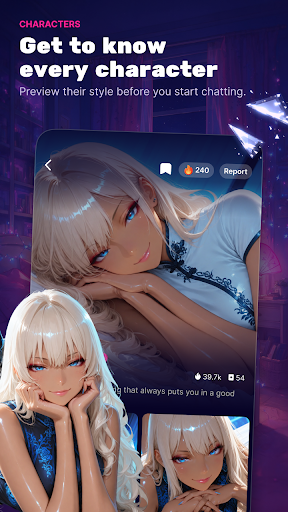
Welcome to Echora: Lucid Echoes, a world where conversations leave traces and every interaction can reveal something new.
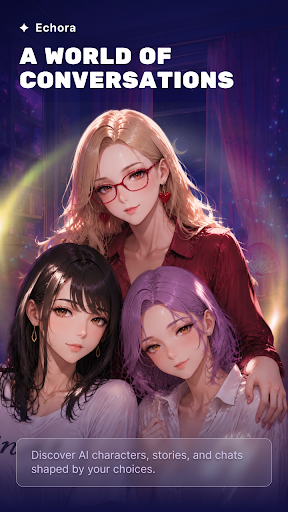
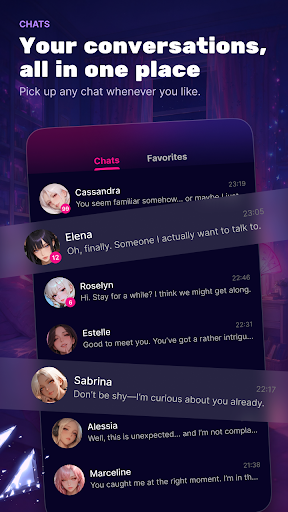
Enter atmospheric spaces filled with distinctive AI characters, unfolding memories, and unexpected paths. Instead of simply following a fixed story, discover experiences that develop through the way you interact.
Follow the Echoes
Every conversation can open another layer of the experience. Explore changing perspectives, hidden details, and moments that connect across your journey.
Discover Distinct Characters
Encounter characters with their own personalities, voices, backgrounds, and perspectives. Each interaction offers a different direction to explore.
Uncover Living Memories
Conversations can reveal fragments of stories, memories, and imagined worlds, creating experiences that gradually take shape over time.
Wander Through Lucid Worlds
Move between imaginative settings and evolving scenarios designed for discovery, expression, and creative interaction.
Shape What Comes Next
Your choices and conversations influence how each experience unfolds, allowing every journey to feel different.
Echora: Lucid Echoes brings together AI-powered characters, atmospheric storytelling, and open-ended exploration in a world built around echoes of interaction.
Enter Echora and see what answers back.
Email:hikoyurewa@gmail.com
Privacy Policy: https://www.echorale.top/privacy-policy.html
User Agreement: https://www.echorale.top/user-policy.html
แสดงเพิ่มเติม

1. ดาวน์โหลดตัวติดตั้ง MEmu และสิ้นสุดการติดตั้ง

2. เริ่ม MEmu จากนั้นเปิด Google Play บนหน้าแรก

3. ค้นหา Echora: Lucid Echoes ใน Google Play
Install
4. ดาวน์โหลดและติดตั้ง Echora: Lucid Echoes
5. เมื่อติดตั้งเสร็จให้คลิกที่ไอคอนเพื่อเริ่มใช้งาน

6. ใช้ MEmu เพื่อสัมผัสประสบการณ์ Echora: Lucid Echoes บนคอมพิวเตอร์ของคุณ
MEmu Play คือโปรแกรมจำลอง Android ที่ดีที่สุด มีผู้ใช้มากกว่า 50 ล้านคน มอบประสบการณ์การใช้งานแอป Android ขั้นสุดยอดให้กับคุณ เทคโนโลยีจำลองเสมือนของ MEmu ช่วยให้คุณรันแอป Android หลายพันแอปบนคอมพิวเตอร์ได้อย่างราบรื่น แม้แอปที่กินทรัพยากรเครื่องสูงที่สุด
จอใหญ่และกราฟฟิกสวยกว่า; เล่นได้นาน, ไม่ต้องใช้แบตเตอรี่โทรศัพท์หรือเน็ตโทรศัพท์.
ระบบปรับแต่งปุ่มคีย์บอร์ดและเม้าส์ตามที่คุณเลือก
เล่นมากกว่าหนึ่งเกมบน PC ในเวลาเดียวกันด้วยระบบหลายจอหรือ Multi-Instance manager.
Use Echora: Lucid Echoes on PC by following steps: